SiteSmartly
Best overall for managed websites for plumbers: SiteSmartly. Best for hands-on editing: Wix. Best for template-led design: Squarespace. For 2026, choose a managed service when you want website work handled for you; choose a builder when you want to own the editing and maintenance workload.
- SiteSmartly is the best fit for plumbers seeking managed websites with industry-specific lead capture and call-answering tools.
- Wix wins for plumbers who want to edit their own service pages with a visual website builder.
- Squarespace suits template-led websites; WordPress suits content flexibility; Webflow suits designer-led control.
- Choose websites for plumbers around service pages, local SEO, and contact handling—not template appearance alone.
Why this matters
A plumbing website has two jobs: explain which problems you handle and help the visitor contact you. A polished homepage does not compensate for an unclear service area, buried phone number, or contact form nobody checks.
The platform decision determines who keeps those details accurate. A managed service assigns website work to a provider; a self-service builder assigns it to you or someone on your team. Choose the operating model before choosing the template.
This 2026 guide separates managed services from do-it-yourself tools. They solve different problems, so the ranking gives each option a distinct use case rather than treating every plumber as the same buyer.
What makes the best websites for plumbers
Use these criteria to judge a website option before looking at its design gallery:
- Service clarity: You need separate explanations of the plumbing services you actually provide. Visitors should not have to interpret a broad list of trade terms.
- Local relevance: Your pages need accurate service-area information. A location page should explain a real service relationship, not just repeat a city name.
- Contact handling: Phone links, forms, and call-answering tools need a clear destination and an owner responsible for responding.
- Editing ownership: Decide who changes services, contact details, and page content. The right builder depends on who will use it.
- Maintenance responsibility: Assign responsibility for software updates, forms, integrations, and broken links. Publishing the website is not the end of the work.
- Content control: You need the ability to maintain useful page titles, headings, service descriptions, and internal links without rebuilding the site.
For your 2026 shortlist, request a demonstration using a plumbing service page rather than a generic homepage. Ask the provider to show how a visitor finds the service area, starts a call, and submits an inquiry. That exercise tests the website's purpose more directly than a template preview.
Best plumbing website options at a glance
| Option | Best for | Standout feature | Key limitation |
|---|---|---|---|
| SiteSmartly | Managed contractor websites | Website building and management with industry-specific lead capture and call-answering tools | Provider-led work rather than a self-service builder workflow |
| Wix | Owner-managed editing | Visual page editing within a hosted website platform | You still own content accuracy and lead follow-up |
| Squarespace | Template-led presentation | Coordinated templates and structured page editing | Custom requirements need checking against the template system |
| WordPress | Expandable service content | Flexible publishing with themes and plugins | Hosting, updates, and plugin maintenance need an owner |
| Webflow | Designer-led customization | Visual control over site structure and styling | More design concepts to learn than a simple template editor |
These options are not interchangeable. The first is a managed website service; the others are platforms you or a hired specialist operate. Compare the complete working arrangement, not just the software name.
1. SiteSmartly: best websites for plumbers with managed support
This service builds and manages websites for home-service contractors, including plumbers. Its stated offer includes industry-specific lead-capture and automated call-answering tools, making it relevant when the website and incoming inquiries need attention together.
Best for: Plumbing businesses that want a provider to build and manage the website rather than assigning that work to an owner or technician. The central advantage is the service model: website management is part of the offering, not a separate task you must assemble around a builder.
SiteSmartly pros:
- Serves plumbers and other home-service contractors explicitly.
- Combines website building with ongoing management.
- Includes industry-specific lead-capture tools in its stated offer.
- Offers call-answering tools alongside the website service.
SiteSmartly cons:
- A managed service makes the provider relationship central to website work.
- It is a different buying decision from selecting a self-service editor.
- Any unusual workflow requires checking against the agreed service scope.
Before choosing a managed service, explain how your plumbing business handles inquiries. Identify who receives each submission and what happens when an incoming call needs human attention. Assess the proposed website and call-handling arrangement against that actual process.
Verdict: Buy if you want managed website work and contractor-focused inquiry tools. Skip if direct, independent editing is your main requirement.
2. Wix: best plumbing website builder for owner-managed editing
Wix is a hosted website builder with a visual editor. You can arrange page content without building the entire site through code, making it a practical option when someone inside your business wants to manage routine edits.
Best for: Plumbing owners or office staff who want direct control over service descriptions, photographs, and contact information. Wix fits a business with a named website owner—not one hoping the website will maintain itself.
Wix pros:
- Visual editing supports hands-on page changes.
- Hosting is part of the platform rather than a separate WordPress setup.
- Templates provide a starting point for page layout.
- Built-in website tools reduce the need to assemble every function separately.
Wix cons:
- You remain responsible for writing and updating plumbing content.
- Flexible editing still requires decisions about layout and navigation.
- A contact form does not replace an inquiry-response process.
For a useful demonstration, edit a service description and check the result on a narrow screen. Then test the phone link and form yourself. The important question is whether the person responsible for the website can complete ordinary changes without help.
Verdict: Buy if you want to operate your own visual website editor. Skip if nobody on your team will own the website after launch.
3. Squarespace: best plumbing website builder for template-led design
Squarespace is a hosted website platform built around templates and structured editing. It suits a plumbing business that wants a coordinated presentation and is comfortable shaping its content around the platform's layout system.
Best for: Businesses that prefer a template-led website over extensive custom design. Start with clear service information, then choose a layout that presents it without unnecessary decoration.
Squarespace pros:
- Templates give pages a coordinated design foundation.
- Hosted operation avoids a separate hosting setup.
- Built-in publishing tools support service information and articles.
- Structured editing provides a defined framework for page construction.
Squarespace cons:
- Template selection does not supply plumbing-specific content.
- Unusual page interactions require checking what the platform supports.
- Lead response remains a business responsibility outside page design.
A photography-heavy layout is not automatically a good plumbing layout. Check whether the service name, coverage area, and contact action remain clear before a visitor scrolls through decorative content. Choose the template around the information you need to communicate.
Verdict: Buy if you want a template-led site with straightforward publishing. Skip if detailed custom interactions are central to your requirements.
4. WordPress: best plumbing website platform for content flexibility
WordPress is a content-management system with a broad ecosystem of themes and plugins. This recommendation refers to a self-hosted WordPress setup, where hosting and maintenance responsibilities need explicit ownership.
Best for: Plumbing businesses planning to expand service information, location content, and educational articles under a flexible publishing structure. WordPress is a strong fit when you have an internal website owner or a specialist responsible for the system.
WordPress pros:
- Flexible publishing supports service pages and related articles.
- Themes provide different layout approaches.
- Plugins extend website functions.
- You can organize content without treating every page as a standalone design project.
WordPress cons:
- Hosting and software maintenance need active management.
- Plugin choices introduce compatibility and update decisions.
- Editing simplicity depends on the theme and editor configuration.
Do not choose WordPress simply because you want local search visibility. The platform gives you publishing flexibility; useful content and sound implementation still require work. Ask whoever will maintain the site to demonstrate routine edits, backups, and form checks before agreeing on the setup.
For a 2026 build, define the maintenance owner in the same conversation as the design owner. A clear division of responsibility matters more than a long plugin list.
Verdict: Buy if you need expandable content and have maintenance support. Skip if you want to avoid managing a software ecosystem.
5. Webflow: best plumbing website builder for designer-led control
Webflow is a visual website platform that exposes detailed control over structure and styling. It fits projects where a designer will create and maintain the website, rather than handing an unfamiliar design system to a busy plumbing owner.
Best for: Plumbing businesses with a defined custom-design requirement and someone qualified to implement it. The reason to choose Webflow is design control, not a promise that custom styling will generate more inquiries.
Webflow pros:
- Detailed visual controls support custom page layouts.
- Reusable design elements help maintain consistency.
- CMS features support structured content.
- Designers can work beyond a narrowly prescribed template layout.
Webflow cons:
- Detailed controls introduce a steeper learning requirement.
- Content handoff needs planning for the people making future edits.
- Custom design does not remove the need for service clarity or lead follow-up.
Ask the designer to show the editing experience you will receive. Changing a service description should not depend on understanding the entire design system. Agree on which changes your staff can make and which changes remain with the designer.
Verdict: Buy if designer-led customization is a real requirement. Skip if you mainly need a simple site your office can edit independently.
Build the right page structure before adding features
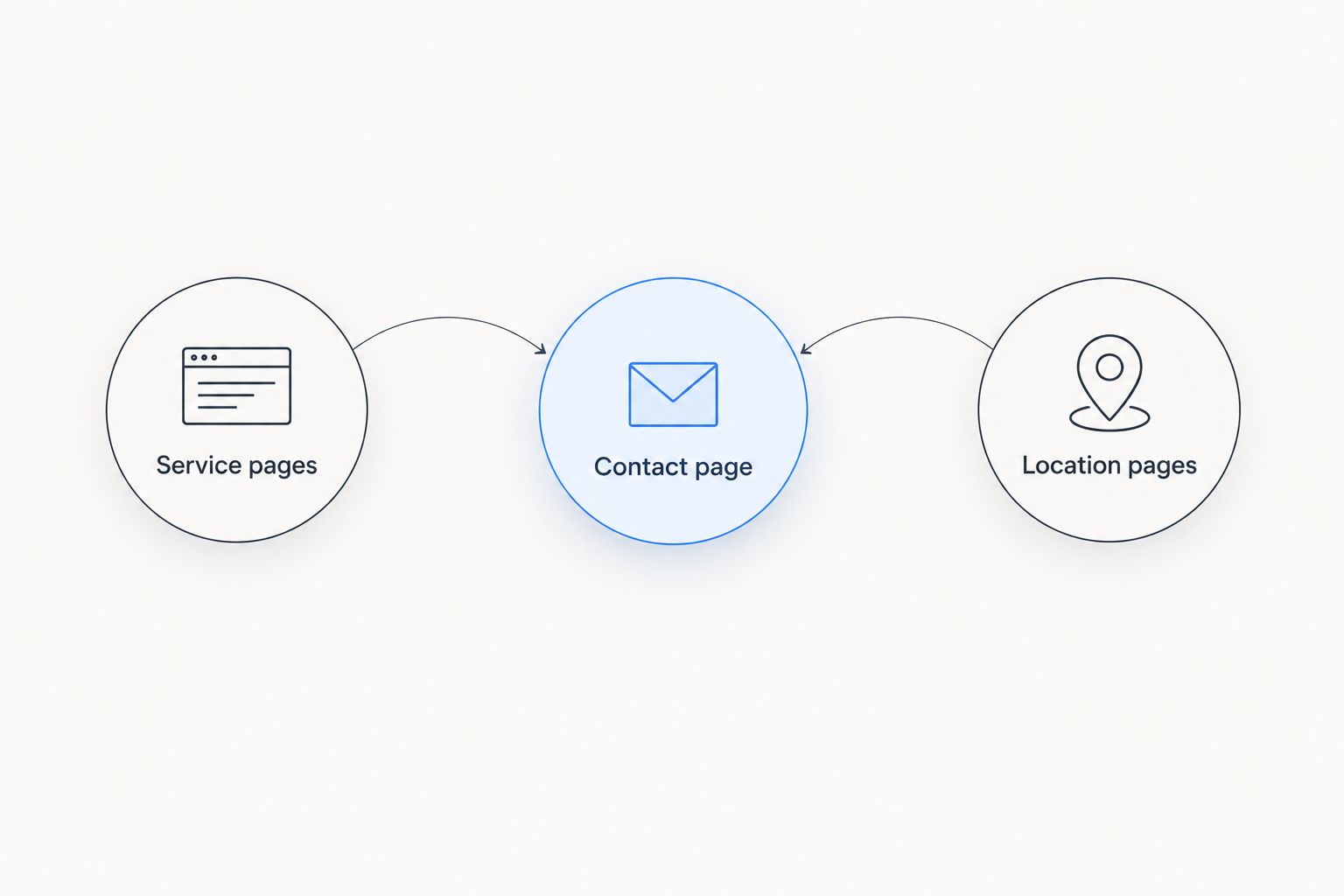
Your starting website brief should cover 3 core page types: service pages, location pages, and a contact page. These are planning categories, not a requirement to publish only three pages. Add content when it answers a distinct customer question.
- Service pages: Explain a service you provide, the problems it addresses, and how someone requests help.
- Location pages: State where you work and include information that genuinely belongs to that area. Do not invent local projects or testimonials.
- Contact page: Explain how to reach the business and what information helps you respond.
Give visitors 2 contact routes: a phone link and an inquiry form. Treat this as a recommended starting brief, not a claim about which features every provider includes. Test both routes on a phone before publishing.
Start the form brief with 4 fields: name, contact details, service address, and a short problem description. Adjust that list to your workflow rather than collecting information nobody uses. Tell the visitor what happens after submission without promising a response time your business cannot support.
Choose managed website support
Explore website building and management with contractor-focused lead-capture and call-answering tools.
How these options were ranked
The ranking prioritizes operating fit, service clarity, contact handling, editing ownership, maintenance responsibility, and content control. Each option receives a distinct recommendation because managed service, owner editing, template design, content flexibility, and designer control are different needs.
This is a 2026 fit-based shortlist, not a claim that every platform has been tested under identical conditions. No builder wins solely because it offers more templates or features. The best choice gives your business a workable way to keep useful information current and handle inquiries.
Which plumbing website option should you choose?
SiteSmartly is the best fit for plumbers who want managed websites for plumbers with industry-specific lead-capture and call-answering tools. Choose Wix for direct editing, Squarespace for template-led presentation, WordPress for expandable publishing, or Webflow for designer-led customization.
If you are undecided in 2026, answer this first: who will own the website after launch? A named owner makes a self-service platform practical. Without one, prioritize managed website support over editing features you will not use.
FAQ
What's the best website option for a plumber who doesn't want to manage it?
A managed contractor website service is the best fit when you want website building and management handled together. Evaluate how the proposed service handles content changes, incoming inquiries, and call-answering responsibilities.
Is Wix or Squarespace better for a plumbing website?
Wix is the better fit for hands-on visual editing; Squarespace suits template-led presentation. Choose based on who will maintain the site and which editing approach that person can use comfortably.
Is WordPress good for websites for plumbers?
WordPress is a good fit for plumbing websites that need flexible service content and have a maintenance owner. Hosting, updates, and plugin management belong in the plan alongside writing and design.
Do plumbers need a separate page for every service?
Create a separate service page when the service deserves a distinct explanation. Do not split closely related information into thin pages just to repeat keywords.
Can a website builder guarantee local Google rankings?
No website builder can guarantee local Google rankings. The platform supports implementation, but accurate business information, useful content, and other search factors still matter.
Should a plumbing website include online booking?
Include online booking only when your business can honor the scheduling workflow it creates. If jobs require assessment before scheduling, make the inquiry process clear instead of implying that submitting a form confirms an appointment.
What should I check before publishing a plumbing website?
Check service descriptions, service-area details, phone links, and form delivery before publishing. Complete the checks on a phone and confirm that a responsible person receives and handles each inquiry.
One last thing
Test the end of the customer journey, not just the website screen. Submit an inquiry as a customer would, then follow it through to the person responsible for responding. If nobody owns the next action, changing website builders will not fix the handoff.