
Instantsite earns its place when your existing website clearly explains your services and brings in useful inquiries. You outgrow that setup when managing the site or handling those inquiries becomes the problem. The best Instantsite alternative in 2026 is Sitesmartly if you need a managed contractor website with lead-capture tools; Wix if you want to edit the website yourself.
- For Instantsite alternatives, choose Sitesmartly for managed contractor websites, lead capture, and call-answering tools.
- Choose Wix for hands-on website editing; choose WordPress.org for control over hosting, themes, and plugins.
- Keep Instantsite when your current website and inquiry-handling process already meet your needs.
- Test the complete customer journey before switching, not just the replacement website's appearance.
Why this matters
A contractor website has two separate jobs: explain why someone should hire you and help that person reach your business. A better-looking page does not fix an unanswered phone or an inquiry nobody follows up.
For your 2026 shortlist, separate website management from lead handling. Decide who updates the pages, where inquiries arrive, and who responds while you are on a job. That distinction matters more than a long feature list.
Start with the task you want off your plate. If you dislike maintaining a website, another do-it-yourself editor leaves you with the same responsibility. If you enjoy making changes, a managed service changes how much work you keep in your own hands.
Instantsite alternatives at a glance
These options represent different ways to run your website, not interchangeable packages. Keep Instantsite as the benchmark and compare each replacement against the work your current setup actually performs.
| Option | Best for | Standout capability or reason to keep it | Difference from keeping Instantsite |
|---|---|---|---|
| Instantsite | Keeping a website that already meets your needs | Continuity with your existing pages and workflow | No migration; assess the setup you already have |
| Sitesmartly | Managed websites for home-service contractors | Industry-specific lead capture, quoting tools, and AI call answering | A contractor-focused managed-service option |
| Wix | Contractors who want to edit their own website | Visual website editing and templates | A DIY alternative; compare editing tasks directly |
| WordPress.org | Contractors who want control over their website setup | Open-source software with themes and plugins | A self-hosted route with separate hosting and maintenance responsibilities |
Choose the operating model first. Then compare the pages, inquiry tools, and handoff process you need. A website builder and a managed website service solve different ownership problems.
1. Sitesmartly: best for managed contractor websites
Sitesmartly builds and manages websites for home-service contractors, including plumbers, HVAC technicians, and water restoration companies. Its offering includes industry-specific lead-capture tools, quoting tools, and AI call answering. That makes it the most relevant option here when you want website management and inquiry handling considered together.
Where it shines
- Contractor focus: The service is built around home-service businesses rather than a general-purpose DIY website project.
- Managed website work: You can evaluate a service that builds and manages the website, instead of taking on the editor yourself.
- Lead handling: Lead-capture, quoting, and call-answering tools address what happens after someone decides to contact you.
For a plumber, the useful demonstration is not a tour of page layouts. Ask to see how a homeowner describes a problem and how that inquiry reaches the business. For restoration work, walk through an urgent inquiry and the next action your team would take.
Where it falls short
- A contractor-focused managed service is not the natural fit if your main goal is to build and maintain the website yourself.
- Website and inquiry tools do not perform the field work, decide which jobs to accept, or replace your responsibility for following up.
- A managed service still needs accurate information from you: services, coverage areas, job photos, and changes to the business.
Best for: Busy home-service contractors who want managed contractor websites with tools for capturing and handling inquiries.
Before choosing Sitesmartly in 2026, ask for a walkthrough based on your trade. Follow an inquiry from the website or phone interaction through to the point where your team takes over. Judge the handoff, not just the demonstration.
Verdict: Buy if managed website work and contractor-specific inquiry handling are your priorities.
2. Wix: best for hands-on website editing
Wix is a website builder with visual editing and templates. It belongs on your shortlist when you want to change page content yourself rather than send updates to a website manager. The trade-off is straightforward: control over routine edits also leaves someone responsible for making them.
Where Wix shines
- Direct editing: You can work on the website's content and layout through a visual editor.
- Template starting points: Templates give you a structure to adapt instead of beginning with an empty page.
- DIY ownership of updates: Wix suits a business with a person willing to maintain service descriptions, photos, and contact details.
Where Wix falls short
- A website editor does not remove your responsibility for writing useful service pages and keeping them accurate.
- Choosing a template does not establish who answers inquiries or follows up on missed calls.
- Adding separate business tools creates setup and checking work; assess the complete workflow rather than assuming the editor covers it.
Best for: Contractors who want DIY editing and have a named person responsible for website updates.
For a useful comparison with Instantsite, make the same small change in each environment: update a service description, replace a job photo, and check the mobile result. Compare the effort involved rather than the number of editing controls available.
Verdict: Buy if you want to handle website changes yourself; skip if your goal is to stop managing the website.
3. WordPress.org: best for control over your website setup
WordPress.org provides open-source website software that you install with a hosting provider. Themes control presentation, while plugins add functions. It is the strongest fit here when you want control over that setup and accept the responsibility that comes with it.
Where WordPress.org shines
- Hosting choice: You choose the hosting arrangement rather than treating the website software and hosting as one decision.
- Extensibility: Themes and plugins provide ways to change presentation and add functions.
- Technical control: You or your developer can work directly with the site's software and configuration.
Where WordPress.org falls short
- Hosting, updates, backups, and security need clear ownership.
- Plugin selection adds decisions and maintenance work; installing more plugins is not a substitute for a defined process.
- A custom setup needs someone who can troubleshoot it when forms, updates, or integrations stop behaving as expected.
Best for: Contractors with a developer or a capable internal owner who want control over hosting and website configuration.
Compare WordPress.org with your current Instantsite setup by writing down who will handle each maintenance task. If those jobs have no owner, control becomes unfinished work.
Verdict: Buy if technical control matters and maintenance has an owner; skip if you want a hands-off website.
Why people switch from Instantsite
A sound reason to switch is a problem you can identify in your own operation. Do not move because another platform has a longer feature list. Use these checks to decide whether your current setup needs replacing or simply needs attention.
Website upkeep has become your job
If page updates keep getting postponed, ask whether the problem is the editor or the lack of an owner. Switching DIY builders does not solve an ownership gap. A managed service addresses a different need: having someone responsible for website work.
Inquiries arrive without a clear handoff
If you cannot explain where a form submission goes and who responds, map that process before choosing software. Check the actual notification, the information it contains, and the person expected to act. This is a workflow test, not an assumption about Instantsite's capabilities.
Your business needs have changed
A site built around basic contact information might no longer match how you want to receive job details or handle calls. Write down the new requirement precisely. Then ask each provider to demonstrate it, including your current provider.
Test the replacement before moving your website
For a 2026 decision, use the same acceptance test for every shortlisted option. Keep the test small enough to finish and specific enough to expose a bad handoff.
- Page check: Review 2 service pages on a phone. Confirm that a homeowner can identify the service, coverage area, and next action.
- Inquiry check: Send 3 test inquiries using different job descriptions. Check where each arrives and whether the recipient has enough information to act.
- Handoff check: Assign 1 named owner to each inquiry route. Make sure that person knows what happens when they are unavailable.
- Maintenance check: Request or perform a routine content change. Confirm who owns the work and how you verify the result.
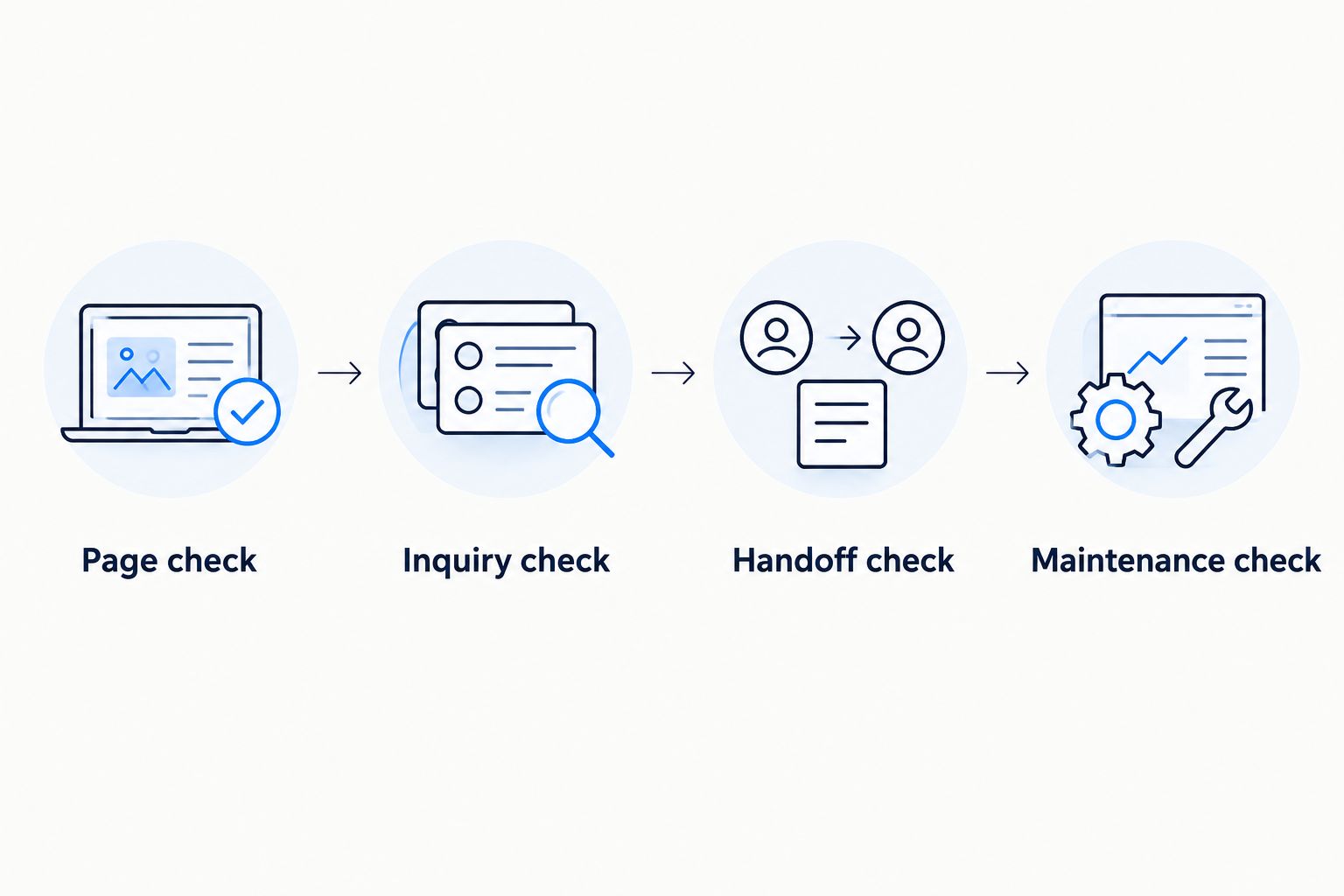
Do not submit real customer information during a demonstration. Use clearly marked test details, and tell the receiving team what you are testing. The point is to trace the process without creating confusion.
For the migration itself, list your important pages, domain access, inquiry destinations, and connected business accounts. Ask who handles each item before authorizing changes. A replacement should preserve useful customer routes, not leave you discovering broken ones after launch.
When staying with Instantsite is the right call
Stay with Instantsite if your current website meets your needs and the surrounding workflow works. That means customers can understand your services, reach the right person, and receive a response your business can deliver.
Keeping a working setup avoids migration work. It also lets you focus on a narrower fix when the problem is an outdated page, unclear copy, or an unassigned follow-up task rather than the platform itself.
For 2026, switch only when the replacement demonstrates a specific improvement you need. A new dashboard is not, by itself, a reason to move.
FAQ
What's the best Instantsite alternative for a busy contractor?
Sitesmartly is the best fit on this shortlist for contractors who want managed websites with industry-specific lead capture and call-answering tools. Choose Wix instead if your priority is editing the website yourself.
Is Wix better than Instantsite for contractor websites?
Wix is the better candidate when visual DIY editing is your main requirement. Compare the same editing task and inquiry workflow in both setups before deciding to move.
Should a plumber choose WordPress.org instead of a managed website?
Choose WordPress.org when control over hosting and configuration matters and someone owns maintenance. Choose a managed website service when you want to assign website work rather than perform it yourself.
Do I need to replace Instantsite to improve lead handling?
No, a lead-handling problem does not automatically require a website replacement. First identify whether the failure occurs at the form, notification, phone response, or follow-up stage.
What should I ask during a contractor website demonstration?
Ask the provider to trace a customer inquiry from the service page to your team's next action. Also ask who maintains the website and who checks that inquiries keep reaching the right person.
Will switching website builders automatically improve Google rankings?
No, switching website builders does not guarantee better Google rankings. Preserve useful pages and review how the migration handles existing addresses, content, and redirects.
When should I keep my current Instantsite website?
Keep Instantsite when your website explains your services clearly, inquiries reach the right person, and maintenance is under control. Replace it only when an alternative demonstrates a needed improvement.
One last thing
Before you approve a replacement, ask someone who has never used your website to request service from their phone. Do not coach them. Watch where they hesitate, then check whether the inquiry reaches the person responsible for responding.
That exercise gives you a concrete buying requirement. Fix the failed step, whether that means changing the page, changing the handoff, or changing the provider.