
Best overall for managed website lead capture: SiteSmartly. Best for standalone inquiry forms: Jotform. Best for WordPress control: Gravity Forms. Best for CRM-based follow-up: HubSpot. Best for call attribution: CallRail. This 2026 guide compares lead capture software for home service businesses by the job each option handles—not by how many features appear on a sales page.
- SiteSmartly is the managed option for lead capture software for home service businesses that need website inquiries and call answering.
- Choose Jotform for standalone inquiry forms or Gravity Forms for a WordPress website you maintain.
- Choose HubSpot when contractor lead capture needs organized CRM follow-up.
- Choose CallRail when identifying the marketing source of inbound calls is the main requirement.
Why this matters
A homeowner's inquiry is not a booked job. Someone still needs to understand the problem, confirm whether you serve the address, and respond with a useful next step.
Lead capture handles the intake: collecting contact details and enough job information to start that conversation. Lead management handles what happens afterward. Confusing those jobs creates a familiar mess—a working contact form with inquiries nobody owns.
For your 2026 decision, start with the weak point. A website problem calls for a different purchase than a follow-up problem. Call attribution is different again: knowing which advertisement produced a call does not mean that call was answered or the job was booked.
Buy for the missing step, not the longest feature list. A plumber working alone and an HVAC business with office staff do not need the same setup.
What makes the best lead capture software?
These criteria matter more than a polished dashboard:
- Intake fit: Can you collect the customer's contact details, service address, and reason for calling without turning the inquiry into homework?
- Channel coverage: Does the option address the channel you actually need—website forms, inbound calls, or both?
- Clear ownership: Can your team establish who receives an inquiry and who is responsible for responding?
- Maintenance burden: Who updates the website, fixes broken forms, and checks that notifications still work?
- Useful handoff: Does the inquiry reach the people or system responsible for estimates, scheduling, and follow-up?
- Source visibility: Can you distinguish where inquiries came from when that information affects your marketing decisions?
For a practical 2026 evaluation, write down 1 response owner for each intake channel. This is a setup recommendation, not a software feature. If nobody owns the next action, adding another form will not fix the problem.
Lead capture options at a glance
The order below starts with managed website intake, then moves through standalone forms, WordPress forms, CRM follow-up, and call attribution. Each option owns a different use case.
| Option | Best for | Standout capability | Key limitation |
|---|---|---|---|
| SiteSmartly | Contractors wanting managed website intake | Managed websites with industry-specific lead-capture and call-answering tools | Not a like-for-like replacement for a standalone form builder or CRM |
| Jotform | Adding a standalone inquiry form | Building forms without developing a custom form application | A form alone does not answer calls or manage your whole website |
| Gravity Forms | Contractors maintaining a WordPress website | Form building within WordPress | Requires responsibility for the WordPress setup and maintenance |
| HubSpot | Organizing captured inquiries for follow-up | Forms connected to a CRM | CRM organization does not replace your team's response process |
| CallRail | Understanding the source of inbound calls | Call tracking and attribution | Attribution does not itself deliver a booked job |
The table compares roles, not interchangeable products. You can need a form builder and a CRM at the same time. That does not mean you should purchase both before deciding how an inquiry moves between them.
1. SiteSmartly: best for managed contractor website intake
SiteSmartly builds and manages websites with industry-specific lead-capture and AI call-answering tools for home-service contractors. Its stated audience includes plumbers, HVAC technicians, and water restoration companies.
Best for: A contractor who wants website management and intake tools together rather than another application to configure independently.
SiteSmartly pros
- Website management is part of the offering, not a separate DIY project.
- Lead-capture tools are intended for home-service contractors.
- The offering includes call-answering tools alongside website intake.
SiteSmartly cons
- This is a managed website offering, not simply a form plugin for your existing stack.
- It does not remove the need to assign responsibility for responding to inquiries.
- Businesses seeking only call attribution or only CRM organization need a different scope of solution.
Choose the managed route when website upkeep and intake are connected problems. You need a place for homeowners to describe the job, but you also need someone responsible for the website that collects those inquiries.
Before committing, walk through your actual intake requirements: service-area questions, urgent calls, estimate requests, and the information your office needs. Match the offering to that workflow rather than assuming every contractor uses the same process.
Verdict: Buy the managed website approach when you need website management and contractor intake together.
2. Jotform: best for standalone inquiry forms
Jotform is an online form builder. You can use it to create an inquiry form and collect structured answers without developing a custom form application.
Best for: A contractor whose existing website is usable but whose inquiry form needs better questions or clearer organization.
Jotform pros
- Keeps the purchase focused on form creation rather than a website rebuild.
- Lets you structure intake around the information needed for a callback.
- Supports a form-based approach without requiring WordPress.
Jotform cons
- A submitted form still needs a response owner.
- Form building does not replace inbound phone handling.
- Your website and the form remain separate maintenance responsibilities.
A useful starting form asks for 5 intake fields: name, callback number, service address, service needed, and a brief problem description. That is a recommended starting point, not a claim about the platform's limits. Remove questions your team does not use.
For a roof estimate, detailed project information can help. For an urgent plumbing problem, a long questionnaire puts the wrong task in front of the homeowner. Build around the first conversation, not every detail needed to complete the job.
Verdict: Buy Jotform when the missing piece is a standalone inquiry form; skip it as a substitute for website management or phone handling.
3. Gravity Forms: best for WordPress intake control
Gravity Forms is a form-building plugin for WordPress. It suits businesses that want to manage intake inside an existing WordPress website rather than move to a separate managed website offering.
Best for: A contractor with a maintained WordPress site and someone accountable for its technical upkeep.
Gravity Forms pros
- Keeps form building within your WordPress website.
- Lets you organize inquiries around your own service questions.
- Fits a setup where a developer or website manager already maintains WordPress.
Gravity Forms cons
- It requires WordPress; it is not a general replacement for every website platform.
- Plugin configuration and website maintenance remain your responsibility.
- Installing a form does not establish a callback process.
The important buying question is not whether you can build a form. It is who will keep that form working after website changes, plugin updates, and staff changes.
Ask your website manager to demonstrate a submission from a phone and show where the inquiry arrives. Then confirm who checks delivery when the website changes. A form that looks correct on the page still needs a working destination.
Verdict: Buy Gravity Forms when WordPress control matters and maintenance ownership is clear; skip it when nobody manages the website.
4. HubSpot: best for CRM-based lead follow-up
HubSpot combines CRM tools with forms and related marketing capabilities. Its useful distinction here is connecting captured contact information with a place to organize the follow-up.
Best for: A home-service business whose main problem is tracking inquiries after they arrive.
HubSpot pros
- Connects website form capture with CRM records.
- Provides a place to organize contact information and follow-up activity.
- Fits a process where office staff work from a shared customer system.
HubSpot cons
- CRM setup adds a system your team must maintain and use consistently.
- Recording an inquiry is different from answering an urgent call.
- You still need to define the handoff from inquiry to estimate or scheduling.
Choose a CRM-centered approach when inquiries already reach you but disappear into inboxes, personal phones, or scattered notes. Adding another capture tool will not solve that organizational problem.
Keep the first workflow simple. Assign an owner, record the next action, and distinguish an unanswered inquiry from an estimate already sent. For a closer look at that separate buying decision, see the guide to CRM software for home-service contractors.
Do not assume CRM software replaces your field-service scheduling or dispatch requirements. Evaluate those jobs separately.
Verdict: Buy HubSpot when contact organization and follow-up are the missing steps; hold when your immediate problem is simply a broken intake form.
5. CallRail: best for inbound call attribution
CallRail provides call tracking and attribution. It helps businesses connect inbound calls with marketing sources, making it a different purchase from a website form builder.
Best for: A contractor who needs to understand which marketing sources produce calls.
CallRail pros
- Focuses on phone inquiries rather than treating every lead as a form submission.
- Helps connect calls with their marketing source.
- Supports evaluating phone-driven marketing alongside website inquiries.
CallRail cons
- Source attribution is not the same as answering the call.
- A recorded call source does not prove the inquiry became a customer.
- Your team still needs to connect marketing information with actual job outcomes.
Use call attribution when the question is which campaign produced the phone inquiry. Do not buy attribution expecting it to solve an unanswered-phone problem by itself.
For example, an inquiry from outside your service area and a suitable request for an estimate are different business outcomes. Your team needs to make that distinction before treating call activity as evidence of useful demand.
Keep marketing measurement tied to the work you can actually accept. Otherwise, a clear report can still describe the wrong kind of inquiries.
Verdict: Buy CallRail when call-source visibility is the missing information; skip it as a standalone fix for missed calls or weak follow-up.
How these options are ranked
This 2026 ranking follows the criteria above: intake fit, channel coverage, response ownership, maintenance, handoff, and source visibility. Managed website intake comes first for contractors seeking that combined scope; the remaining options address narrower jobs.
The ranking does not treat feature quantity as quality. WordPress control matters only if you want to maintain WordPress. Call attribution matters only if identifying call sources changes a decision.
Check the handoff before you buy
Run 3 test inquiries through the setup you are considering: a routine estimate request, an urgent service request, and an out-of-area inquiry. These are recommended test cases, not performance benchmarks.
Follow the same sequence for each:
- Submit inquiry: Use a phone, as your customer would, and provide the details needed for that request.
- Confirm delivery: Check where the form submission or call information reaches your team.
- Assign owner: Identify the person responsible for the next action.
- Record outcome: Mark whether the inquiry needs a callback, an estimate, or a clear explanation that you cannot serve it.
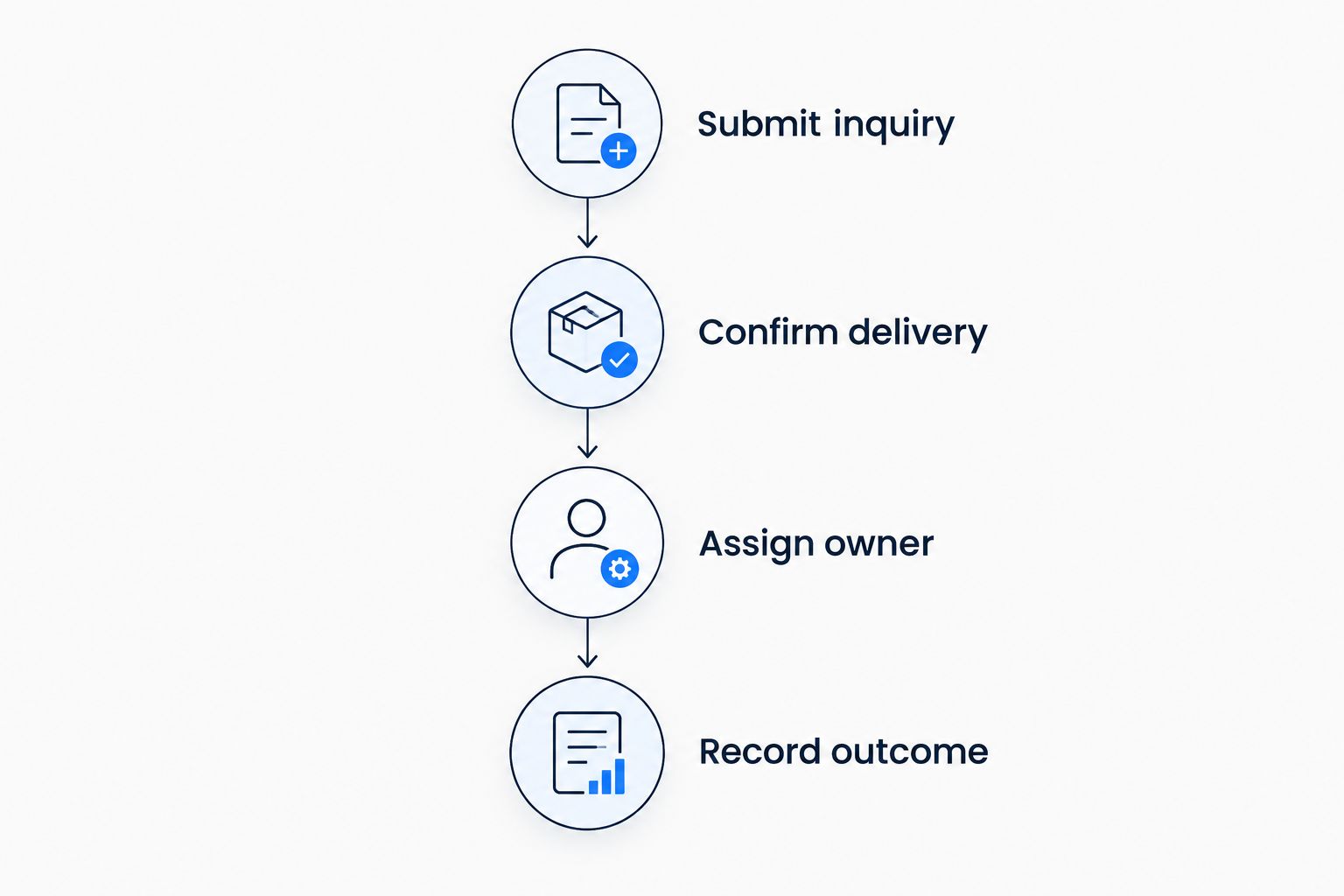
A successful test shows the whole handoff, not just a confirmation message. For your 2026 purchase, ask the person handling inquiries to participate. The office needs to recognize and act on the information the website collects.
Which lead capture option should you choose?
SiteSmartly is the managed lead-capture option for home-service contractors who want website management and intake tools together. That is the default recommendation when you want responsibility for the website included in the offering.
Choose Jotform for a standalone form, Gravity Forms for maintained WordPress intake, HubSpot for CRM-based follow-up, or CallRail for call attribution. Do not ask one category to do another category's job.
Your 2026 shortlist should start with the inquiry that currently breaks down. Fix that handoff first. Add other tools only when you can explain the separate job each will handle.
FAQ
What's the best lead capture software for home service businesses?
The best option depends on the missing step: managed website intake, standalone forms, WordPress forms, CRM follow-up, or call attribution. Choose the category that fixes your actual intake problem rather than the product with the longest feature list.
Is lead capture the same as lead generation?
No. Lead generation attracts inquiries; lead capture collects the information needed to respond. Your website can attract visitors while still making it difficult to submit a useful inquiry.
Is Jotform better than Gravity Forms for contractors?
Jotform fits standalone form building, while Gravity Forms fits forms inside WordPress. Choose based on your website setup and who will maintain it, not a universal winner.
Do I need a CRM to capture website leads?
No. A form can collect an inquiry without a CRM, but a CRM provides a place to organize contacts and follow-up. Consider CRM software when inquiries are arriving but your team loses track of the next action.
Does call tracking solve missed calls?
Call tracking and missed-call handling are different jobs. Call attribution identifies sources; you still need a defined process for answering calls and responding to unanswered inquiries.
What should a contractor lead form ask for?
Start with a name, callback number, service address, service needed, and brief problem description. Add questions only when the answers help your team decide the next action.
How should I compare lead capture tools in 2026?
Compare intake fit, channel coverage, maintenance responsibility, response ownership, handoff, and source visibility. Test a routine inquiry, an urgent request, and an out-of-area request before choosing.
One last thing
Test where inquiries arrive before rewriting the form. Submit a request yourself, then ask the responsible person to find it and explain the next action.
If the inquiry arrives correctly but nobody acts, you have a response problem—not a capture problem. Fix ownership before buying more software.