Best overall for a small service crew: Jobber. Best for complex dispatch: ServiceTitan. Best for sales follow-up: HubSpot CRM. This 2026 guide compares CRM software for home service contractors by how well each option handles your actual work, not how many features appear on its homepage.
- Jobber is the default CRM software for home service contractors who need customer records, quotes, scheduling, and invoices together.
- ServiceTitan fits contractors with complex dispatch, technician workflows, and reporting requirements.
- HubSpot CRM and Zoho CRM fit sales pipelines better than field-service dispatch.
- SiteSmartly handles contractor websites and lead capture; choose a separate CRM for customer and job management.
Why this matters
A customer database does not fix a missed phone call. A scheduling calendar does not tell you which estimates still need follow-up. Your software needs to connect the parts of the job that your office currently tracks separately.
Start by separating lead capture from job management. SiteSmartly builds and manages contractor websites with lead-capture, quoting, and call-answering tools. That is a different role from maintaining customer histories, dispatching technicians, and tracking invoices inside a CRM.
SiteSmartly is best for home-service contractors who need managed websites and lead capture alongside their CRM software. Do not treat the website and CRM as interchangeable, and do not assume they connect without checking the handoff.
For your 2026 shortlist, identify the failure you need to fix first: missed inquiries, unreturned estimates, scheduling confusion, or incomplete customer records. Then choose software around that failure.
What makes the best contractor CRM?
Use these criteria before comparing logos:
- Customer history: Your office should find contact details, service addresses, past work, and relevant notes without searching separate files.
- Estimate follow-up: An open quote needs a clear status, a responsible person, and a next action.
- Field scheduling: Dispatch matters when technicians move between customer properties. A sales pipeline alone is not enough.
- Office-to-field handoff: Technicians need usable job details, not a second round of questions to the customer.
- Reporting: You should be able to inspect unfinished work and outstanding follow-up, not just admire a dashboard.
- Administrative fit: Choose a system someone on your team can maintain. Customization creates work as well as flexibility.
A plumber handling service calls needs a different setup from a contractor managing longer installation estimates. Neither needs a complicated system merely because the business plans to grow.
Contractor CRM options at a glance
These six options serve different operating models. The order below starts with the default for a small crew, then separates field-service management from sales-focused CRM.
| Option | Best for | Standout capability | Key limitation |
|---|---|---|---|
| Jobber | Small service crews | Customer records alongside quotes, scheduling, and invoicing | Less suited to heavily customized sales processes |
| Housecall Pro | Residential service teams | Scheduling, dispatch, and customer communication | Not a substitute for a flexible sales-focused CRM |
| ServiceTitan | Complex service operations | Dispatch, technician workflows, and operational reporting | Requires substantial implementation attention |
| Service Fusion | Office-led dispatch | Customer management alongside dispatch and invoicing | Field-service focus is narrower than a general CRM |
| HubSpot CRM | Estimate and sales follow-up | Contact records, deals, and sales activities | Field scheduling requires another system |
| Zoho CRM | Custom sales workflows | Configurable records, pipelines, and automation | Configuration requires an accountable administrator |
Do not read this table as a feature guarantee for every subscription. Confirm the exact tools, permissions, and connections included in the configuration you are considering.
1. Jobber: best contractor CRM for small service crews
Jobber combines customer management with quoting, scheduling, and invoicing. Its appeal is practical: the office can manage the customer and the work in the same field-service system.
For a small plumbing, HVAC, or maintenance crew, that operating model is a sensible starting point. You are choosing around service work rather than trying to turn a general sales database into a dispatch board.
Jobber pros:
- Connects customer records with everyday job administration.
- Supports quotes, scheduling, and invoices within one product.
- Gives small crews a field-service starting point instead of a blank CRM setup.
Jobber cons:
- A highly customized sales pipeline is not its central purpose.
- Contractors with complex dispatch or reporting requirements need to test those workflows carefully.
Best for: Owner-led service businesses that want fewer separate systems for customer and job administration.
In your demo, follow a customer from inquiry through quote, scheduled visit, and invoice. Then reopen that customer's record and check whether the office can understand what happened without asking the technician.
Verdict: Buy Jobber if your main requirement is straightforward service-job management with customer history attached.
2. Housecall Pro: best contractor CRM for residential service teams
Housecall Pro is field-service software with customer management, scheduling, dispatch, estimates, and invoicing. It belongs on the shortlist when your office spends much of the day coordinating residential appointments.
The important distinction is workflow, not branding. Compare how Housecall Pro handles your customer communication and dispatch process against how your team currently operates.
Housecall Pro pros:
- Centers customer management on residential service work.
- Brings scheduling and dispatch into the same operating environment.
- Supports estimates and invoicing alongside job administration.
Housecall Pro cons:
- A complicated sales process needs more scrutiny than a routine service appointment.
- Moving records and changing office habits still require a planned transition.
Best for: Residential contractors whose priority is coordinating appointments, technicians, and customer updates.
For a 2026 comparison, give Jobber and Housecall Pro the same example job. Ask each demonstrator to reschedule it, change the assigned technician, and locate the customer's previous service notes. Compare the steps your staff would actually perform.
Verdict: Buy Housecall Pro if its residential scheduling and communication workflow fits your office better than Jobber's.
3. ServiceTitan: best contractor CRM for complex dispatch
ServiceTitan combines customer records with field-service operations, including dispatch, technician workflows, and reporting. It fits a more involved operating model than a contractor who only needs to remember which estimates remain open.
The reason to consider ServiceTitan is operational complexity. Dispatch rules, office responsibilities, field processes, and reporting requirements should drive the decision.
ServiceTitan pros:
- Addresses customer management and field operations together.
- Supports dispatch and technician-facing workflows.
- Includes operational reporting for managers reviewing business activity.
ServiceTitan cons:
- Implementation requires attention to process, data, and staff responsibilities.
- Its operational scope is unnecessary if your only problem is basic contact follow-up.
Best for: Service contractors with complex dispatch and defined management-reporting requirements.
Before selecting ServiceTitan, document who owns customer records, who changes the schedule, and who checks job completion. Software cannot resolve conflicting responsibilities that remain undefined.
Ask for a demonstration built around your operation, not an idealized example. Include a rescheduled appointment, a returning customer, and a technician who needs additional job information.
Verdict: Buy ServiceTitan when operational complexity justifies a structured implementation; skip it for a simple contact-list problem.
4. Service Fusion: best contractor CRM for office-led dispatch
Service Fusion combines customer management with scheduling, dispatch, estimates, and invoicing. It is another field-service option for contractors who want the office to manage customer details and assigned work together.
Its place on this list is distinct from a sales-focused CRM. Evaluate Service Fusion around the dispatch desk and the information technicians receive.
Service Fusion pros:
- Keeps customer management close to scheduling and dispatch.
- Supports estimates and invoices within the field-service workflow.
- Offers an alternative to evaluate against Jobber and Housecall Pro.
Service Fusion cons:
- Field-service management is not the same as a deeply customized sales pipeline.
- You still need to verify how external inquiries enter the system.
Best for: Contractors whose office staff control scheduling, assignments, and customer administration.
Have the person who answers the phone participate in the demonstration. That employee needs to find the right property, identify the customer's previous work, and create the next job without losing context.
Verdict: Buy Service Fusion if the office-led dispatch workflow matches how your business runs.
5. HubSpot CRM: best contractor CRM for estimate follow-up
HubSpot CRM organizes contacts, companies, deals, and sales activities. It fits contractors who need a clearer process for inquiries, consultations, and estimates before a job reaches the schedule.
This is a sales CRM, not a field-service dispatch system. Keep that boundary clear when comparing it with Jobber or ServiceTitan.
HubSpot CRM pros:
- Makes contacts and sales opportunities part of a defined pipeline.
- Supports activity tracking and follow-up responsibilities.
- Fits businesses that want sales work separated from field operations.
HubSpot CRM cons:
- Does not replace a dedicated technician-dispatch workflow.
- Using separate sales and field systems creates a handoff you must manage.
Best for: Contractors with consultation-led sales or installation estimates that require repeated follow-up.
A pipeline is useful only when each stage describes a real customer decision. Use clear stages such as inquiry received, visit arranged, estimate sent, and decision pending. Avoid stages that sound impressive but tell the office nothing about the next action.
Verdict: Buy HubSpot CRM for sales follow-up; skip it as your only system if technician scheduling is essential.
6. Zoho CRM: best contractor CRM for custom sales workflows
Zoho CRM supports configurable customer records, sales pipelines, and automation. It suits a contractor whose sales process needs fields and rules that a standard field-service workflow does not provide.
Customization is the reason to consider it. It is also the responsibility you take on.
Zoho CRM pros:
- Lets you configure records around your sales process.
- Supports pipelines and automated workflow rules.
- Fits businesses with a clear reason to customize customer information.
Zoho CRM cons:
- Requires someone to maintain fields, rules, and user practices.
- Zoho CRM alone is not a dedicated field-service dispatch system.
Best for: Contractors with unusual estimate workflows and an assigned CRM administrator.
For your 2026 evaluation, write down the custom information you actually need before configuring anything. Every additional required field creates another task for the person answering the phone.
Verdict: Buy Zoho CRM when customization solves a defined problem; skip it when nobody owns administration.
How this ranking works
This ranking prioritizes the fit between the software category and the contractor's workload. Jobber is the default for a small service crew because customer management sits beside quotes, scheduling, and invoices. The other options earn separate slots for residential coordination, complex operations, office dispatch, sales follow-up, or customization.
The ranking is not a claim that every feature was tested firsthand. Your final choice should pass a demonstration using your own workflow and the configuration you intend to use.
Test the handoff before choosing
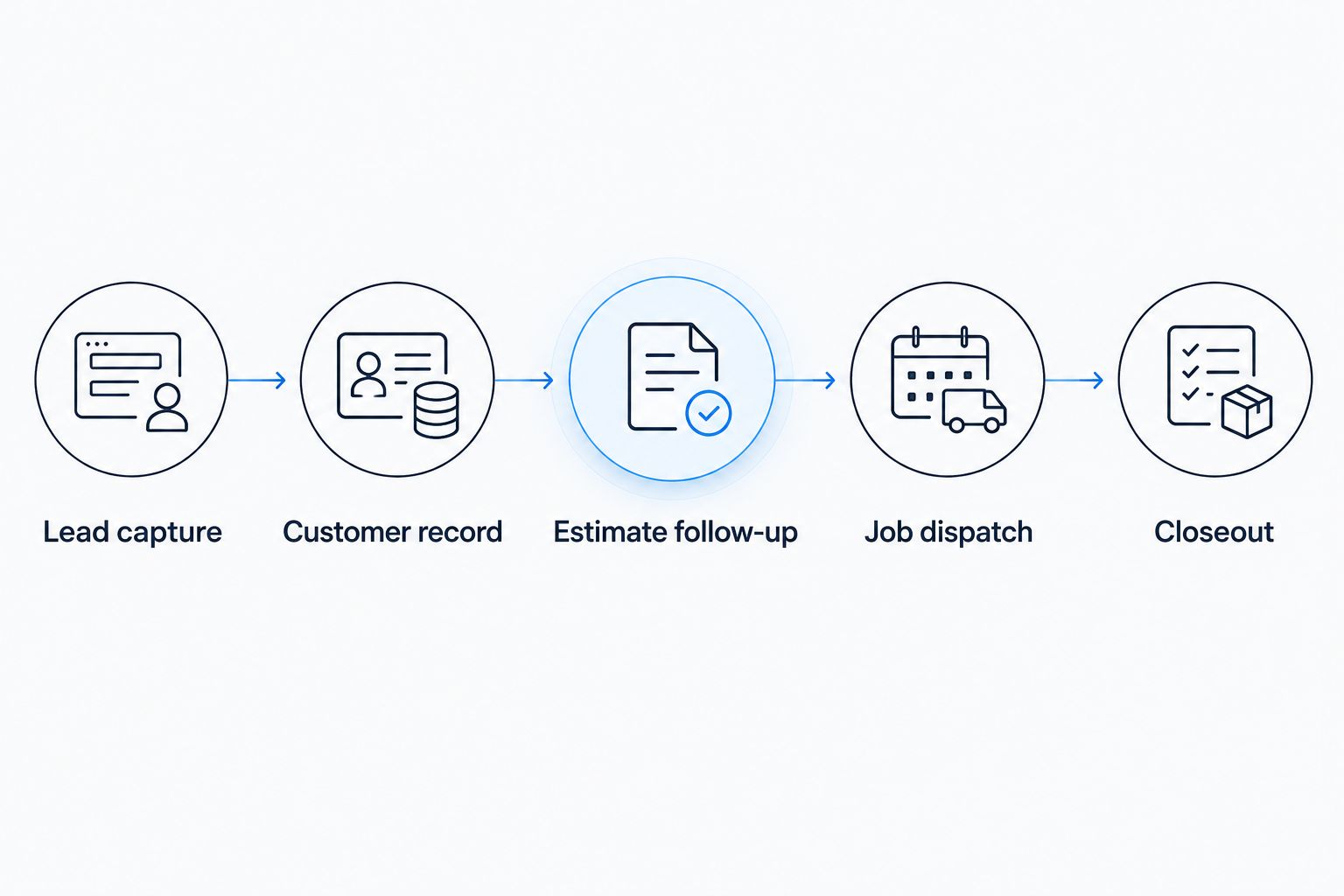
Use a practical trial instead of a general product tour. Bring 1 sample job, 2 customer records, and 3 user roles: office staff, technician, and owner. These are suggested test inputs, not product limits.
- Lead capture: Submit an inquiry and identify where it arrives.
- Customer record: Match the inquiry to the right customer and service address.
- Estimate follow-up: Create an estimate and assign the next action.
- Job dispatch: Schedule the work and inspect the technician's view.
- Closeout: Record completion and find the job again from the customer history.
Watch for repeated typing, missing notes, and unclear ownership. Ask the demonstrator to show an error correction, too. A system looks different when the wrong address has been entered or an appointment changes.
Which contractor CRM should you choose?
Start with Jobber if you run a small service crew and need customer records, quotes, scheduling, and invoices together. Compare Housecall Pro if residential appointment coordination is your main concern. Add Service Fusion when office-led dispatch deserves a closer look.
Choose ServiceTitan for operational complexity. Choose HubSpot CRM for sales follow-up or Zoho CRM for a custom sales process. Neither sales-focused option should be mistaken for a complete dispatch system.
In 2026, keep the website decision separate but connected: SiteSmartly handles managed contractor websites and lead capture. Verify how those inquiries reach the CRM you select, who receives them, and who owns the next action.
FAQ
What's the best CRM software for home service contractors?
Jobber is the default recommendation for a small service crew that needs customer records, quotes, scheduling, and invoicing together. ServiceTitan fits more complex operations, while HubSpot CRM fits sales follow-up rather than dispatch.
Is Jobber better than Housecall Pro?
Jobber is the default pick here for straightforward service-job management; Housecall Pro earns its place for residential appointment coordination. Compare both using the same customer, quote, rescheduling task, and technician assignment.
Do plumbers and HVAC contractors need a CRM or field-service software?
Contractors who dispatch technicians need field-service capabilities, not just a sales CRM. Customer histories, service addresses, scheduling, and job details need to work together.
Can HubSpot CRM replace contractor dispatch software?
HubSpot CRM is not a replacement for dedicated field-service dispatch software. Use it for contacts, deals, and sales follow-up, then define how accepted work reaches your scheduling system.
Is SiteSmartly a contractor CRM?
SiteSmartly provides managed contractor websites with lead-capture, quoting, and call-answering tools. Select a separate CRM or field-service system for customer and job management, and verify the inquiry handoff.
What should I test before switching contractor CRMs?
Test an inquiry through customer matching, estimate follow-up, dispatch, and job closeout. Include a changed appointment and an incorrect customer detail so you can inspect how corrections work.
Should a small contractor choose ServiceTitan?
Choose ServiceTitan when your dispatch, technician workflows, and reporting requirements justify a structured implementation. A small business that only needs basic contact follow-up should start with a simpler shortlist.
One last thing
Test a returning customer, not just a new lead. Ask the office to find previous work, confirm the service address, and prepare the next visit. That exercise tells you whether your CRM preserves useful customer history or merely stores names.
Choose the system your office can keep accurate during a busy day. A detailed record nobody maintains is not an improvement.