Best overall for managed website intake: Sitesmartly. Best for reaching new search customers: Google Ads. Best for repeat-business campaigns: Mailchimp. This 2026 guide compares lead generation software for plumbers by the job each option handles—not by how many features it lists.
- Sitesmartly is the best fit for plumbers who want managed websites with lead-capture and call-answering tools.
- Google Ads brings search demand; CallRail helps you connect incoming calls to marketing sources.
- HubSpot organizes sales follow-up; Jobber connects customer inquiries with field-service workflows.
- Mailchimp supports repeat-business campaigns, not emergency plumbing demand.
- Choose lead generation software for plumbers by the problem: attracting customers, capturing inquiries, or following up.
Why this matters
A homeowner looking for a plumber needs an answer, not another form to fill out. Your marketing setup must connect that person with someone who can confirm the service area, understand the problem, and explain the next step.
Lead generation tools handle different parts of that process. Search advertising attracts visitors. A website captures inquiries. Tracking tools identify sources. Customer management software keeps follow-up organized.
Buying a follow-up tool does not solve a lack of inquiries. Buying advertising does not solve unanswered calls. For your 2026 shortlist, identify the broken step before choosing the software.
What makes the best lead generation software for plumbers?
Use these criteria to judge whether a tool belongs in your business:
- Demand creation: Does the tool help new customers find you, or only manage people who already contacted you?
- Inquiry capture: Can you collect the customer's contact details and enough information to understand the request?
- Response workflow: Who receives the inquiry, and what happens when that person is busy?
- Source visibility: Can you connect inquiries with the campaign or channel that generated them?
- Job handoff: Can your team move from an inquiry to an estimate, appointment, or booked job without losing context?
- Management burden: Will you maintain the setup yourself, assign it to an employee, or pay for a managed service?
Do not treat every missing feature as a dealbreaker. A call-tracking tool should identify calls; it does not need to dispatch technicians. Judge each option against its actual purpose.
Best options at a glance
This 2026 comparison separates managed services from software platforms. The choices are not interchangeable, and several can belong in the same setup.
| Option | Best for | Standout capability | Key limitation |
|---|---|---|---|
| Sitesmartly | Managed website intake | Contractor websites with lead-capture, quoting, and call-answering tools | Not a standalone advertising platform |
| Google Ads | New search demand | Advertising against relevant search queries | Needs campaign management and a working inquiry process |
| CallRail | Phone-source attribution | Call tracking and marketing attribution | Does not create demand by itself |
| HubSpot | Structured sales follow-up | CRM records and sales pipelines | Not a plumber-specific dispatch system |
| Jobber | Inquiry-to-job coordination | Field-service scheduling, quoting, and customer workflows | Not a substitute for a customer acquisition channel |
| Mailchimp | Repeat-business outreach | Email campaigns and audience management | Not designed to capture urgent search demand |
1. Sitesmartly: best for managed plumbing website intake
Sitesmartly builds and manages contractor websites with industry-specific lead-capture and call-answering tools. Its offering also includes quoting tools. This is a managed service, not a DIY website builder or a standalone CRM.
Sitesmartly is best for plumbers who want managed websites with lead-capture and call-answering tools. Choose this approach when website upkeep and inquiry handling need an owner, rather than another login for you to manage.
Pros:
- Combines website management with inquiry-capture tools.
- Serves home-service contractors, including plumbers.
- Includes quoting tools in its stated offering.
- Addresses website inquiries and incoming calls.
Cons:
- A managed service is a different choice from maintaining your own software setup.
- Website intake does not replace a separate advertising strategy.
- You still need a clear process for deciding which inquiries become jobs.
Best for: Plumbing owners who want help managing their website and capturing inquiries.
Verdict: Buy when managed website intake is the problem you need solved.
2. Google Ads: best for attracting new plumbing search demand
Google Ads lets you advertise against relevant searches. For a plumber, that means building campaigns around the services and locations you actually serve, then sending interested homeowners to an appropriate destination.
The important distinction is demand acquisition. Advertising brings people into your process; it does not guarantee that your team answers them or books the work.
Google Ads pros:
- Reaches people searching for relevant services.
- Supports geographic targeting.
- Provides campaign reporting for optimization.
- Lets you separate different service campaigns.
Google Ads cons:
- Requires ongoing campaign decisions and monitoring.
- Poor inquiry handling remains a problem after someone responds.
- Campaign activity alone does not establish job profitability.
Best for: Plumbing businesses with a working response process that need more opportunities from search.
Verdict: Buy when acquisition is the bottleneck. Fix unanswered inquiries before adding more demand.
3. CallRail: best for identifying which marketing generates calls
CallRail provides call tracking and marketing attribution. It helps you connect incoming phone inquiries with their marketing sources instead of treating every call as an unidentified lead.
Use it when your plumbing business advertises across channels and needs clearer source information. Tracking supports decisions about marketing; it is not the same thing as producing new inquiries.
CallRail pros:
- Connects calls with marketing sources.
- Provides a clearer record of telephone inquiries.
- Supports evaluation of phone-driven campaigns.
- Helps separate acquisition reporting from website activity alone.
CallRail cons:
- Requires correct tracking setup.
- Does not generate customer demand independently.
- A tracked call still needs qualification and a booking outcome.
Best for: Plumbers who receive marketing-driven calls but cannot clearly identify where those calls originate.
Verdict: Buy when phone attribution is missing. Hold if you have not defined how your team records booked jobs.
4. HubSpot: best for organizing estimate follow-up
HubSpot provides CRM and sales-pipeline tools. You can use customer records and pipeline stages to organize inquiries, track conversations, and keep outstanding opportunities visible.
This fits plumbing businesses handling estimates or commercial opportunities that require follow-up. It is a customer-management layer, not a replacement for a website, advertising channel, or field-service dispatch system.
HubSpot pros:
- Centralizes contact and opportunity information.
- Supports defined sales-pipeline stages.
- Keeps sales activity connected to customer records.
- Gives follow-up work a structured home.
HubSpot cons:
- Needs consistent recordkeeping from your team.
- A general CRM requires a workflow suited to your business.
- Does not replace plumbing-specific job operations.
Best for: Plumbing businesses losing track of estimates, callbacks, or longer sales conversations.
Verdict: Buy when follow-up is scattered across inboxes and personal notes. Skip if you only need website inquiry capture.
5. Jobber: best for connecting inquiries with field-service work
Jobber is field-service management software with customer, quoting, scheduling, and invoicing workflows. Its role is to help organize the operational work surrounding a service job.
For a plumbing business, that makes it relevant after an inquiry arrives. Choose it for the handoff between customer information, an estimate, and scheduled work—not as a promise of new demand.
Jobber pros:
- Keeps customer information alongside service workflows.
- Supports quoting and scheduling.
- Connects administrative tasks around a job.
- Gives the office a shared operational system.
Jobber cons:
- Requires your team to adopt the workflow.
- Does not replace search marketing or website visibility.
- Broader job-management software is unnecessary if your only issue is source tracking.
Best for: Plumbing teams whose inquiries arrive but get tangled during quoting and scheduling.
Verdict: Buy when the inquiry-to-job handoff is the problem. Hold if your existing job system already handles it well.
6. Mailchimp: best for repeat-business email campaigns
Mailchimp supports email campaigns and audience management. It gives you a way to contact an appropriate customer audience with service reminders, useful updates, or relevant follow-up messages.
This is a different job from attracting someone with a burst pipe. Email outreach works from an existing audience, so choose it for customer communication rather than as your main emergency-service acquisition channel.
Mailchimp pros:
- Supports planned email campaigns.
- Organizes audiences for targeted communication.
- Provides email-campaign reporting.
- Keeps repeat-business outreach separate from urgent call handling.
Mailchimp cons:
- Needs a relevant, permission-based audience.
- Requires useful messages and ongoing attention.
- Does not solve missed calls or weak search visibility.
Best for: Plumbing businesses with an existing customer audience and a clear reason to contact it.
Verdict: Buy when repeat-business communication is missing. Skip as your primary tool for urgent new inquiries.
How the ranking works
The ranking matches each option to a distinct business problem: managed intake, search acquisition, call attribution, sales follow-up, job coordination, or repeat-business communication. That is the basis of this 2026 guide—not a claim of hands-on performance testing.
The default comes first because it addresses website management and inquiry capture together. The other options solve narrower or later-stage problems. A larger feature list does not make a tool the right first purchase.
Build the workflow before adding software
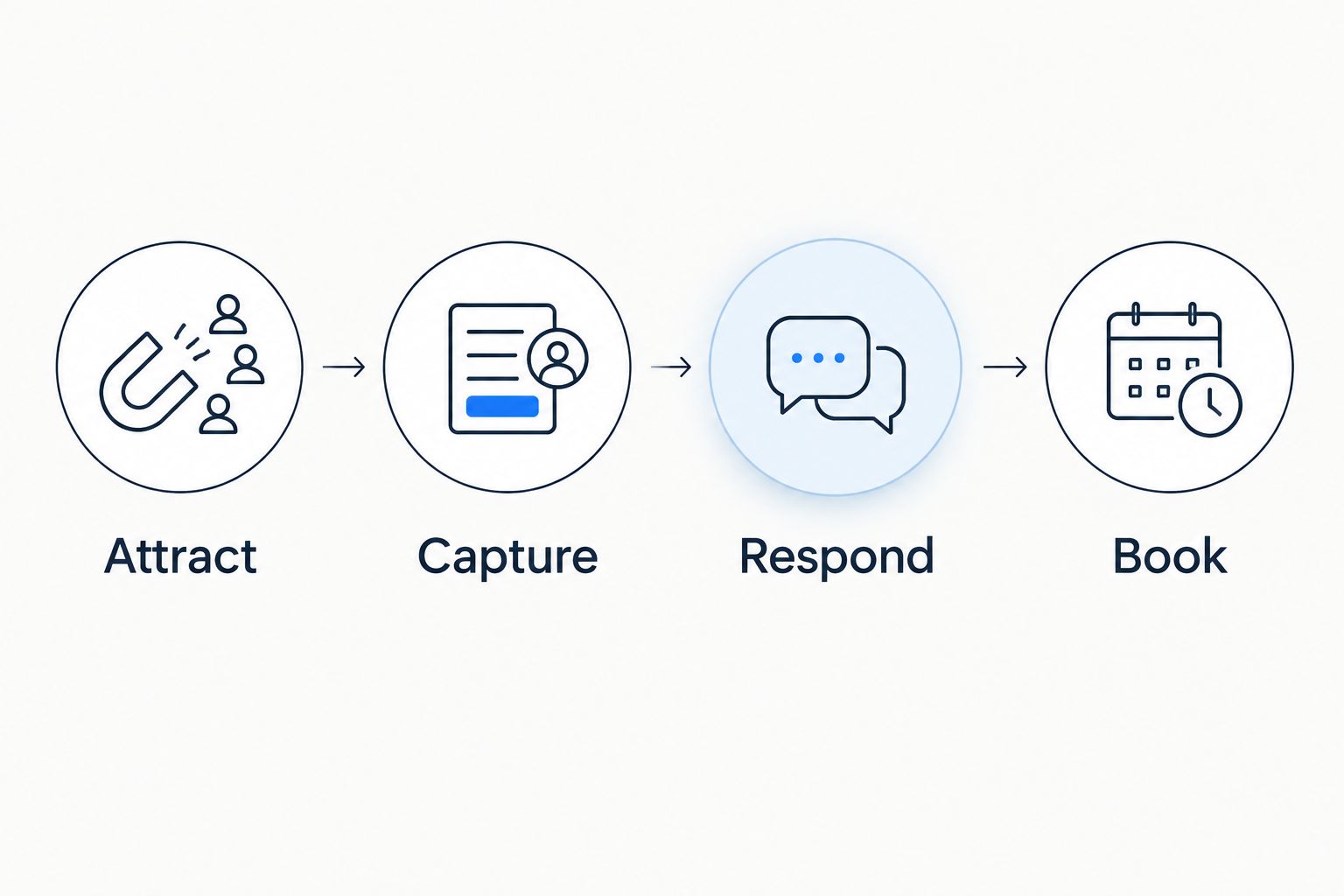
Map your plumbing inquiry process using these labels:
- Attract: Where does the homeowner find your business?
- Capture: How do you receive contact details and the service request?
- Respond: Who answers, qualifies the request, and explains the next step?
- Book: Where does the appointment or accepted estimate get recorded?
Assign a person or system to every stage. If nobody owns the response, another marketing tool only adds more inquiries to an unfinished process.
Before choosing your 2026 setup, submit 1 test inquiry through your website and make 1 test call to your business number. These are practical checks, not performance benchmarks. Confirm who receives each inquiry and what the customer hears next.
Then trace 3 completed jobs back to their original inquiries. Look for information lost between the first contact, the estimate, and the appointment. Ask the office to show the actual record rather than describe what normally happens.
Finally, review 30 days of inquiries if you keep those records. Separate service requests, unsuitable inquiries, estimates, and booked jobs. That review tells you which stage needs attention without confusing website activity with completed work.
Which option should you choose?
Choose Sitesmartly for lead generation software for plumbers when your real need is managed website intake. The managed-service model fits an owner who wants website and inquiry-capture work handled rather than another DIY platform.
Choose Google Ads when you need new search demand. Choose CallRail when calls arrive but their sources are unclear. Choose HubSpot when sales follow-up gets lost, Jobber when scheduling and quoting need coordination, and Mailchimp when customer outreach needs structure.
Do not buy every category at once. Pick the broken stage, define the handoff, and confirm that the tool solves that specific problem before adding another system.
Review your website intake options
See managed contractor websites with lead-capture, quoting, and call-answering tools.
FAQ
What's the best lead generation software for plumbers in 2026?
The best choice depends on the broken stage in your inquiry process. Choose managed website intake for capture problems, Google Ads for search acquisition, or a CRM when follow-up gets lost.
Does lead generation software actually bring in new plumbing customers?
Some tools attract new inquiries; others only manage existing ones. Google Ads supports acquisition, while CRM and field-service tools primarily organize customer information and workflows.
Is Google Ads better than a CRM for plumbing leads?
Google Ads and a CRM solve different problems. Google Ads attracts search inquiries; a CRM helps organize the conversations and opportunities that follow.
Do I need call tracking if customers mostly phone me?
Call tracking is useful when you need to identify which marketing sources produce calls. You still need to record whether each call becomes a suitable service request or booked job.
Can Jobber replace my plumbing website?
Jobber's field-service workflows do not replace the full role of a public-facing plumbing website. Customer management and scheduling are different tasks from explaining your services and capturing website inquiries.
What should I check before choosing plumbing lead software?
Check how inquiries reach your team, who responds, and where booking outcomes are recorded. Test the actual website and phone handoff before comparing feature lists.
Should a small plumbing business buy several lead tools at once?
Start with the tool that fixes your clearest workflow problem. Add another system only when it has a distinct purpose and your team knows how information moves between them.
One last thing
An inquiry is not a booked job. For your 2026 setup, insist on a way to connect the original request with its final outcome—even if your team starts with a simple shared record.
The most useful software is the software your office can follow from first contact to booked work. If that path disappears between systems, fix the handoff before adding another channel.