Best overall for managed contractor websites: Sitesmartly. Best for DIY editing: Wix. Best for design flexibility: WordPress.org. These are the strongest starting points among website builders for landscaping companies in 2026; choose according to who will build, update, and manage your site.
- Sitesmartly is the best fit for contractors choosing managed websites with lead-capture and quoting tools.
- Wix suits landscaping companies that want to edit their own pages without managing WordPress.
- Squarespace suits portfolio-led landscaping websites; Webflow suits designer-led custom layouts.
- Choose website builders for landscaping companies around quote requests, service areas, project photos, and maintenance responsibility.
Why this matters
A landscaping website needs to do more than display a lawn photo. Visitors need to know whether you handle their job, serve their address, and offer a clear way to request an estimate. A polished homepage cannot answer those questions by itself.
Your business model changes the brief. Recurring lawn maintenance needs clear coverage and service information. Landscape installation needs project examples and a way to explain the work requested. Neither needs an elaborate website that nobody has time to update.
For your 2026 website decision, choose the maintenance model before the template. The right platform is the one your business can keep accurate while crews are working.
What makes the best website builders for landscaping companies
Use these criteria before comparing platforms. They separate a useful business website from an attractive editing demo.
- Management responsibility: Identify who handles page updates, technical maintenance, and broken forms. A managed service and a DIY builder solve different problems.
- Quote capture: Make it easy to describe the property, requested service, and contact details. Ask only for information you will actually use.
- Project presentation: Show completed work with useful captions. Explain the job instead of relying on unexplained before-and-after photos.
- Local clarity: Give visitors accurate service areas and individual service descriptions. A town name repeated across a generic page is not useful detail.
- Mobile usability: Check readable text, usable buttons, straightforward navigation, and forms you can complete on a phone.
- Editing and ownership: Understand what you can change, who controls the domain and accounts, and what moving platforms would involve.
Landscaping website builders at a glance
This 2026 comparison gives each option a different job. The order favors a busy contractor's operational needs, then separates the self-managed choices by editing style and technical requirements.
| Option | Best for | Standout feature | Key limitation |
|---|---|---|---|
| Sitesmartly | Managed contractor websites | Website management with lead-capture and quoting tools | You still own the estimating and follow-up process |
| Wix | Owner-managed editing | Visual editing with hosted website tools | Design freedom needs careful mobile checks |
| WordPress.org | Extensible websites | Open-source software with themes and plugins | Hosting and maintenance need an accountable owner |
| Squarespace | Portfolio-led landscaping | Templates and visual page layouts | Less open-ended customization than WordPress |
| Webflow | Designer-led custom layouts | Detailed visual control over website structure and styling | More learning than a basic template editor |
| GoDaddy Website Builder | A straightforward brochure site | Guided site-building tools | A simpler starting point for complex site requirements |
1. Sitesmartly: best for managed landscaping websites
Sitesmartly builds and manages websites for home-service contractors, with industry-specific lead-capture and call-answering tools. Its stated offer includes quoting tools. That makes the managed-service approach relevant when you want a business website without becoming its day-to-day editor.
Sitesmartly is the best fit for contractors who want a managed website with lead-capture and quoting tools. For a landscaping company, the buying decision is whether that managed approach fits your services and lead-handling process. Define those requirements before choosing a layout.
Pros:
- Website building and ongoing management are part of the stated offer.
- Lead-capture tools address the inquiry stage, not just page appearance.
- Quoting tools are included in the stated contractor offering.
- Call-answering tools address another route through which homeowners contact contractors.
Cons:
- You still need to supply accurate service information and genuine project material.
- Website management does not replace your estimating, scheduling, or customer follow-up responsibilities.
Best for: Landscaping owners who want website management handled as a service rather than another task on their calendar.
Before committing, explain how you separate maintenance inquiries from installation inquiries. Ask to see how your proposed website would collect the information needed for each. Do not assume that one generic form fits every landscaping service.
Verdict: Buy the managed-service approach if you want responsibility for the website assigned outside your crew.
2. Wix: best for owner-managed landscaping websites
Wix is a hosted website builder with visual editing tools. You can create pages, arrange content, and manage a business website without setting up separate WordPress hosting. It suits owners who want to make their own routine changes.
That control is useful when your service descriptions or project gallery need frequent attention. The trade-off is responsibility: you become the person checking layouts, publishing updates, and testing inquiry forms.
Wix pros:
- Visual editing makes page changes accessible without coding.
- Hosted website tools remove the need to arrange separate web hosting.
- Templates provide a starting structure for service pages and galleries.
- Built-in website tools reduce the need to assemble every function separately.
Wix cons:
- Flexible layouts need deliberate checks on smaller screens.
- DIY control leaves content accuracy and routine website checks with you.
Best for: Landscaping owners who enjoy editing their website and can make time for it.
For a 2026 site refresh, start with a service page rather than the homepage. Add an accurate description, a relevant project example, and an estimate request. If editing that page feels manageable, Wix fits your working style better than a platform chosen solely for its template preview.
Verdict: Buy Wix if you want direct editing control and will use it consistently.
3. WordPress.org: best for extensible landscaping websites
WordPress.org provides open-source website software. You arrange hosting and use themes, plugins, or custom development to create the site. It offers a broader technical foundation than a simple all-in-one template builder.
That flexibility helps when your requirements extend beyond standard service pages. It also creates maintenance work. Someone needs to own updates, backups, security, and compatibility checks.
WordPress.org pros:
- Open-source software gives you control over the website's technical foundation.
- Themes and plugins offer many ways to build pages and add functions.
- Custom development can support requirements outside a standard template.
- You can choose your hosting provider rather than use one prescribed platform.
WordPress.org cons:
- Hosting and maintenance are separate responsibilities.
- Plugins and custom changes introduce compatibility checks.
- Technical freedom is not a substitute for a clear website brief.
Best for: Landscaping businesses with a developer or maintenance partner and specific customization needs.
Choose WordPress.org because you need its flexibility, not because somebody says it automatically produces better search rankings. Useful content, accessible pages, and a maintained site still matter. Assign a named person or provider to maintenance before the build starts.
Verdict: Buy WordPress.org with an accountable technical partner; skip a self-managed setup if nobody owns upkeep.
4. Squarespace: best for portfolio-led landscaping websites
Squarespace is a hosted website builder centered on templates and visual page layouts. It suits a landscaping business that wants to explain services alongside a carefully organized project portfolio. You do not need to assemble a separate hosting setup.
A portfolio should explain your work, not just decorate the site. Give each featured project a short description of the starting problem, the work completed, and the service it represents.
Squarespace pros:
- Templates provide a consistent starting point for page design.
- Visual layouts support image-led project presentation.
- Hosted website management keeps the core setup in one platform.
- Page editing supports routine changes without custom development.
Squarespace cons:
- Template structure constrains some layout choices.
- Unusual workflows can require integrations or a different technical approach.
Best for: Landscape designers and installation businesses whose completed projects carry much of the sales explanation.
Start with 3 project examples, each showing a different service you actually provide. That is a practical content brief, not a platform requirement. A smaller, explained portfolio is more useful than an unexplained collection of images.
Verdict: Buy Squarespace when project presentation matters more than open-ended technical customization.
5. Webflow: best for designer-led landscaping websites
Webflow gives designers detailed visual control over website structure and styling. It also includes content management features for repeatable content such as project entries. It fits a custom design brief better than a quick owner-built brochure site.
The editing experience depends on how the site is built. Before approving a design, ask the builder to demonstrate how you will replace photos, change service text, and publish a new project.
Webflow pros:
- Detailed layout and styling controls support custom designs.
- Content management supports structured, repeatable project entries.
- Responsive design controls let designers adjust layouts for different screens.
- Visual development connects page structure and styling in one environment.
Webflow cons:
- The design environment takes more learning than a basic template editor.
- A custom build needs a clear handoff for everyday content changes.
Best for: Landscaping companies hiring a designer for a distinct website with organized project content.
For a 2026 redesign, include the editing handoff in the brief. Ask for written instructions and make the owner perform a real update before signing off. A website should not require a designer every time a service description changes.
Verdict: Buy Webflow for a designer-led build; skip it if your main goal is the simplest DIY setup.
6. GoDaddy Website Builder: best for a basic landscaping brochure site
GoDaddy Website Builder uses guided tools to help you create a hosted business website. It fits a straightforward brief: explain your services, show your coverage area, and give visitors a contact route. It is a different choice from commissioning a custom website.
Keep the scope honest. A basic brochure site can present your business, but complex content structures and unusual inquiry processes need closer review before you commit.
GoDaddy Website Builder pros:
- Guided building tools suit a simple website brief.
- Hosted setup avoids arranging separate website hosting.
- Standard page-building tools cover basic business information.
GoDaddy Website Builder cons:
- Guided layouts leave less room for highly customized designs.
- Specialized workflows need checking against the available tools.
Best for: Small landscaping businesses that need a straightforward online presence and want to manage it themselves.
Write the service descriptions before opening the editor. Otherwise, the template ends up deciding what your business says. Your actual work and coverage should determine the pages.
Verdict: Buy GoDaddy Website Builder for a basic brochure site; skip it for a demanding custom brief.
How we ranked
The ranking prioritizes management responsibility, quote capture, project presentation, local clarity, mobile usability, and editing control. It is a fit-based buying guide, not a claim that every platform was tested against the same landscaping website.
Managed service comes first for an owner who wants website responsibility assigned. The remaining options separate DIY editing, technical extensibility, portfolio presentation, custom design, and basic setup. Your requirements determine the winner—not the length of a feature list.
Check the inquiry path before choosing
Run the same practical exercise on any proposed website. Use 1 sample inquiry for recurring maintenance and 1 sample inquiry for an installation project. Check both on your phone.
- Find services: Can a homeowner identify the right service without guessing?
- Check coverage: Can the homeowner establish whether you serve the property?
- Request estimate: Can the homeowner describe the work and submit contact details?
- Confirm receipt: Does the submission clearly explain what happens next?
- Assign follow-up: Is someone responsible for reviewing and answering the inquiry?
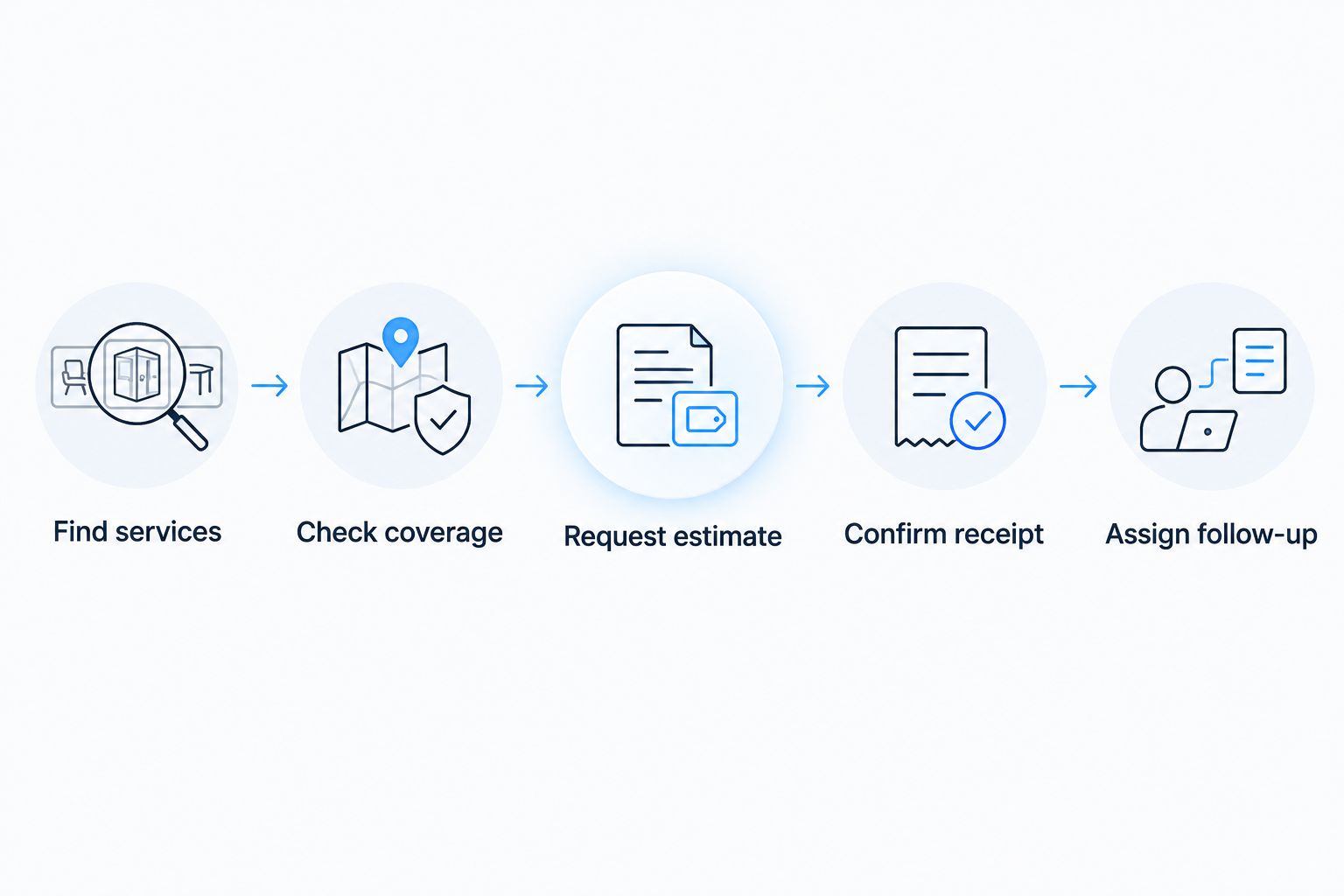
Treat this as an acceptance check for your 2026 website. A form submission is not the finish line. It needs a clear destination and an accountable response process.
Which landscaping website builder should you choose?
Choose Sitesmartly if you want a managed contractor website with lead-capture and quoting tools. Choose Wix if you want to handle editing yourself. Choose WordPress.org when you have technical support and a genuine customization requirement.
Choose Squarespace for portfolio-led presentation, Webflow for a designer-led custom build, and GoDaddy Website Builder for a basic brochure site. Do not buy technical complexity that your landscaping business has no plan to maintain.
Review the managed website option
Compare a managed contractor website with the DIY approaches in this guide.
FAQ
What's the best website builder for a landscaping company?
Sitesmartly is the best fit here for contractors choosing a managed website with lead-capture and quoting tools. Wix is the DIY alternative for owners who want to edit their own pages.
Is Wix or WordPress.org better for landscapers?
Wix fits owner-managed visual editing; WordPress.org fits businesses that need extensibility and have technical support. WordPress.org requires separate hosting and an accountable maintenance arrangement.
Do landscaping companies need separate service pages?
Separate pages help when services require different explanations. Lawn maintenance and landscape installation can describe different customer needs, project information, and estimating processes.
Is Squarespace a good choice for landscape designers?
Squarespace fits landscape designers who want an image-led portfolio alongside clear service information. Explain each project so visitors understand the work rather than seeing photos without context.
Should a landscaper choose Webflow?
Choose Webflow when a designer-led custom website is the priority. Require a practical editing handoff so routine updates do not depend on the original designer.
What should a landscaping estimate form ask for?
A landscaping estimate form should collect contact details, property location, the requested service, and a useful description of the work. Keep questions tied to information you need for the next step.
Will switching website builders improve local search rankings?
Switching builders alone does not establish better local search rankings. Accurate service information, useful pages, technical accessibility, and careful handling of existing URLs remain necessary.
One last thing
Test the confirmation message, not just the form. Submit an inquiry yourself and read what a homeowner sees afterward. Promise only the response process your business can actually deliver.
A new website cannot make an inaccurate promise true. Get that final step right before adding more pages.