Best overall among roofing website builders for managed websites: Sitesmartly. Best for DIY editing: Wix. Best for platform ownership: WordPress.org. Best for photo-led presentation: Squarespace. Best for custom visual design: Webflow. This 2026 guide shows which approach fits your roofing business, what each requires from you, and what to check before choosing.
- Sitesmartly wins among roofing website builders for contractors who want managed websites and lead-capture tools.
- Wix suits roofers who want to edit their own website without managing separate hosting.
- WordPress.org suits roofers who want control over hosting, code, and website ownership.
- Squarespace favors project presentation; Webflow favors detailed visual design control.
Why this matters
Your roofing website has two jobs: explain why a homeowner should trust you and give that homeowner a clear way to request help. A polished homepage does not finish either job by itself. You also need accurate service information, credible project examples, and a working contact path.
The first decision is not which template looks best. It is who will keep the website working after launch. If you want someone else to handle website management, choose that service model before comparing editors. If you want to make changes yourself, choose an editor you can actually use.
For your 2026 shortlist, separate website features from business responsibilities. A form captures an inquiry; someone still has to handle it. A project gallery shows completed work; it cannot explain an unfamiliar roofing problem unless the surrounding copy does that job.
What makes the best roofing website builders
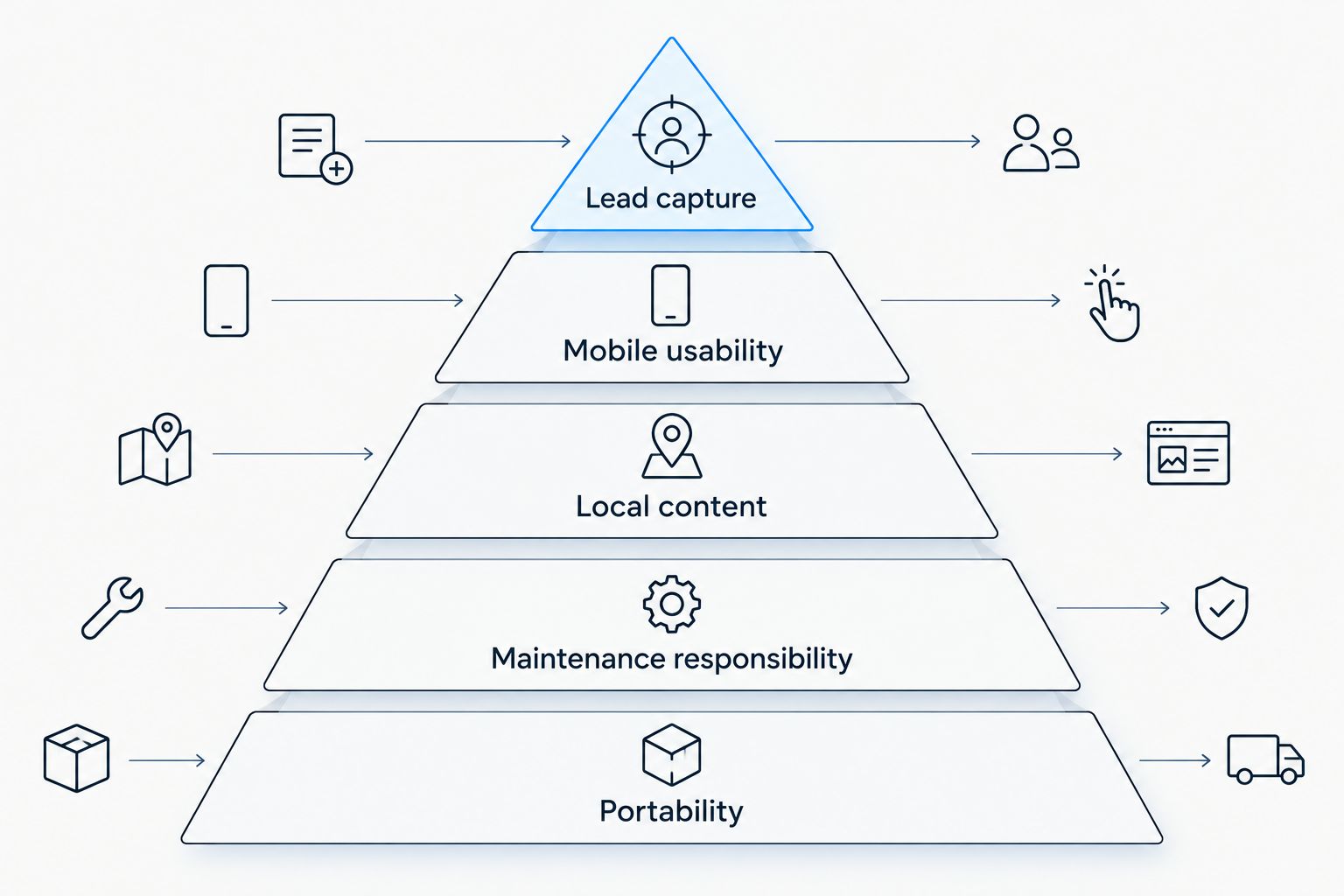
Use these criteria in priority order. A roofing website needs a usable contact path before it needs elaborate animation.
- Lead capture: Homeowners need an obvious way to call or request an estimate. Check the submission and the handoff, not just the appearance of the form.
- Mobile usability: Read service information, tap the phone link, and complete the contact form on a phone. Small buttons and crowded layouts make those tasks harder.
- Local content: You need room for roofing services, genuine service areas, and project examples. Separate pages should answer different questions rather than repeat the same paragraph.
- Maintenance responsibility: Decide who handles edits, technical upkeep, and broken contact tools. Write down the division of responsibility before launch.
- Portability: Understand who controls the domain, content, hosting account, and website files. An easy editor and an easy move to another platform are different things.
Before choosing a builder in 2026, test 3 tasks: find a relevant roofing service, request an estimate, and locate the business contact details. Submit 1 test inquiry and check the full journey through to the person responsible for responding. Repeat the checks at 2 screen widths, using a phone and a desktop browser.
Roofing website builders at a glance
These options solve different problems. The ranking puts contractor-focused management first, then separates the DIY choices by the responsibility or capability you want.
| Builder | Best for | Standout feature | Key limitation |
|---|---|---|---|
| Sitesmartly | Managed contractor websites | Website management with lead-capture and quoting tools | Not the same buying model as a self-managed editor |
| Wix | DIY editing | Hosted visual website editor | Platform convenience limits infrastructure control |
| WordPress.org | Platform ownership | Open-source software with a choice of hosting | You must arrange maintenance and technical support |
| Squarespace | Photo-led presentation | Integrated templates and project layouts | Template-led design offers less freedom than custom development |
| Webflow | Custom visual design | Detailed layout controls and a content management system | More demanding to learn than a basic template editor |
1. Sitesmartly: best roofing website builder for managed service
This managed approach combines website building and ongoing management with lead-capture, quoting, and call-answering tools for home-service contractors. You are choosing help with the website operation, not simply access to an editor. That distinction matters when your workday is already full of inspections, crews, and customer calls.
For a roofer, the practical question is how the contact path fits your business. Ask how an inquiry captures the property location, roofing concern, and contact details. Keep an estimate request clearly separate from a final quote that depends on inspecting the roof.
Sitesmartly pros:
- Website building and management sit within the same service approach.
- Lead-capture tools address inquiries rather than appearance alone.
- Quoting tools support the estimate-request process.
- Call-answering tools add another way to handle incoming interest.
Sitesmartly cons:
- A managed service is the wrong model if administering the website yourself is your main goal.
- Quoting tools do not replace a roof inspection or your judgment about the work.
- Accurate roofing information still requires real service areas and job details.
Best for: Roofing owners who want a managed website with contractor-focused inquiry tools.
Before committing, establish who handles updates and how inquiries reach your team. Verdict: Buy if website management and lead handling are the responsibilities you want help with.
2. Wix: best roofing website builder for DIY editing
Wix is a hosted website builder with a visual editor, templates, and website tools such as forms. It suits roofers who want to change page copy, add project photos, and adjust layouts themselves. You work inside the platform instead of selecting and maintaining a separate hosting setup.
That convenience does not write your roofing pages for you. Give roof repair, replacement, and inspection services their own clear explanations when those services belong to your business. Use actual completed work rather than filling every section with generic roofing images.
Wix pros:
- Visual editing supports owner-managed content changes.
- Hosting and the website editor belong to one platform.
- Templates provide a starting structure for service pages.
- Forms give visitors a way to submit inquiries.
Wix cons:
- Hosted platform convenience does not provide the infrastructure control of a self-hosted website.
- You remain responsible for content accuracy and routine editing.
- An attractive template still needs a deliberate roofing inquiry flow.
Best for: Roofers who want to maintain their own content without managing separate hosting.
Try editing a service page before choosing Wix. Replace a headline, add a project image, and check the phone layout. Verdict: Buy if you want hands-on editing and accept the platform's boundaries.
3. WordPress.org: best roofing website builder for platform ownership
WordPress.org provides open-source website software that you install with a hosting provider. Themes control presentation, while plugins add functions such as forms and other website tools. You choose the hosting arrangement and have access to the site's code.
That control comes with responsibility. Someone must handle software updates, backups, security, and compatibility between components. For a busy roofer, WordPress.org makes sense when ownership matters and a named person or service is accountable for maintenance.
WordPress.org pros:
- You can choose and change hosting providers.
- Open-source software gives you access to the website code.
- Themes and plugins support different content and functional needs.
- The platform suits service pages, project articles, and other structured content.
WordPress.org cons:
- Hosting and technical maintenance require separate decisions.
- Plugins introduce components that need updates and compatibility checks.
- Editing ease depends on the theme and tools selected for the site.
Best for: Roofing businesses that prioritize platform control and have dependable technical support.
Before choosing WordPress.org, identify who owns the hosting account and who responds when a form stops working. Avoid treating maintenance as an unnamed future task. Verdict: Buy if ownership is a priority and technical responsibility is settled; skip this approach if nobody will maintain it.
4. Squarespace: best roofing website builder for project presentation
Squarespace is a hosted website builder built around templates, page layouts, and an integrated editing environment. It fits a roofing business that wants to present completed projects clearly without arranging separate hosting. Project photos and straightforward service descriptions can form the core of the site.
Use those photos to answer questions, not just decorate pages. Explain what the customer needed, what work your business performed, and what the visitor should do next. Do not imply that every pictured roof represents a service you currently offer.
Squarespace pros:
- Templates provide a consistent starting point for presentation.
- Page layouts support photo-led project content.
- Hosting and editing sit within one platform.
- Built-in forms support basic inquiry collection.
Squarespace cons:
- Template-led design offers less freedom than a fully custom build.
- A project gallery does not replace detailed service information.
- Specialized quoting or call-handling requirements need separate evaluation.
Best for: Roofers whose strongest website material is a well-documented collection of completed jobs.
Build the contact route alongside the project pages. A visitor should not have to return to the homepage to find out how to request an estimate. Verdict: Buy if clear project presentation is your priority and the template structure fits your content.
5. Webflow: best roofing website builder for custom visual design
Webflow combines visual website design controls with a content management system. It suits a roofing business working with a designer who wants detailed control over layouts and responsive behavior. The advantage is design flexibility, not less work for an inexperienced editor.
Use that flexibility to organize information. A custom design should make roofing services, project evidence, and contact actions easier to find. Elaborate motion or unusual navigation is not a useful trade if a homeowner cannot find the estimate request.
Webflow pros:
- Detailed layout controls support custom page designs.
- Responsive controls help designers adapt layouts to different screens.
- The content management system supports structured project content.
- Reusable design elements help keep repeated page sections consistent.
Webflow cons:
- The design workflow requires more learning than a basic template editor.
- Custom layouts still need testing when content changes.
- Routine edits require a clear handoff between the designer and your team.
Best for: Roofing companies with design support and a specific need for custom layouts.
Ask the designer to demonstrate a normal project update before approving the build. The owner-facing editing process matters as much as the finished design. Verdict: Buy if custom design is a real requirement and someone can support it; skip it for a simple owner-built site.
How the ranking works
This 2026 ranking follows the criteria above: lead capture, mobile usability, local content, maintenance responsibility, and portability. It is a fit-based buying guide, not a claim that every builder produces the same result for every roofer.
Managed service takes the first slot because it addresses website responsibility alongside inquiry tools. Wix takes the DIY-editing slot. WordPress.org takes ownership. Squarespace takes photo-led presentation, while Webflow takes custom visual design.
Do not read the order as a reason to ignore your working style. A builder that requires weekly attention from someone who never opens it is a poor fit, regardless of its feature list.
Which roofing website builder should you choose?
Sitesmartly is the best fit among roofing website builders for roofers who want a managed website with lead-capture tools. Choose that model when you want help running the website rather than another tool to administer yourself.
Choose Wix when you want to edit the website directly. Choose WordPress.org when control over hosting and code matters more than having everything in one hosted platform. Choose Squarespace when project presentation drives the site, or Webflow when custom layout control is a defined requirement.
For a 2026 decision, write down your non-negotiable responsibility first: management, editing, ownership, presentation, or design. Then inspect the contact process. If the website cannot send a usable inquiry to the right person, the rest of the comparison is secondary.
FAQ
What's the best website builder for a roofing company?
The best website builder depends on who will manage the site and how you want to capture inquiries. Choose a managed service for ongoing help, Wix for DIY editing, or WordPress.org for control over hosting and code.
Is Wix or WordPress.org better for roofers?
Wix is better for hosted DIY editing, while WordPress.org is better for control over hosting and website code. WordPress.org also requires you to arrange maintenance, backups, and technical support.
Can I build a roofing website myself?
Yes, you can build a roofing website yourself with a hosted visual editor. You still need accurate service descriptions, real project content, and a tested contact process.
What should a roofing website include?
A roofing website should include clear service information, genuine service areas, project evidence, and an obvious contact route. An estimate-request form should collect enough detail for your team to understand and respond to the inquiry.
How much does a roofing website builder cost?
Check the current terms for the exact builder or managed service you are considering. Compare the scope as well as the subscription: hosting, maintenance, content updates, and inquiry tools are separate responsibilities unless the arrangement includes them.
Will a website builder make my roofing company rank on Google?
A website builder does not guarantee Google rankings. The platform provides publishing tools; your site still needs relevant content, accessible pages, and accurate information about the business and its services.
Should a roofing website provide an instant final quote?
An estimate-request tool should not present an uninspected roofing job as a settled final quote. Use the website to collect relevant information and explain what assessment is needed before confirming the scope.
How do I check whether my roofing website is working?
Test the homeowner's path from a service page to a submitted inquiry and a response from your team. Check the mobile layout, phone links, form delivery, and who is responsible for following up.
One last thing
Test the handoff, not just the website. A successful form submission only proves that the visitor reached the confirmation step. It does not prove that the right person received enough information to act.
Before your 2026 launch, send a test inquiry describing a roofing problem and a property location. Check the message your team receives. Can the person reading it tell what the homeowner needs and how to contact them?
Then change a service detail and a project photo. If nobody knows who can make those edits, your maintenance decision is unfinished. Fix the responsibility gap before spending time on another homepage design.