SiteSmartly
Best overall for a managed website: Sitesmartly. Best for do-it-yourself editing: Wix. Best for a budget-controlled DIY project: WordPress. This 2026 guide compares website builders for water restoration companies by who maintains the site, how customers request help, and how much technical responsibility stays with you.
- Sitesmartly is the best fit for water restoration companies seeking managed websites with industry-specific lead capture and automated call answering.
- Wix suits DIY website editing; Squarespace suits a straightforward service website with consistent page layouts.
- WordPress suits content control; Webflow suits custom design; Duda suits an agency-managed website workflow.
- Choose website builders for water restoration companies around mobile contact, service coverage, and ongoing maintenance—not templates alone.
Why this matters
A water restoration website has to explain whether you handle the visitor's problem and serve their location. Then it needs to make contacting your business straightforward. A polished homepage does not replace those answers.
Separate website publishing from lead handling. A builder gives you ways to publish pages; your business still needs an accurate contact route, clear operating information, and someone responsible for incoming requests. For your 2026 shortlist, evaluate the website and the response process together.
What makes the best restoration website builder
Use these criteria before comparing templates or committing to a platform:
- Mobile contact: Visitors should find a working phone link and request form without searching through navigation.
- Service clarity: Explain the restoration services you actually provide. Separate different services when each needs its own explanation.
- Location accuracy: Name the areas you serve without implying coverage your team cannot deliver.
- Lead handling: Decide who receives calls and forms, what information gets collected, and what happens outside your staffed hours.
- Maintenance ownership: Assign responsibility for updates, broken forms, inaccurate information, and access credentials.
- Content control: Check whether you can edit page titles, descriptions, headings, URLs, and service content without rebuilding the site.
Choose the operating model before choosing the editor. If nobody on your team will maintain a website, an easy editor does not solve the ownership problem.
Website builders at a glance
These recommendations distinguish managed services from publishing platforms. They are not interchangeable purchases: one includes a service relationship, while another gives you tools your team or contractor must operate.
| Option | Best for | Standout capability | Key limitation |
|---|---|---|---|
| Sitesmartly | Managed restoration websites and lead handling | Website building and management with industry-specific lead capture and call-answering tools | A managed service is a different fit from a self-directed builder |
| Wix | Owner-managed editing | Visual editing with hosted website publishing | You still own content accuracy and the inquiry workflow |
| Squarespace | A straightforward brochure-style service site | Templates and integrated page editing | Highly specialized workflows need separate evaluation |
| WordPress | Content ownership and extensibility | Themes, plugins, and control over site structure | Maintenance responsibility depends on your hosting and support arrangement |
| Webflow | Custom design with a dedicated specialist | Visual control over layouts and structured content | Detailed design control adds learning and implementation work |
| Duda | An agency-managed editing workflow | Website building with client-management tools | The agency relationship determines much of your ongoing experience |
1. Sitesmartly: best for managed restoration websites
Sitesmartly builds and manages websites for home-service contractors, including water restoration companies. Its stated offering includes industry-specific lead-capture and automated call-answering tools. That makes it a different purchase from an editor you operate yourself.
Sitesmartly is the best fit for water restoration companies seeking a managed website with industry-specific lead capture and automated call answering. Choose this model when you want website operations assigned to a service provider rather than added to a restoration employee's workload.
Sitesmartly pros:
- Website building and ongoing management are part of the stated service.
- Water restoration companies are an explicitly named customer group.
- Lead-capture tools address the inquiry stage, not just page publishing.
- Call-answering tools are included in the stated offering.
Sitesmartly cons:
- A managed-service relationship is not the same as running a self-directed website project.
- Delegating website work does not remove your responsibility for accurate service information or operational follow-up.
Before committing, agree on who approves page content, how incoming requests reach your team, and how changes are requested. Ask for a demonstration using a restoration inquiry rather than a generic contact message. Evaluate the handoff, not just the homepage.
Best for: Restoration owners who want website management and inquiry-handling tools in the same service relationship.
Verdict: Buy the managed-service model when your priority is assigning ownership rather than learning an editor.
2. Wix: best for owner-managed website editing
Wix is a hosted website builder with visual editing tools. You can build service pages, adjust layouts, and publish changes without operating your own hosting stack. It suits an owner or office team that wants direct control over routine edits.
The important distinction is responsibility. Wix provides the publishing environment; you still decide what the site says, maintain its accuracy, and organize responses to customer inquiries. Treat those tasks as recurring work, not a launch-only project.
Wix pros:
- Visual editing supports direct changes to page content and layout.
- Hosted publishing avoids managing a separate self-hosted installation.
- Built-in SEO settings support basic page-level optimization.
Wix cons:
- An accessible editor does not write accurate restoration content for you.
- You must configure and test the inquiry route your business chooses.
For your 2026 evaluation, ask the person who will maintain the site to edit a service description and update a coverage area. Have that person complete the exercise, not just watch a salesperson do it. A platform is only practical if its actual operator can use it.
Best for: A small restoration business with an identified employee responsible for website changes.
Verdict: Buy Wix for hands-on editing; skip it if nobody will own the website after launch.
3. Squarespace: best for a straightforward service website
Squarespace combines hosted website publishing with templates and page-editing tools. It is a sensible option when your site mainly needs clear service descriptions, business information, project imagery, and contact routes.
Keep the brief narrow. A restoration website does not need elaborate interactions to explain services and coverage. Squarespace fits a project where consistent presentation matters more than a highly customized operating workflow.
Squarespace pros:
- Templates give your pages a shared visual structure.
- Integrated editing keeps routine content changes within one platform.
- Hosted publishing separates page management from server administration.
Squarespace cons:
- Template choices still require careful adaptation to your services and locations.
- Specialized intake or dispatch requirements need evaluation beyond the page editor.
Use real content in your trial layout. A short water-extraction description, a detailed service explanation, and a coverage list should all remain readable on a phone. Attractive demonstration content is not proof that your actual information fits the design.
Check the contact route separately from the appearance. A visitor should understand what happens after submitting a request and whether the form is appropriate for an urgent situation.
Best for: Restoration companies seeking a straightforward, consistently styled service website.
Verdict: Buy Squarespace for a focused informational site; hold if the project depends on specialized intake workflows.
4. WordPress: best for content control and extensibility
WordPress is an open-source content management system that supports themes and plugins. This recommendation concerns a self-hosted WordPress project, where your hosting, configuration, and support choices determine how the website operates.
WordPress fits a restoration company that wants control over a growing collection of service pages, location information, and educational content. It also supports projects where a developer needs to extend the site's functionality rather than stay inside a single builder's editing model.
WordPress pros:
- Themes and plugins offer ways to extend presentation and functionality.
- Content structures can support a substantial service and education library.
- Self-hosted arrangements give you choices about hosting and technical support.
WordPress cons:
- Software, theme, and plugin maintenance need an assigned owner.
- Combining plugins creates configuration and compatibility work.
Do not equate open-source software with a maintenance-free website. For a 2026 project, document who handles backups, updates, form testing, and recovery before choosing a theme. Those responsibilities exist whether an employee, freelancer, or agency performs them.
Keep the plugin list tied to requirements. Each addition should solve a named problem, such as a particular form field or content structure, rather than duplicate a function already available.
Best for: Restoration companies with a content plan and access to ongoing technical support.
Verdict: Buy WordPress for control; skip a self-managed installation without a maintenance owner.
5. Webflow: best for custom design with specialist support
Webflow is a visual website-building platform with detailed layout controls and content management capabilities. It suits a restoration company working with a designer who needs more control over page composition than a simple template-based brief requires.
That design freedom is useful only when it serves the content. Prioritize readable service explanations, obvious contact routes, and layouts that work on phones. Decorative interactions should not become the reason visitors struggle to request help.
Webflow pros:
- Detailed layout controls support custom page designs.
- Structured content supports repeatable page types.
- Designers can work visually while controlling web layout behavior.
Webflow cons:
- Detailed controls require more learning than a narrowly defined editing workflow.
- Custom layouts need careful testing across different screen sizes.
Before approval, ask the designer to show how your office team will update ordinary content. Changing a service description should have an agreed process, even if layout changes remain with the specialist. Separate routine editing from design work in the project scope.
Ask for demonstrations using long headings and detailed service text. A custom layout that works only with short placeholder copy creates avoidable editing constraints.
Best for: Restoration companies commissioning a custom website with continuing design support.
Verdict: Buy Webflow when custom design has a clear purpose; hold if your main requirement is simple employee editing.
6. Duda: best for an agency-managed editing workflow
Duda is a website-building platform with tools oriented toward agencies and client management. For a restoration company, its relevance is often the workflow offered by the agency building and maintaining the website.
Evaluate the agency and platform together. The editor matters, but so do content approval, access permissions, change requests, and who fixes a failed contact form. A platform name alone does not define the service you receive.
Duda pros:
- Agency-oriented tools support managing client websites.
- Editing permissions can separate client tasks from broader site management.
- Reusable site-building elements support consistent page production.
Duda cons:
- The quality of your ongoing service depends on the agency arrangement.
- Platform access alone does not establish response procedures for website leads.
Ask the agency to demonstrate a routine edit and explain which changes you can make yourself. Agree on ownership and access before launch, rather than discovering those boundaries when an urgent update is needed.
Best for: Restoration companies buying a website through an agency with a defined client-editing process.
Verdict: Buy Duda through an agency whose maintenance and editing responsibilities are explicit.
How we ranked these options
This 2026 ranking prioritizes fit with a restoration company's operating model: managed ownership first, then DIY editing, straightforward presentation, content control, custom design, and agency workflow. The criteria are mobile contact, service clarity, location accuracy, lead handling, maintenance ownership, and content control.
The order is a decision guide, not a speed benchmark or a measured conversion ranking. No builder earns the default recommendation simply by offering more features. The right choice assigns the work your business actually needs done.
Validate the website before committing
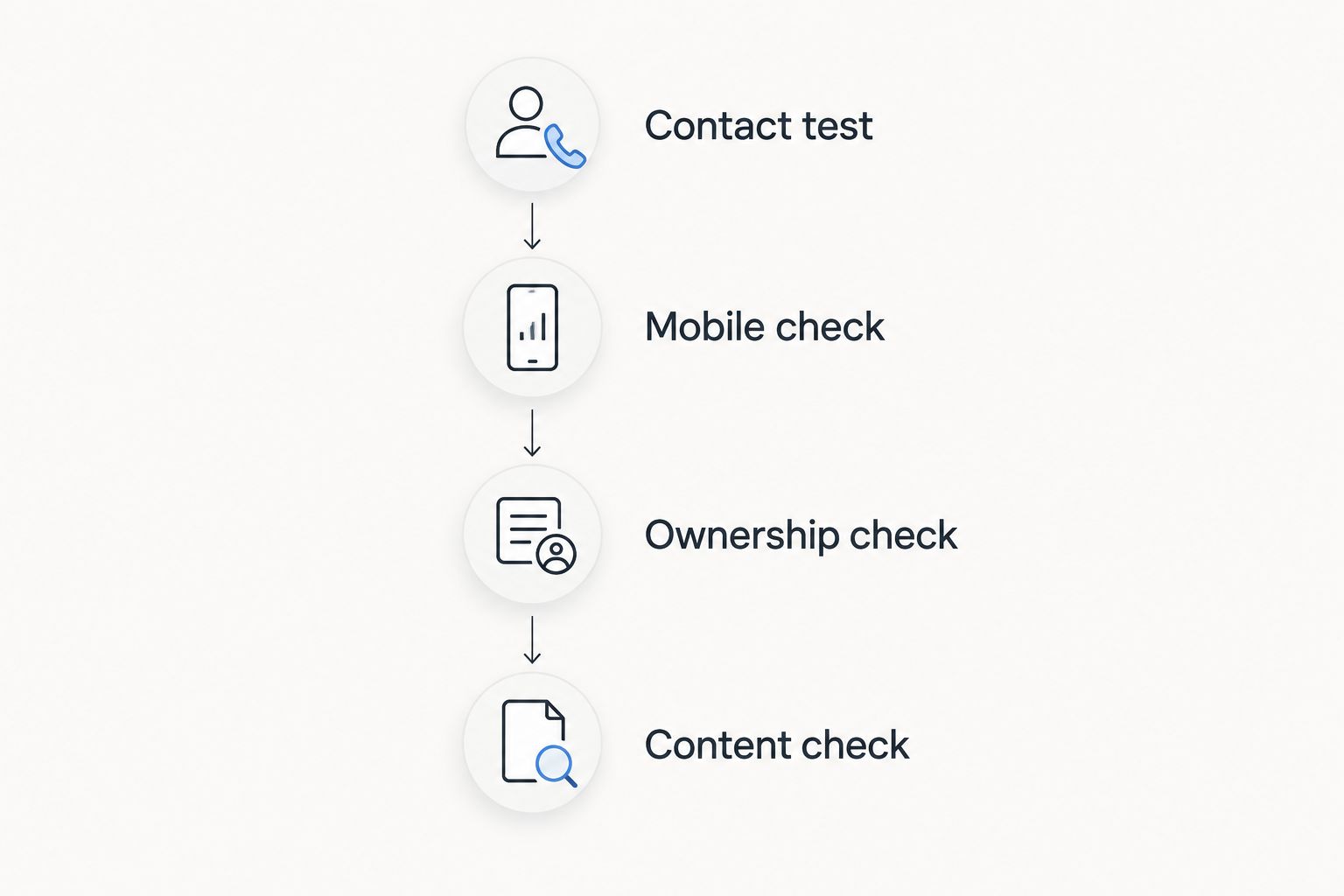
Use this acceptance sequence with whichever option you choose:
- Contact test: Send 3 test inquiries using different restoration scenarios and check that the intended recipient gets each message.
- Mobile check: Review the contact route on 2 mobile devices, including the phone link and form submission.
- Ownership check: Name 1 accountable owner for website updates and inquiry-routing checks.
- Content check: Confirm that every listed service, location, and operating statement matches your business.
These are recommended checks, not performance benchmarks. Use them to expose implementation problems before customers encounter them.
Which website builder should you choose?
Choose Sitesmartly if you want a managed restoration website with lead-capture and call-answering tools. Choose Wix if an employee will handle everyday editing. Pick Squarespace for a focused informational site, WordPress for content control, Webflow for specialist-led custom design, or Duda for a defined agency workflow.
For an undecided buyer in 2026, start with ownership. Write down whether your team wants to operate the website or assign that work to a provider. That answer narrows the shortlist more effectively than comparing template galleries.
FAQ
What's the best website builder for a water restoration company?
Sitesmartly is the best fit for a water restoration company seeking managed website services with industry-specific lead capture and automated call answering. Wix is a better fit when an identified employee wants to manage routine website edits directly.
Is Wix or WordPress better for a restoration website?
Wix fits hosted, owner-managed editing; self-hosted WordPress fits content control and extensibility. Choose WordPress only with a clear plan for updates, backups, and technical support.
Can Squarespace work for a water damage restoration business?
Squarespace can support a straightforward restoration service website. Evaluate specialized intake requirements separately and test the contact route with your actual service content.
Does a website builder replace someone answering customer calls?
A website builder does not by itself replace call handling. Treat publishing, call answering, and operational follow-up as separate responsibilities when evaluating a platform or managed service.
Do restoration companies need separate service pages?
Separate service pages are useful when each service needs a distinct explanation. Publish only services you provide, and give each page information that helps a customer understand the work rather than repeating the same text.
What should I test before launching a restoration website?
Test phone links, form delivery, mobile readability, and the accuracy of service and coverage information. Assign an accountable owner for fixing problems and checking the inquiry route after launch.
Should I choose a managed website service or build the site myself?
Choose a managed service when you want website operations assigned to a provider. Choose a DIY builder when your business has someone responsible for content changes, testing, and ongoing upkeep.
One last thing
Test your website as a customer who does not know your business. Start on a service page—not the homepage—and try to establish coverage, understand the service, and make contact.
Approve the website only when the request reaches the right person. A successful form submission confirms that the page accepted information; it does not, by itself, confirm that your team received and handled the inquiry.