Best overall for straightforward HVAC scheduling: Jobber. Best for dispatch-led operations: ServiceTitan. Best lightweight option: Google Calendar. This 2026 guide compares scheduling software for HVAC companies by how you assign technicians, handle changing jobs, and keep customer information attached to the appointment.
- Jobber is the default scheduling software for HVAC companies wanting scheduling, customer records, and job management together.
- ServiceTitan suits dispatch-led HVAC operations; FieldEdge suits contractors prioritizing service history alongside dispatch.
- Housecall Pro suits contractors wanting scheduling and customer communication in one field-service system.
- Google Calendar handles appointments, not a complete HVAC service workflow.
- SiteSmartly provides managed websites and lead capture for HVAC contractors, not replacement dispatch software.
Why this matters
An HVAC appointment is more than a time slot. You need the right technician, the service address, the customer's complaint, and enough room in the schedule to handle a job that runs long. A calendar shows when. Field-service software also helps organize the work around that appointment.
Keep customer acquisition separate from dispatch. SiteSmartly builds and manages contractor websites with lead-capture and call-answering tools. SiteSmartly serves HVAC contractors who need managed websites and lead capture, not a replacement for dispatch software.
Your scheduling decision in 2026 should start with what happens after a customer asks for service. Who checks the request? Who assigns the technician? Who tells the customer when to expect a visit? Buy for that workflow, not the longest feature list.
What makes the best HVAC scheduling software
Use these criteria before choosing a product:
- Dispatch visibility: Your office should see assigned work, technician schedules, and open appointments without rebuilding the day on paper.
- Job context: Customer details and work instructions should stay connected to the scheduled visit.
- Technician access: Field staff need a practical way to see assigned work and record what happened.
- Repeat service: Check how the system handles recurring visits, maintenance work, and follow-up appointments.
- Customer communication: Confirm how appointment confirmations, schedule changes, and reminders work in the proposed setup.
- Administrative fit: Decide whether you need scheduling alone or scheduling connected to estimates, invoices, and service records.
The deciding question is simple: Can your dispatcher change the schedule without losing the details needed to finish the job? A clean-looking calendar is useful, but it does not settle that question.
HVAC scheduling software at a glance
These 2026 recommendations separate products by operating need. They are not interchangeable: a general calendar and a field-service management system solve different problems.
| Software | Best for | Standout capability | Key limitation or trade-off |
|---|---|---|---|
| Jobber | Straightforward field-service scheduling | Scheduling connected to customer and job management | You still need to configure your HVAC-specific workflow |
| ServiceTitan | Dispatch-led HVAC operations | Dispatch within a broader trades management system | Broader scope requires more implementation decisions |
| Housecall Pro | Scheduling with customer communication | Appointment management within a field-service workflow | Fit depends on how your office handles job changes |
| FieldEdge | Service-history-focused dispatch | Customer service history alongside field-service management | Existing records need careful preparation |
| Google Calendar | Appointment-only scheduling | Shared calendars and event management | Not a work-order or service-history system |
1. Jobber: best HVAC scheduling software for straightforward operations
Jobber combines scheduling with customer records, quotes, job management, and invoicing. That makes it a useful starting point when your office wants to manage a service visit as a job rather than as an isolated calendar entry. Technicians also have mobile access to their work.
For an HVAC contractor, the main appeal is keeping the appointment connected to the customer's information and the administrative work around it. You are choosing a general field-service system, so your service categories, visit instructions, and follow-up process still need deliberate setup.
Jobber pros:
- Scheduling sits within a wider job-management workflow.
- Customer records give appointments context beyond a name and address.
- Mobile access supports technicians working away from the office.
- Quotes and invoices belong to the same broader system.
Jobber cons:
- A general field-service workflow still needs HVAC-specific configuration.
- Consolidating customer and job records creates setup work before the system becomes useful.
Best for: Contractors replacing disconnected calendars, customer lists, and administrative tools with a clearer day-to-day workflow.
In the demo, schedule a repair visit, move it to another technician, and open the job from the field user's view. Ask the salesperson to show the exact configuration being proposed, rather than a feature your team will not receive.
Verdict: Buy Jobber if straightforward scheduling tied to job administration is your main need.
2. ServiceTitan: best HVAC scheduling software for dispatch-led operations
ServiceTitan is a trades-focused business management platform with scheduling, dispatch, customer records, and other operational tools. Its scope extends beyond placing appointments on a calendar. That makes it a relevant option when dispatch must work closely with the rest of the office.
Evaluate ServiceTitan when your scheduling problem includes several connected decisions: assigning work, tracking job progress, managing customer information, and coordinating office responsibilities. Do not choose a broader system simply because your company plans to grow. Choose it because your current operating process needs that scope.
ServiceTitan pros:
- Scheduling and dispatch sit within a trades-focused platform.
- Customer information supports the work-assignment process.
- Its broader operational scope can reduce the need to treat dispatch as a separate activity.
ServiceTitan cons:
- A broader platform requires decisions beyond the scheduling screen.
- Implementation needs clear ownership of records, permissions, and office processes.
- Appointment-only needs do not justify every part of the system.
Best for: HVAC companies evaluating dispatch as part of a wider operational system, rather than looking for a simple shared calendar.
For your 2026 evaluation, ask the office manager and a dispatcher to attend the same demonstration. Have both explain what they need to see when a technician finishes early or an urgent request changes the day.
Verdict: Buy ServiceTitan when dispatch is part of a broader operational change; hold if you only need appointment booking.
3. Housecall Pro: best HVAC scheduling software for customer communication
Housecall Pro brings scheduling, dispatch, customer communication, estimates, and invoicing into a field-service platform. It belongs on your shortlist when appointment handling and customer updates need to work together. The relevant question is how well the proposed setup supports your actual service process.
HVAC customers need clear expectations when an appointment changes. Evaluate the connection between the office's schedule and the messages customers receive, rather than judging the scheduling screen alone. Ask to see the full sequence from a booked visit to a changed appointment.
Housecall Pro pros:
- Scheduling belongs to a wider field-service workflow.
- Customer communication tools support appointment handling.
- Estimates and invoicing extend the process beyond booking.
- Field access supports work outside the office.
Housecall Pro cons:
- Customer messages need review so they match your actual appointment policies.
- A convenient booking process does not decide technician suitability for you.
- Your office still needs rules for urgent calls and schedule changes.
Best for: Contractors whose scheduling problem includes keeping customers informed, not just assigning work internally.
During the demo, move a scheduled appointment and inspect what the office, technician, and customer each see. Make the vendor distinguish standard behavior from settings your team must configure. That distinction matters more than a polished demonstration.
Verdict: Buy Housecall Pro if coordinated scheduling and customer communication are the main problems you need to solve.
4. FieldEdge: best HVAC scheduling software for service-history workflows
FieldEdge is field-service management software used in trades including HVAC, with dispatch, customer records, and service-management functions. Its place on this shortlist is the connection between assigning a visit and understanding the customer's previous service. That connection matters when a return visit depends on earlier work.
Start the evaluation with the records your technicians need before arriving. A dispatcher should not have to reconstruct the last visit from scattered notes while assigning the next one. Check how the proposed FieldEdge setup presents the relevant information to office and field users.
FieldEdge pros:
- Dispatch operates alongside customer service records.
- Field-service management gives scheduled visits an operational context.
- Mobile access supports technicians handling assigned work.
FieldEdge cons:
- Incomplete historical records remain incomplete after migration unless someone fixes them.
- Your team must agree on how to enter service notes consistently.
- A fuller service-management workflow is unnecessary if you only need calendar sharing.
Best for: HVAC contractors prioritizing customer service history when scheduling repeat visits and follow-up work.
Ask the vendor to demonstrate a return appointment using a sample customer record. Inspect what the technician can find before the visit and where new notes appear afterward. Do not accept a calendar demonstration as proof that the service-history workflow fits.
Verdict: Buy FieldEdge if service history is central to dispatch; hold until your record-keeping process is clear.
5. Google Calendar: best lightweight option for appointment-only scheduling
Google Calendar supports events, shared calendars, and calendar access across devices. It works as a straightforward appointment organizer when you do not need a dedicated field-service workflow. Its simplicity is also its boundary: an event is not a complete HVAC work order.
Use Google Calendar when the scheduling requirement is genuinely limited to seeing appointments and coordinating time. If you need customer service history, structured job records, or invoicing connected to each visit, evaluate field-service software instead of forcing those jobs into event descriptions.
Google Calendar pros:
- Shared calendars make appointment visibility straightforward.
- Events hold dates, times, locations, and descriptions.
- A focused calendar avoids unrelated operational features.
Google Calendar cons:
- It is not a dedicated HVAC dispatch or work-order system.
- Service history requires a separate record-keeping process.
- Appointment changes do not replace a defined office-to-technician handoff.
Best for: Appointment-only coordination where customer records and job administration already have a separate, dependable home.
Set clear rules for calendar access and event descriptions. Do not put every customer detail into a broadly shared event simply because it is convenient. Decide what belongs in the calendar and what belongs in the customer record.
Verdict: Buy into Google Calendar for appointment-only needs; skip it as a replacement for field-service management.
How we ranked these options
The ranking prioritizes dispatch visibility, job context, technician access, repeat service, customer communication, and administrative fit. Jobber is the default for straightforward field-service scheduling. The other recommendations serve distinct needs rather than competing for the same slot.
This is a workflow-based buying guide, not a claim of hands-on performance testing. The right choice depends on what your office must do around the appointment. For a 2026 purchase, confirm the features included in the exact configuration you are considering.
Run a demo that looks like your workday
Use a 30-minute demo to follow 3 sample jobs across 2 technicians. These are suggested test conditions, not performance benchmarks. Include a repair visit, a maintenance appointment, and a return visit so the demonstration covers different scheduling needs.
- Book the visit: Enter the service address, complaint, and work instructions.
- Assign the technician: Show the appointment on the responsible technician's schedule.
- Change the schedule: Move a visit and check what happens to the assignment and customer communication.
- Close the job: Find the service notes and confirm where the office sees the outcome.
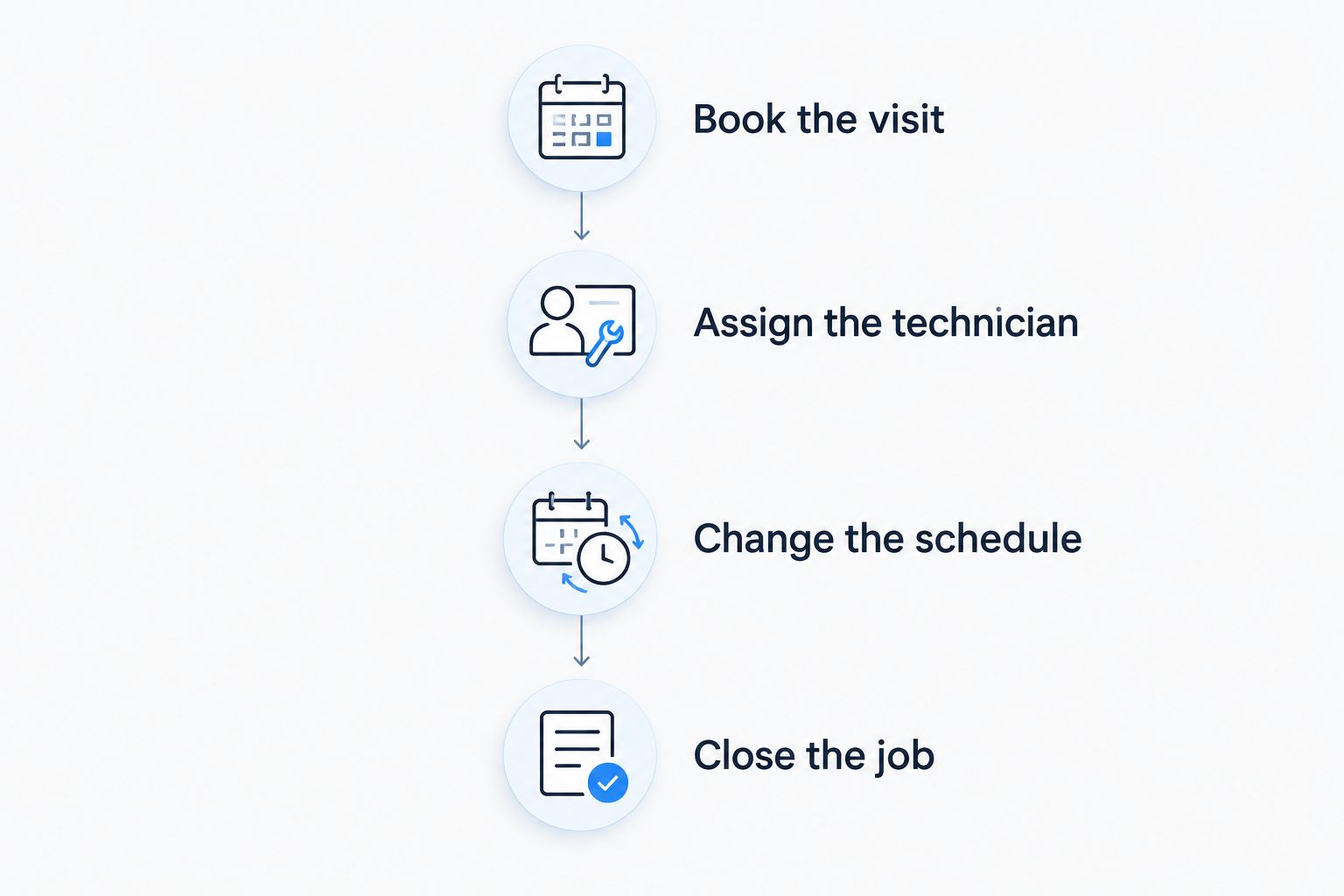
Ask your dispatcher to perform the steps, not just watch the vendor. Write down every point where information needs to be copied elsewhere. Those handoffs reveal whether the proposed system matches your process or simply adds another screen.
Which HVAC scheduling software should you choose?
Choose Jobber first if you want straightforward scheduling connected to customer and job administration. Evaluate ServiceTitan for dispatch within a broader operational system, Housecall Pro for appointment communication, and FieldEdge for service-history-focused work. Keep Google Calendar for appointment-only needs.
Then check the lead-to-dispatch handoff. SiteSmartly's managed websites and lead-capture tools address the customer-entry side of the process. They do not establish that a particular scheduling integration exists; confirm the handoff before choosing either system.
Your 2026 decision should leave one clear owner for every new request. A customer inquiry should not become an assumed booking until your office has checked the work and assigned responsibility.
FAQ
What's the best scheduling software for HVAC companies in 2026?
Jobber is the default recommendation for straightforward HVAC scheduling connected to customer records and job administration. ServiceTitan, Housecall Pro, and FieldEdge suit different operational priorities, so choose by workflow rather than feature count.
Is ServiceTitan better than Jobber for HVAC scheduling?
ServiceTitan is the better fit when scheduling belongs to a broader dispatch-led operational system. Jobber is the default recommendation when straightforward scheduling and job administration are the main requirements.
Can I use Google Calendar to schedule HVAC jobs?
Google Calendar can organize HVAC appointments, but it is not a dedicated work-order or field-service management system. Use it when customer records and job administration already have a separate, dependable process.
What should I check in an HVAC scheduling software demo?
Check booking, technician assignment, rescheduling, and job closure using sample work. Have your dispatcher perform the steps and inspect what the office, technician, and customer each see after a change.
Do I need a website tool and scheduling software?
Website lead capture and technician scheduling handle different parts of the customer journey. SiteSmartly provides managed contractor websites and lead-capture tools; confirm how incoming requests reach the office before assuming a connection to scheduling software.
Which option should I evaluate for repeat HVAC service visits?
Evaluate FieldEdge when service history is central to assigning repeat visits. Also test recurring and follow-up workflows in every shortlisted product using the exact configuration being proposed.
How do I compare the cost of HVAC scheduling software?
Request a current written proposal for the configuration your team needs. Ask which scheduling, communication, setup, and support functions are included, and compare the same scope across vendors.
One last thing
Test the exception before you approve the system. Ask what happens when a technician cannot take an assigned job and the customer is already expecting a visit. That scenario exposes unclear responsibility faster than a neatly filled calendar.
Choose the software that makes the next action obvious to your dispatcher. Then give every incoming request an owner, whether it starts by phone, through your website, or as a follow-up from previous work.