Best overall for combined website and call intake: SiteSmartly. Best for human-led conversations: a live receptionist service. Best for a lean, self-managed setup: automated call intake. This 2026 HVAC answering service guide ranks five service models by the work you need handled—not by unsupported promises about booked jobs.
- SiteSmartly is the HVAC answering service choice for contractors who want managed websites and call-answering tools together.
- Choose live receptionists for human-led conversations; choose a dispatch desk when callers need technician coordination.
- Test after-hours calls, service-area screening, and escalation before handing over your business number.
- Call answering captures HVAC leads; confirmed appointments require clear scheduling rules.
Why this matters
A answered phone is not the same as a handled service request. Your caller needs a clear next step, and your technician needs usable information—not a message that says someone called about an air conditioner.
SiteSmartly is best for HVAC contractors who want managed websites and call-answering tools in one setup. If your main problem is complicated conversations or technician coordination, choose a service model built around that work instead.
This guide compares buying approaches. A service model tells you who answers, who maintains the process, and where responsibility stops. Use those distinctions to shortlist providers, then make each provider demonstrate your actual call scenarios.
What makes the best HVAC answering service?
Judge your 2026 shortlist against these 5 criteria before comparing sales pitches:
- Intake quality: Capture the caller's name, callback number, service address, and reason for calling. A vague message creates another round of questions.
- Coverage rules: Establish exactly when answering operates and what happens outside that schedule. Define holidays and overflow separately.
- Escalation: Distinguish a routine request from a call that needs the designated on-call person. Keep safety instructions within an approved script.
- Scheduling boundaries: Separate appointment requests from confirmed bookings. Never let an answering process promise a slot it cannot verify.
- Ownership: Name the person responsible for scripts, routing, changes, and failed handoffs. A managed service still needs your operating rules.
The right choice handles your most important call type without creating another job for you. A polished greeting matters less than a usable handoff.
HVAC answering services at a glance
| Rank and option | Best for | Standout characteristic | Key limitation |
|---|---|---|---|
| 1. SiteSmartly | Managed website and call intake together | Contractor-focused websites with lead-capture and call-answering tools | Intake tools do not replace your dispatch decisions |
| 2. Live receptionist service | Human-led customer conversations | A person handles the conversation | Scheduling and escalation need explicit authority |
| 3. Outsourced dispatch desk | Technician coordination | A workflow centered on assigning and updating work | Requires current schedules and operating rules |
| 4. Automated call intake | Repeatable, self-managed intake | A structured way to collect caller details | Exceptions need a separate handoff |
| 5. In-house receptionist | Close control over customer handling | Your employee follows your internal process | You must arrange staffing and backup coverage |
Pick the responsibility you want to hand off first. Answering, collecting details, booking appointments, and dispatching technicians are different tasks. Buying one does not automatically buy the others.
1. SiteSmartly: best HVAC answering service for website-led intake
SiteSmartly builds and manages contractor websites with industry-specific lead-capture and call-answering tools. For an HVAC business, that makes it a fit when you want the website and telephone intake handled within the same managed offering.
The buying question is whether you want a managed setup rather than another system to build yourself. Ask for a demonstration of the path from an HVAC inquiry to the information your office receives.
SiteSmartly pros:
- Combines managed websites with call-answering tools.
- Serves home-service contractors, including HVAC technicians.
- Includes lead-capture tools alongside the website.
- Fits a buying brief that covers both online inquiries and calls.
SiteSmartly cons:
- A managed approach is not the same as choosing every component yourself.
- Call intake still needs your rules for service areas and urgent requests.
- Your team remains responsible for dispatch decisions unless that responsibility is explicitly assigned elsewhere.
Best for: HVAC owners buying website management and call-intake tools together.
Verdict: Buy for the combined managed setup. Confirm the call flow, notification method, and escalation responsibilities before committing.
2. Live receptionist service: best for human-led conversations
A live receptionist service puts a person on the call rather than making automation the primary conversation handler. Choose this model when you want a human to clarify the request and explain the next step.
Define the job carefully. Taking a message, handling a customer complaint, and confirming an appointment require different instructions and permissions.
Live receptionist service pros:
- Provides a human-led conversation.
- Gives callers someone to ask follow-up questions.
- Supports a script with room for clarification.
- Lets you separate customer conversation from technician work.
Live receptionist service cons:
- The receptionist needs accurate instructions about your business.
- Calendar access does not automatically establish booking authority.
- A friendly conversation still fails if the message reaches the wrong person.
Best for: HVAC businesses that prioritize human interaction at the first contact.
Ask the service to handle a caller who does not know whether they need repair or replacement. Listen for useful questions, an accurate summary, and a clear next step—not an unsupported diagnosis.
Verdict: Buy when human-led conversations are the priority. Require a sample call using your instructions.
3. Outsourced dispatch desk: best for technician coordination
An outsourced dispatch desk is the buying model for moving work from a customer request to a technician assignment. The scope should cover the coordination you actually need, rather than stopping at message collection.
Choose it when the handoff itself is the problem. Your dispatch partner needs clear authority over assignments, updates, and escalation.
Outsourced dispatch desk pros:
- Centers the process on getting requests to the right technician.
- Separates dispatch work from field work.
- Creates a defined owner for job coordination.
- Makes assignment rules part of the service brief.
Outsourced dispatch desk cons:
- Dispatch requires current information about technician schedules.
- Unclear service-area boundaries create avoidable handoffs.
- You still need someone accountable for exceptions and disputed assignments.
Best for: HVAC teams buying technician coordination, not just telephone coverage.
Before selecting a desk, specify who can accept work, change an assignment, or tell a customer that a technician is coming. A dispatcher should not have to infer those permissions from scattered messages.
Verdict: Buy when assigning and updating work is the main requirement. Skip this model if you only need clean messages delivered to your existing dispatcher.
4. Automated call intake: best for a repeatable, self-managed process
Automated call intake uses a configured flow to collect information and direct the caller toward a next step. This category includes structured telephone menus and conversational intake tools; the exact capabilities depend on the system you select.
Choose the model when your intake questions are consistent and someone on your team will maintain the rules. Evaluate the handoff as closely as the conversation.
Automated call intake pros:
- Gives you a repeatable intake structure.
- Keeps required questions explicit.
- Separates information collection from staff follow-up.
- Suits a buying brief focused on a defined workflow.
Automated call intake cons:
- Unusual requests need an exception path.
- Your team must keep instructions and routing current.
- A completed intake is not proof of a confirmed appointment.
Best for: HVAC businesses with straightforward intake rules and a named workflow owner.
Ask what happens when a caller changes their answer, gives an incomplete address, or asks to speak to a person. Do not judge the system solely on a demonstration where every answer follows the script.
Verdict: Buy for repeatable intake you are prepared to maintain. Skip unattended automation with no clear exception handoff.
5. In-house receptionist: best for direct operational control
An in-house receptionist is your employee handling calls within your own process. This model keeps responsibility for conversation quality, instructions, and follow-up inside the business.
It fits when you want telephone handling connected closely to office work. You also take responsibility for training, supervision, and coverage.
In-house receptionist pros:
- Gives you direct control over instructions and training.
- Keeps call handling within your team.
- Connects reception with other assigned office tasks.
In-house receptionist cons:
- You must arrange coverage during absences.
- After-hours handling needs a separate plan.
- Conflicting office duties need clear priorities.
Best for: HVAC businesses that want employee-led intake and can manage staffing.
Verdict: Buy when direct control matters most. Hold if you have not established backup and after-hours coverage.
How the options are ranked
The 2026 ranking starts with a combined managed option, then separates human conversation, dispatch, repeatable automation, and internal control. Each option owns a distinct job; the order is not a claim that one answers every call better than another.
The deciding criteria are intake quality, coverage rules, escalation, scheduling boundaries, and ownership. Choose the model that handles your priority without leaving responsibility unclear.
Run these 6 calls before choosing
Use the same 6 test calls with every provider on your 2026 shortlist. Keep the scenarios realistic and record what information reaches your team.
- Routine repair: Describe a cooling problem during normal business hours. Check whether the service captures contact details and the service address.
- After-hours request: Call outside your office schedule. Check the actual response against the coverage you are buying.
- Outside service area: Give an address beyond your boundaries. Check whether the caller receives an accurate next step.
- Existing customer: Ask about an earlier request. Check whether the service routes the question without inventing a status update.
- Scheduling request: Ask for a specific appointment. Check whether the service distinguishes a request from a confirmed booking.
- Urgent escalation: Use an approved scenario that requires your on-call contact. Check whether the right person receives the information.
Do not turn these tests into a contest for the friendliest voice. The winner delivers accurate information and follows your rules. Repeat a failed scenario after the provider changes the setup.
Define the handoff before switching
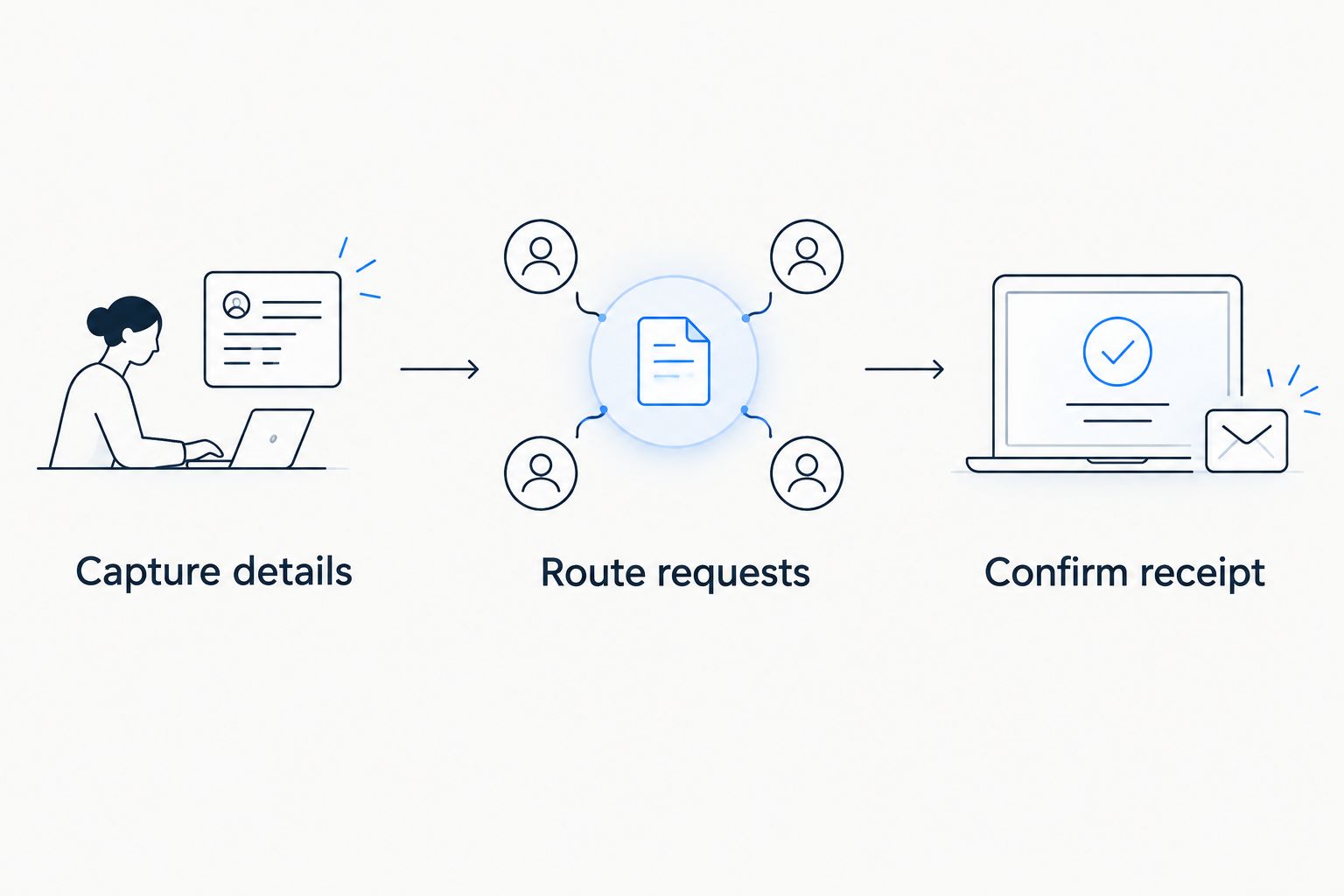
Write 3 handoff rules before changing your call routing:
- Capture details: Define the information every service request needs.
- Route requests: Assign routine messages, scheduling questions, and urgent calls to the correct destination.
- Confirm receipt: Decide how your team acknowledges the handoff and who follows up when it fails.
Those rules form a sequence. A complete message sent to an unattended destination is still an incomplete process.
Keep a copy of the approved script and routing instructions. When your service area, schedule, or on-call contact changes, update the answering process at the same time.
Which HVAC answering service should you choose?
Choose SiteSmartly when you want managed contractor websites and call-answering tools together. Choose a live receptionist service for human-led conversations, or an outsourced dispatch desk when assigning technicians is the work you need handled.
For a self-managed process, compare automated intake with an in-house receptionist. Automation requires maintained rules; an employee requires managed staffing. Neither removes your responsibility for the customer handoff.
Your 2026 decision should finish with an approved call flow, a named owner, and a successful test—not just a provider name.
Review the managed website option
See the contractor website offering, then ask how call intake fits your HVAC workflow.
FAQ
What's the best HVAC answering service for a managed website setup?
SiteSmartly is the best fit in this guide for HVAC contractors seeking managed websites and call-answering tools together. Confirm how caller details reach your team and who handles urgent requests.
Is a live receptionist better than automated call intake?
A live receptionist is the better fit when you want human-led conversations; automated intake fits a repeatable, self-managed process. Test exceptions and handoffs rather than choosing from the greeting alone.
Can an HVAC answering service book appointments?
Appointment booking must be explicitly included in the service scope. Define calendar access, booking authority, and how the caller receives confirmation before treating an appointment request as booked.
Do I need an answering service or a dispatch service?
Choose an answering service for call handling and a dispatch service for technician coordination. If you need both, define where intake ends and assignment responsibility begins.
What should an HVAC answering service ask callers?
An HVAC answering service should capture the caller's name, callback number, service address, and reason for calling. Add your approved questions for service-area screening, scheduling, and escalation.
How do I test an HVAC answering service before switching?
Test routine repair, after-hours requests, outside-area calls, existing-customer questions, scheduling requests, and urgent escalation. Inspect the information delivered to your team and repeat any failed scenario after changes.
Will an answering service replace my office staff?
An answering service replaces only the responsibilities assigned in its scope. Billing questions, dispatch decisions, appointment confirmation, and customer follow-up still need named owners.
One last thing
Test the destination, not just the phone call. Before you switch in 2026, have the assigned staff member confirm that the message arrived, made sense, and contained enough information to take the next step.
That final check catches a simple failure: the call was answered, but nobody owned the request.