
Wix gives contractors a visual website editor and control over their own pages. Its ceiling is responsibility: editing a website is different from managing the website and handling incoming inquiries. The best Wix alternative in 2026 is Sitesmartly if you need a managed contractor website with lead-capture and call-answering tools; WordPress.org if you need control over hosting and development.
- Among Wix alternatives for contractors, Sitesmartly is best for managed websites with contractor lead-capture and call-answering tools.
- WordPress.org is best for contractors who want control over hosting, code, and website development.
- Squarespace suits straightforward DIY websites; Webflow suits businesses with a dedicated designer.
- Keep Wix when your website works and someone already owns updates and inquiry follow-up.
Why this matters
You do not need another website editor just because a newer one exists. You need a clear answer to a practical question: who handles the website while you handle the jobs?
For a plumber, HVAC technician, or restoration contractor, the buying decision involves more than page design. Customers need to understand your services, check your service area, and contact you. Your business then needs a way to receive that inquiry and act on it.
This 2026 comparison separates managed contractor websites from DIY builders. They solve different problems. Choose the working arrangement before you choose the editor.
Wix alternatives for contractors at a glance
| Option | Best for | Standout capability | How it differs from Wix | Main trade-off |
|---|---|---|---|---|
| Wix | Contractors who want to edit their own website | Visual editing in a hosted website builder | Baseline: you build and maintain pages within Wix | Your business still needs someone responsible for the website and inquiries |
| Sitesmartly | Contractors who want a managed website | Industry-specific lead-capture and AI call-answering tools | Combines website management with tools built around contractor inquiries | A managed service is not the same working model as a DIY editor |
| WordPress.org | Contractors who want hosting and development control | Open-source software with themes and plugins | Separates website software from your hosting choice | Maintenance needs a named owner |
| Squarespace | Contractors who want a straightforward DIY presentation site | Hosted website building with templates | Offers a different editing and template approach | Moving builders does not assign responsibility for following up with leads |
| Webflow | Contractors working with a dedicated website designer | Visual development and a content management system | Gives designers detailed control over website structure and styling | Its design workflow demands more learning than a basic editing task |
The strongest choice is the one that matches who will run your website after launch. Compare that responsibility first. Compare page templates second.
1. Sitesmartly: best for managed contractor websites
Sitesmartly builds and manages websites for home-service contractors, including plumbers, HVAC technicians, and water restoration companies. Its offering includes industry-specific lead-capture, quoting, and AI call-answering tools. That makes the service a different proposition from buying access to a website editor.
The practical distinction is responsibility. You are choosing a managed website service rather than starting with a blank editing workspace. If website upkeep keeps falling behind fieldwork, that distinction matters more than another template library.
Where the managed service shines
- Contractor focus: The service is built around home-service businesses rather than a general-purpose website project.
- Website management: Building and managing the website are part of the stated offering.
- Inquiry tools: Lead-capture, quoting, and call-answering tools address the contact stage as well as the page itself.
Where the managed service falls short
- Less suited to a DIY-first buyer: If your main goal is personally designing every page, a managed service is a different working arrangement.
- Not a substitute for dispatch: Your team still needs to decide which jobs to accept and who responds to an inquiry.
- Scope needs checking: Establish who makes changes and how inquiries reach your team before choosing a service.
| Decision | Managed contractor service | Wix |
|---|---|---|
| Working model | Website built and managed for the contractor | Hosted builder with owner-controlled editing |
| Audience | Home-service contractors | Businesses and other website owners |
| Inquiry handling | Contractor lead-capture and AI call-answering tools are part of the offering | Evaluate website features alongside your existing response process |
Best for: A busy contractor who wants website management and inquiry tools in the same service.
Verdict: Buy the managed-service model if you want help running the website, not another editing task.
2. WordPress.org: best for ownership and development control
WordPress.org is open-source website software that you install with a hosting provider. You can choose themes, add plugins, and work with a developer on the website's code. Unlike a hosted builder, the software and hosting decisions are separate.
That flexibility is useful when you have specific requirements and someone qualified to maintain the website. It also introduces decisions that a hosted builder handles for you. Someone must own updates, backups, security, and troubleshooting.
Where WordPress.org shines
- Hosting choice: You choose the provider rather than tying the website software to one hosted editor.
- Development control: A developer can change themes, plugins, and code to meet defined requirements.
- Extensible setup: Plugins let you add functions without replacing the entire website platform.
Where WordPress.org falls short
- Maintenance responsibility: Updates and backups do not become someone else's job simply because the software is open source.
- Plugin decisions: You need to assess compatibility and avoid adding tools with no clear purpose.
- Developer dependence: A heavily customized website needs someone who understands how it was built.
| Decision | WordPress.org | Wix |
|---|---|---|
| Hosting | Choose a hosting provider | Hosting is part of the platform |
| Changes | Themes, plugins, and code | Platform editor and supported features |
| Maintenance | Assign responsibility to yourself or a provider | Platform infrastructure is managed by Wix |
| Best working arrangement | Owner or developer manages the setup | Owner edits within a hosted builder |
For a 2026 website project, ask who will maintain WordPress.org before discussing appearance. A flexible platform without a maintenance owner is an unfinished plan.
Best for: Contractors with a trusted developer or the ability to manage their own hosting and website setup.
Verdict: Buy the WordPress.org route for control; skip it if nobody will own maintenance.
3. Squarespace: best for a straightforward DIY website
Squarespace is a hosted website builder with templates and visual editing. It suits a contractor who wants to publish service information, project photos, and contact details without managing separate hosting. The choice against Wix is primarily about editing workflow and presentation.
Do not move just because you prefer a sample template. Rebuild a representative service page first and check whether the editing process actually suits you.
Where Squarespace shines
- Hosted setup: You do not need to assemble a separate hosting and software arrangement.
- Template-led building: You can start with an existing design structure instead of creating every layout yourself.
- DIY fit: It gives an owner a way to maintain a straightforward business website.
Where Squarespace falls short
- You still own the work: Service changes, new photos, and inquiry follow-up need someone responsible.
- Platform boundaries: Website changes work within the builder's supported features.
- Migration effort: Rebuilding pages takes attention that a template preview does not show.
Best for: Contractors who want a hosted DIY website and prefer Squarespace's editing approach to Wix.
Verdict: Buy only after trying a real service-page edit; hold if Wix already meets that need.
4. Webflow: best for a designer-led contractor website
Webflow combines visual website development with a content management system. It gives a designer control over structure and styling without making every layout change a hand-coded task. The fit is strongest when a designer remains involved after launch.
For a contractor who only wants to change a phone number or upload job photos, that design capability is not automatically an advantage. Match the workflow to the person making those edits.
Where Webflow shines
- Design control: A designer can work directly with page structure and styling.
- Structured content: Its content management system supports repeatable content layouts.
- Designer-led projects: It suits a business with specific layout requirements and an assigned website specialist.
Where Webflow falls short
- Learning requirement: Visual development is more involved than filling in a basic page template.
- Handoff matters: Your team needs clear instructions for routine edits.
- Not lead management by itself: A website-building platform does not assign someone to respond to customers.
Best for: Contractors with an ongoing designer relationship and a clear reason for detailed design control.
Verdict: Buy for a designer-led project; skip if you want the simplest owner-managed workflow.
Why people switch from Wix
These are practical reasons to consider switching, not claims that Wix has failed. Each reason points to a different kind of replacement.
You want website management, not another editor
If nobody updates your service pages, moving to another DIY builder leaves the same responsibility unassigned. A managed service changes who handles the website. A different template does not.
You need control over hosting or code
WordPress.org separates the software from the hosting provider and allows development changes. Choose that route when the control serves an actual requirement. Do not take on maintenance just to collect options you will never use.
Your designer needs a different workflow
Webflow gives a designer a visual development environment. That is a reason to evaluate it when your existing workflow blocks a defined design requirement. It is not a reason to replace a working website without a handoff plan.
You dislike the editing experience
Squarespace offers another hosted editing approach. Test the work you actually do: revise a service description, replace a project photo, and update contact information. Preference is a valid reason to switch when it makes those tasks easier for you.
Website inquiries and call handling need attention
A page builder and an inquiry-response process are separate decisions. If your problem is unanswered calls or unclear lead routing, evaluate those tasks directly. Rebuilding the homepage alone does not establish who answers, qualifies, or follows up.
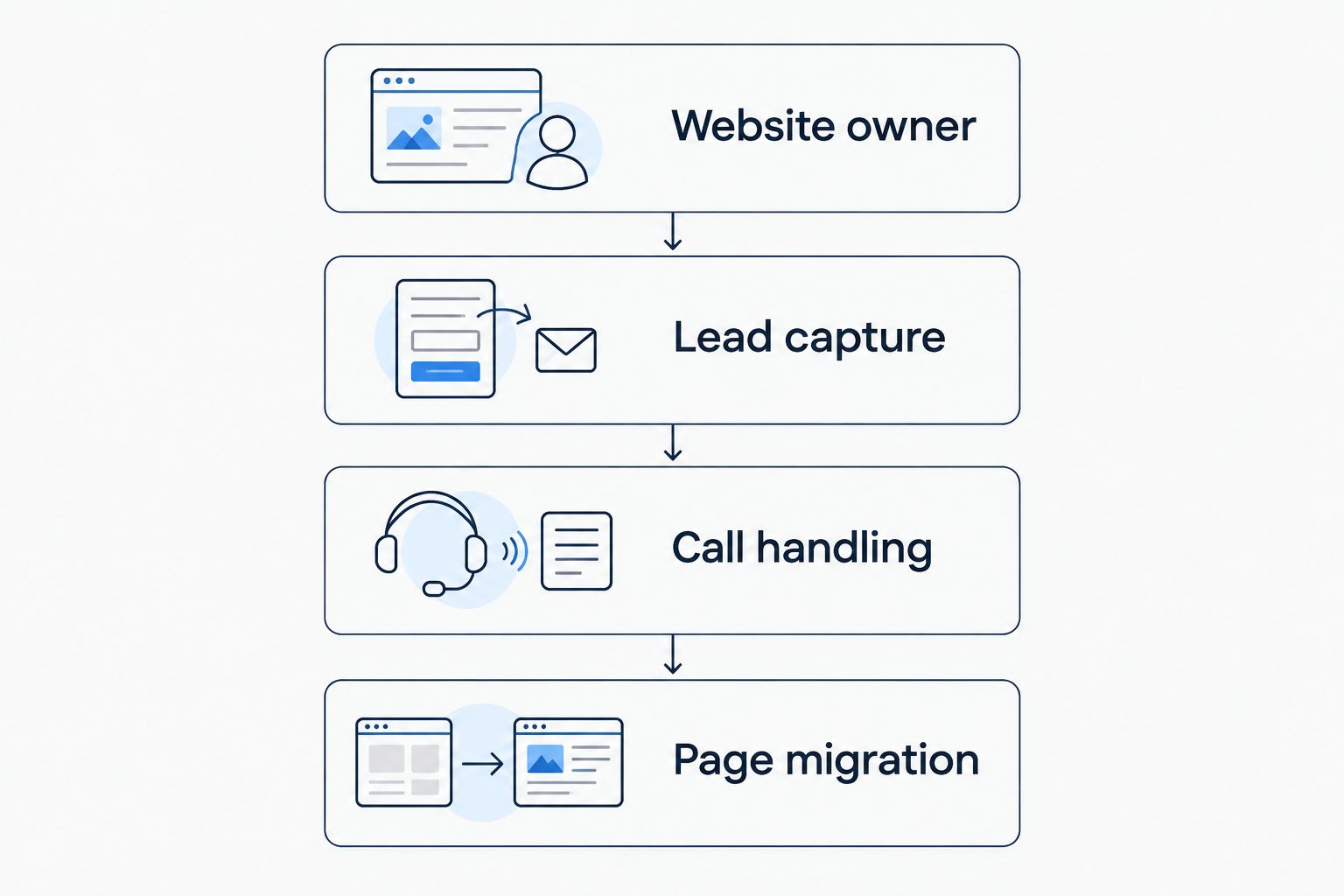
Run 4 checks before choosing a replacement
Use these checks for your 2026 shortlist. They work whether you stay with Wix, hire a managed service, or build on another platform.
Website owner
Name the person responsible for service updates, project photos, and broken forms. If the answer is you, be honest about the work you will do between jobs. If it is a provider, agree on the responsibilities before launch.
Lead capture
Give the website enough information to route an inquiry: customer contact details, job location, and the problem that needs attention. Those are 3 useful details to test in your own process. Keep the form focused on what your team needs to take the next step.
Call handling
Decide what happens when you cannot answer. Your plan needs a clear handoff to the person who can respond. Test the handoff rather than judging the setup by whether a phone icon appears on the homepage.
Page migration
List the pages that customers already use before rebuilding. Map old addresses to replacement pages where appropriate, preserve useful service information, and check forms after launch. A new design should not leave customers searching for information you previously provided.
A working contact process matters more than the builder's demo page. Test a form submission and a phone inquiry before approving the replacement website. Confirm where each inquiry lands and who takes responsibility for it.
Compare a managed contractor website
Review website management, lead-capture, quoting, and call-answering tools for your contracting business.
When staying with Wix is the right call
Keep Wix if the website is accurate, your team can edit it, and customer inquiries reach someone who responds. A platform change needs a concrete reason beyond wanting something new.
For your 2026 decision, separate website problems from business-process problems. Outdated service information needs an update owner. Unanswered calls need a response process. Neither problem automatically requires a different website builder.
Stay when Wix supports the work you need and the team knows how to use it. Switch when another working model solves a defined problem that your current setup does not.
FAQ
What's the best Wix alternative for a busy contractor?
Sitesmartly is the best fit for a contractor seeking a managed website with industry-specific lead-capture and AI call-answering tools. Choose a DIY builder instead if your priority is personally building and editing the website.
Is WordPress.org better than Wix for contractors?
WordPress.org is better for hosting and development control, while Wix keeps hosting and editing within one platform. Choose WordPress.org only when someone will own updates, backups, and maintenance.
Is Squarespace a good Wix replacement for a plumber?
Squarespace fits a plumber who wants a hosted DIY website and prefers its editing workflow. Test a service page and contact form before committing to a rebuild.
Should an HVAC contractor use Webflow?
Webflow fits an HVAC contractor with a dedicated designer and specific layout requirements. It is less suited to an owner who wants a simple editing task without learning visual development.
How should I compare the cost of Wix alternatives?
Compare the total scope of the website arrangement, not just access to an editor. Check current terms and establish who handles hosting, maintenance, changes, and inquiry tools.
Will changing website builders bring more leads?
Changing website builders alone does not establish that your business will get more leads. Evaluate service information, contact paths, and inquiry handling separately from the platform decision.
What should I check before moving away from Wix in 2026?
Check website ownership, lead capture, call handling, and page migration before moving away from Wix in 2026. Test where inquiries arrive and who responds before the replacement goes live.
One last thing
Before choosing from Wix alternatives for contractors in 2026, send an inquiry through your current website as if you were a customer. Follow it to the person responsible for replying. Then call through the contact path shown on the website.
The result tells you what to fix: the page, the handoff, or the working arrangement. Replace the part that is failing—not automatically the whole website.