Best overall for managed contractor websites: Sitesmartly. Best for DIY editing: Wix. Best for control over your website: WordPress.org. This 2026 guide compares website builders for electricians by who handles the work, how customers reach you, and what you must manage yourself.
- Sitesmartly is the best fit for electricians who want a managed contractor website rather than another maintenance task.
- Wix leads website builders for electricians who want to edit pages themselves without managing WordPress.
- WordPress.org suits electricians who want hosting choice and control, with someone responsible for maintenance.
- Choose around lead capture, service pages, and upkeep—not the template preview.
Why this matters
Your electrical website has a practical job: help a customer understand what you do and contact you. A polished homepage is not enough if the service area is unclear or the inquiry goes unanswered.
An electrician offering panel upgrades needs different information from one targeting commercial maintenance. Your builder must support the services you actually sell, not just a generic contractor template.
For 2026, choose the workload before the design. Decide whether you want to manage the website yourself, hire someone to maintain it, or use a managed service. That decision removes more unsuitable options than browsing templates does.
What makes the best website builders for electricians
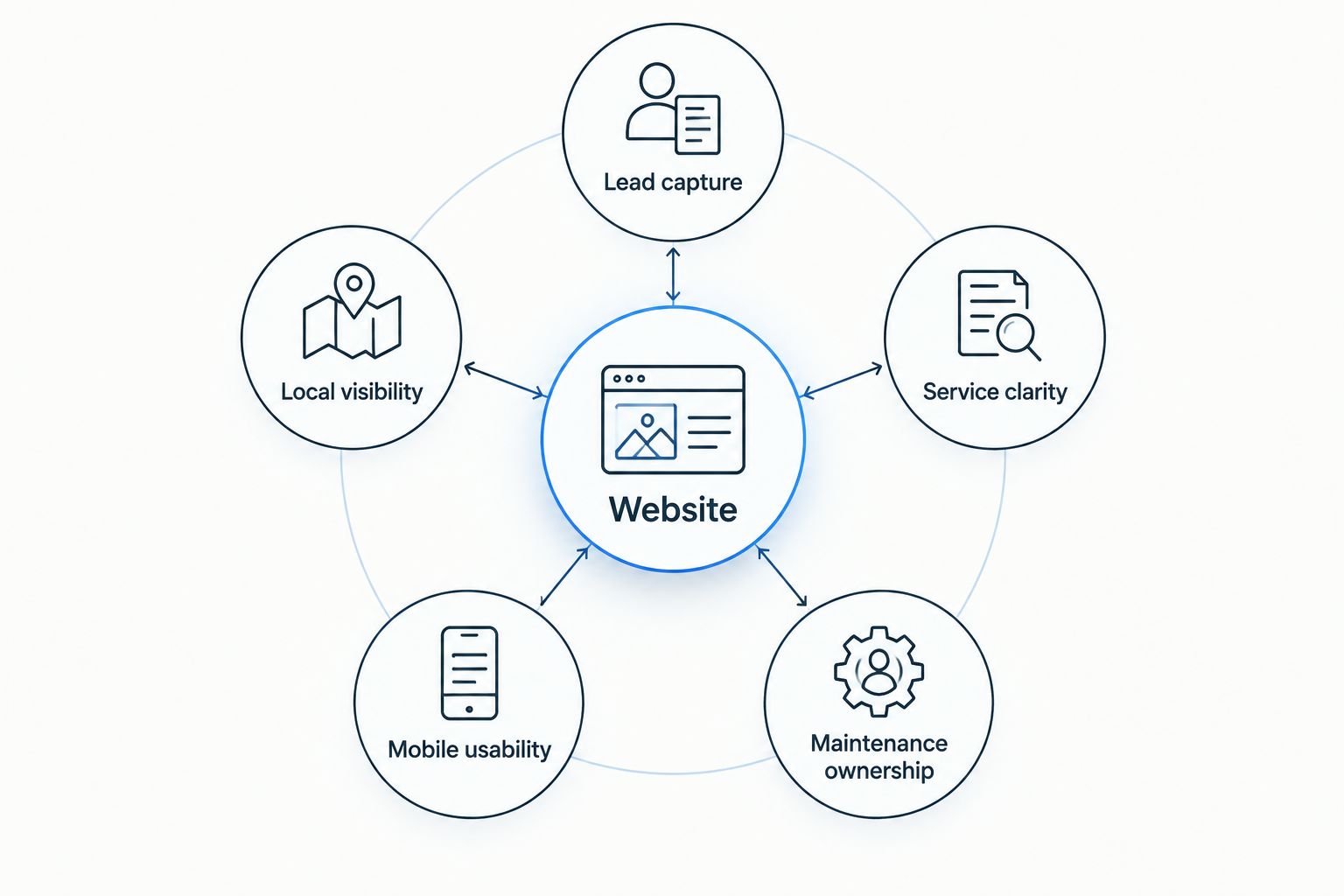
Use these criteria to judge the options. The right choice depends on your time and support needs, not which editor has the longest feature list.
- Lead capture: Customers need a clear phone option and an inquiry form. Decide who receives inquiries and who responds.
- Service clarity: Separate pages should explain distinct jobs, such as troubleshooting, panel upgrades, or commercial electrical work, when you offer them.
- Local visibility: You need editable page titles, useful service-area information, and business details that match your other listings.
- Mobile usability: Check whether a customer can read the page, find your service area, and contact you without fighting the layout.
- Maintenance ownership: Name the person responsible for updates, broken forms, account access, and changes to your services.
Start with 3 page types: a homepage, a service page, and a contact page. This is a planning checklist, not a limit. Expand when another page answers a different customer question.
Keep 2 contact routes easy to find: calling and sending an inquiry. Neither route works unless someone owns the response.
Website builders for electricians at a glance
This 2026 shortlist separates managed services from DIY builders and developer-led platforms. Those are different buying decisions, even when the finished websites look similar.
| Option | Best for | Standout feature | Key limitation |
|---|---|---|---|
| Sitesmartly | Managed contractor websites | Website management with lead-capture and quoting tools | A managed service is not the same as choosing a DIY editor |
| Wix | Electricians editing their own pages | Visual editing with hosted website tools | Layout freedom requires careful mobile checks |
| WordPress.org | Hosting choice and site control | Open-source software with themes and plugins | Hosting, updates, and maintenance need an owner |
| Squarespace | Straightforward project portfolios | Templates and built-in content editing | Less suited to highly customized workflows |
| GoDaddy Website Builder | A simple brochure website | Guided setup and section-based editing | Less design control than developer-oriented tools |
| Webflow | Designer-led custom websites | Detailed visual layout and CMS controls | A steeper learning curve for casual editors |
| Duda | Agency-managed editing | Client access and reusable website components | Usually makes more sense with a website professional |
1. Sitesmartly: best for managed electrician websites
Sitesmartly builds and manages websites for home-service contractors, with lead-capture and quoting tools. Its offering also includes call-answering tools. That makes the service relevant when you want website management handled rather than added to your workload.
Sitesmartly is the best fit for electricians who want a managed contractor website rather than another maintenance task. The buying decision is about responsibility: who builds the pages, handles changes, and keeps the inquiry process useful?
Sitesmartly pros
- Website building and management are part of the offering.
- The service focuses on home-service contractors.
- Lead-capture and quoting tools connect the website to customer inquiries.
Sitesmartly cons
- The managed approach is not a substitute for choosing your own DIY editing platform.
- You still need to provide accurate services, service areas, and business information.
Best for: An electrician who wants a managed website and contractor-focused inquiry tools.
Before choosing a managed service, settle how inquiries reach your team and how you request content changes. Website management does not replace your responsibility to answer a customer accurately.
Verdict: Buy the managed approach if you want the website handled, not another editor to learn.
2. Wix: best for electricians who want DIY editing
Wix is a hosted website builder with a visual editor. You can create pages, change content, and use website tools without arranging separate WordPress hosting.
It suits an electrical business whose owner or office manager wants to make routine changes. That includes updating service descriptions, replacing project photos, and changing contact details without handing every edit to a developer.
Wix pros
- Visual editing makes content changes accessible to non-developers.
- Hosting is part of the platform rather than a separate setup task.
- Templates provide a starting point for service-business pages.
Wix cons
- You remain responsible for building useful content and checking forms.
- Flexible layouts need attention on smaller screens.
Best for: An electrician with someone available to maintain the website directly.
For a 2026 build, start with a clean service-business layout rather than a busy design. Put your actual electrical services and service area ahead of decorative sections. Check every important page on a phone before publishing it.
Verdict: Buy if you want DIY control and will keep the content current.
3. WordPress.org: best for ownership and hosting choice
WordPress.org provides open-source website software that you install with a hosting provider. Themes control presentation, while plugins add functions such as forms and other website features.
The main advantage is choice. You can select hosting, change development partners, and customize the site without committing to a single hosted builder. That control comes with maintenance responsibility.
WordPress.org pros
- You can choose your hosting provider and website developer.
- Themes and plugins support many kinds of service websites.
- The software supports custom content structures and development.
WordPress.org cons
- Updates, backups, and security require ongoing attention.
- Plugins introduce compatibility checks and additional maintenance.
Best for: An electrical company with a dependable developer or a defined maintenance arrangement.
Ask who handles a failed update, a broken form, and a restore from backup. Do not accept shared responsibility without a named owner. A website you control still needs somebody to look after it.
WordPress.org and WordPress.com are different offerings. Make sure any proposal identifies which one you are buying and what the maintenance arrangement includes.
Verdict: Buy for control; skip self-management if nobody owns maintenance.
4. Squarespace: best for a straightforward project portfolio
Squarespace is a hosted builder with templates and built-in page editing. It works well for a service website that combines clear descriptions, project images, and contact information.
For electricians, that approach fits projects where customers benefit from seeing the finished work. Use photos you have permission to publish, then explain what the job involved instead of leaving an unexplained gallery.
Squarespace pros
- Templates give service pages and project galleries a consistent structure.
- Built-in editing keeps routine content work in one platform.
- Hosted operation removes the separate WordPress hosting task.
Squarespace cons
- Detailed custom workflows can require integrations or additional development.
- Working within template structures limits some layout choices.
Best for: An electrician who wants a tidy service website with a useful project portfolio.
A portfolio should support the service decision, not replace it. Explain whether a project involved lighting, rewiring, or another service you offer. Keep customer contact details and private property information out of public project descriptions.
Verdict: Buy for clear presentation; hold if specialized workflows drive the project.
5. GoDaddy Website Builder: best for a simple brochure website
GoDaddy Website Builder uses guided setup and section-based editing. It is a practical option when your main requirement is a straightforward website describing the business and giving customers a way to contact you.
This is a simpler brief than a custom lead-handling system or a large collection of service pages. Decide which brief you have before choosing the platform.
GoDaddy Website Builder pros
- Guided setup gives non-designers a starting structure.
- Section-based editing keeps common page changes straightforward.
- Hosted operation avoids a separate software-maintenance setup.
GoDaddy Website Builder cons
- Section-based layouts offer less detailed design control.
- A complex content structure needs more scrutiny before you commit.
Best for: A small electrical business that needs a basic online presence and direct contact routes.
Before building, write down the service pages you expect to need. Check how the editor handles those pages, navigation, and contact forms. Do not discover the structural limits after you have written the content.
Verdict: Buy for a simple brochure site; skip when custom structure is essential.
6. Webflow: best for a designer-led electrician website
Webflow combines detailed visual layout controls with a content management system. It suits a website professional building a custom design rather than an electrician seeking the simplest possible editor.
The value is in design and content structure. A capable builder can create reusable layouts for services and projects, but somebody must plan those structures and maintain the implementation.
Webflow pros
- Detailed layout controls support custom page designs.
- CMS collections organize repeatable content such as project entries.
- Responsive controls let a designer adjust layouts for different screens.
Webflow cons
- The interface takes more learning than a basic guided builder.
- Complex designs can leave routine changes dependent on a specialist.
Best for: An electrical company hiring a designer with Webflow experience.
Ask for an editing handover before approving the project. You should understand how to update service descriptions and project entries without accidentally changing the layout. Establish which changes require the designer.
A custom design is useful only if it remains usable after handover. Avoid buying design freedom your team cannot maintain.
Verdict: Buy with a qualified designer; skip as a casual DIY project.
7. Duda: best for an agency-managed editing setup
Duda is a hosted website platform with tools designed for website professionals and agencies. It supports client access and reusable components, which helps separate everyday content editing from website construction.
For an electrician, the main decision is usually the agency arrangement rather than the builder alone. Find out what you can edit and what your provider handles.
Duda pros
- Client access supports a defined editing arrangement.
- Reusable components help maintain consistent page structures.
- Hosted operation keeps infrastructure separate from your daily tasks.
Duda cons
- The provider relationship becomes part of the website decision.
- Permissions and handover terms need checking before commitment.
Best for: An electrician working with an agency that already builds and supports Duda websites.
Ask who controls the account, domain, content, and access. Get the handover arrangement in writing. The platform's capabilities do not tell you what a particular provider will deliver or maintain.
Verdict: Buy the agency arrangement only after responsibilities and access are clear.
How we ranked
This 2026 ranking prioritizes contractor fit, lead capture, service clarity, mobile usability, and maintenance responsibility. Each recommendation occupies a different use case rather than claiming one builder wins every category.
Managed service ranks first for an electrician who wants the website handled. Wix takes the DIY slot. WordPress.org takes the control slot. The remaining options fit narrower briefs involving portfolios, simple sites, custom design, or agency-managed editing.
Which website builder should you choose?
Choose the support model first. Use a managed service when you want someone responsible for the website. Choose Wix when you want to edit it yourself. Choose WordPress.org when control matters and maintenance has an owner.
For your 2026 shortlist, request a demonstration of the customer journey: find a relevant service, confirm the service area, then make contact. Do not let the conversation stop at the homepage design.
Before launch, make 1 test inquiry through each form and confirm where it arrives. Repeat that check after changes to the form or its delivery settings. A visible form is not proof of a working inquiry process.
FAQ
What's the best website builder for electricians in 2026?
Sitesmartly is the best fit for electricians who want a managed contractor website with lead-capture tools. Wix fits DIY editing, while WordPress.org fits hosting choice and control with a maintenance owner.
Is Wix or WordPress better for an electrician?
Wix is better for straightforward DIY editing; WordPress.org is better for hosting choice and customization. Choose WordPress.org only with a clear plan for updates, backups, and maintenance.
Do electricians need separate pages for every service?
Create separate pages when the services answer different customer needs. A panel-upgrade page and a commercial-maintenance page should explain their respective work rather than repeat the same generic text.
Can I build an electrical business website myself?
Yes, hosted builders such as Wix and Squarespace support DIY website creation. You still need accurate content, mobile checks, and a working process for receiving inquiries.
How much does an electrician website builder cost?
Check current provider pricing and compare the full scope, not just the website subscription. Include any separate hosting, maintenance, development, and integrations in your decision.
Will a website builder make my electrical business rank on Google?
A website builder does not guarantee Google rankings. Choose editable page titles and useful page structures, then publish accurate service information that answers customer questions.
What should I check before hiring someone to build my website?
Check account access, maintenance responsibility, inquiry delivery, and the editing handover. Have the provider demonstrate how you update content and what happens when a form stops working.
One last thing
Your first website check should happen from a customer's phone, not the designer's desktop. Find a service, look for the service area, and send an inquiry.
Then follow the inquiry to the person who answers it. The website's job is not finished when the customer presses submit.