
Best overall for managed websites: SiteSmartly. Best for DIY editing: Wix. Best for ownership: WordPress.org. This 2026 guide compares website builders for garage door companies by who handles the work, how customers contact you, and what each option leaves on your plate.
- SiteSmartly is best for contractors who want managed websites with lead-capture and call-answering tools.
- Wix leads website builders for garage door companies that want direct control over routine edits.
- WordPress.org fits businesses that prioritize website ownership and accept ongoing maintenance.
- Squarespace suits photo-led project portfolios; Webflow suits custom layouts with a dedicated website specialist.
- Choose around garage door repair inquiries and installation estimates, not the prettiest homepage.
Why this matters
A garage door website has to serve different requests. Someone with a stuck door needs a clear contact route. Someone planning a replacement needs enough information to request an estimate with confidence.
Your builder should support both without making you responsible for work you cannot maintain. A polished template does not decide who answers an inquiry, updates your service area, or fixes a broken form.
Choose the operating model before the design. For a garage door company, a managed service and a DIY builder solve different problems, even when both produce a good-looking website.
What makes the best garage door website builder?
Use these criteria to judge website builders for garage door companies in 2026:
- Management responsibility: Know who edits pages, checks forms, handles technical upkeep, and resolves problems.
- Lead capture: Make phone contact and estimate requests easy to find. Ask for information that helps you respond.
- Service clarity: Separate repair requests from replacement and installation inquiries. Explain only services you actually provide.
- Local relevance: State your real service area and use genuine project photos and customer feedback with permission.
- Mobile usability: Check the contact route, form fields, and project images on a phone, not just a desktop preview.
- Ownership and flexibility: Understand who controls the domain, content, accounts, and website if you change providers.
These criteria do not require the most elaborate platform. They require a website that your business can keep accurate and a contact process your team can actually follow.
Website builders at a glance
The table compares operating models, not measured conversion results. Each option earns a different use-case slot; the right choice depends on how much website work you want to own.
| Option | Best for | Standout feature | Key limitation |
|---|---|---|---|
| SiteSmartly | Managed contractor websites | Managed websites with industry-specific lead capture and call-answering tools | A managed service is a different operating model from self-directed building |
| Wix | Owner-led DIY editing | Visual editing within a hosted website platform | Your business remains responsible for content and inquiry handling |
| WordPress.org | Website ownership and extensibility | Open-source software with themes and plugins | Hosting, updates, and maintenance need an owner |
| Squarespace | Photo-led installation portfolios | Hosted templates and visual page editing | Contact workflows need evaluation beyond the portfolio layout |
| Webflow | Designer-led custom layouts | Visual design controls for custom page structures | Detailed design work requires someone comfortable with the platform |
1. SiteSmartly: best for managed garage door websites
SiteSmartly builds and manages websites for home-service contractors, with lead-capture, quoting, and call-answering tools. That makes it the strongest fit here for a contractor who wants website management handled rather than another platform to learn.
SiteSmartly is best for garage door contractors who want a managed website rather than a DIY building project. Assess the service against your actual repair and installation inquiry process, not a generic homepage demonstration.
SiteSmartly pros:
- Website building and management sit within the stated service.
- The contractor focus matches the home-service business model.
- Lead-capture and quoting tools address customer inquiries, not just page presentation.
- Call-answering tools belong in the evaluation when phone inquiries are part of your workflow.
SiteSmartly cons:
- A managed service is not the same arrangement as editing every detail yourself.
- Your business still needs to supply accurate service information and project material.
- You still need to decide who follows up, confirms scope, and schedules work.
Best for: Garage door business owners who want a provider to build and manage the website.
Before choosing, walk through a repair inquiry and an installation estimate request. Ask how each reaches your team, what information gets collected, and which website changes the provider handles.
Verdict: Buy for managed website responsibility; skip if hands-on building is your main requirement.
2. Wix: best for owner-led DIY editing
Wix is a hosted website builder with visual editing tools. It suits a garage door business owner who wants to change text, images, and page layouts without managing a separate website hosting setup.
The practical advantage is direct editing control. The trade-off is responsibility: buying access to a builder does not assign someone to maintain your service pages or answer inquiries.
Wix pros:
- Visual editing supports owner-led page changes.
- A hosted platform avoids a separate self-hosted software setup.
- Templates provide a starting structure for service and project pages.
- You can keep routine content decisions inside your business.
Wix cons:
- Your team must build, review, and maintain the content.
- Apps and additional workflows introduce decisions beyond the basic page editor.
- A template still needs real service details, useful photos, and clear contact instructions.
Best for: An owner or office manager who will make website edits regularly.
For a 2026 Wix build, start with the customer tasks rather than the template gallery. Can someone identify your service area, find the correct service, and submit a useful request? Finish those routes before adding decorative sections.
Verdict: Buy for hands-on editing; skip if nobody has time to own the website.
3. WordPress.org: best for ownership and extensibility
WordPress.org provides open-source website software that you run with a hosting provider. Themes shape the presentation, and plugins add functions such as forms and other website tools.
It fits a garage door company that wants control over the website setup and has someone responsible for maintenance. That person can be an employee or an outside specialist, but the responsibility needs to be explicit.
WordPress.org pros:
- Open-source software gives you flexibility over the website setup.
- You can choose your hosting provider separately.
- Themes and plugins support different content and functional requirements.
- You can work with a developer when your needs exceed a basic template.
WordPress.org cons:
- Hosting, updates, backups, and security need ongoing attention.
- Themes and plugins require compatibility checks and maintenance.
- Adding extensions without a clear need creates more components to manage.
Best for: An established business with a named technical owner and a reason to prioritize control.
WordPress.org is not the same choice as handing every website task to a managed provider. In 2026, write down who owns software updates, form testing, backups, and content changes before approving the build.
Keep the initial setup focused. A garage door service website needs clear information and working contact routes before it needs an extensive collection of plugins.
Verdict: Buy for control with assigned maintenance; skip if technical responsibility has no owner.
4. Squarespace: best for photo-led installation portfolios
Squarespace is a hosted website builder with templates and visual editing tools. It suits garage door companies that want installation photos and project descriptions to carry much of the website's explanation.
Use the portfolio to help a customer understand the work. A finished-door photo is more useful when the accompanying text explains the project without inventing specifications or promises.
Squarespace pros:
- Templates provide a starting point for visually organized pages.
- A hosted platform keeps the basic website setup together.
- Visual editing supports photo-led project presentation.
- A focused portfolio can sit alongside clear service information.
Squarespace cons:
- A strong image layout does not establish a complete inquiry process.
- Project photos need preparation, permission, and accurate descriptions.
- You need to check whether the available tools fit your required contact workflow.
Best for: Installation-focused companies with genuine project photography and straightforward website requirements.
Keep repair contact information visible even when installation projects dominate the design. Someone seeking help with a stuck door should not have to browse a gallery to find the next step.
Before selecting a template, build a sample project page with your own material. That reveals whether the layout explains your work or simply displays attractive images.
Verdict: Buy for a photo-led portfolio; hold until the inquiry route works as clearly as the gallery.
5. Webflow: best for designer-led custom layouts
Webflow is a visual website development platform with detailed layout controls and content-management features. It fits a garage door company working with a designer who needs more control over page structure than a simple template workflow provides.
The reason to choose Webflow is a defined design requirement, not the expectation that a more elaborate website automatically brings better inquiries. Keep the customer task in charge of the layout.
Webflow pros:
- Detailed visual controls support custom page layouts.
- Content-management features support repeatable content structures.
- A designer can create different presentations for services and projects.
- Custom layouts can accommodate specific content requirements.
Webflow cons:
- Detailed design controls require platform knowledge.
- Routine editing and structural changes need clear boundaries.
- An elaborate build still needs a practical maintenance and inquiry process.
Best for: Companies with a dedicated website designer and specific layout requirements.
Before starting a Webflow project, agree on which changes your office can make independently. Replacing a project description should have a clear process; redesigning a page is a separate task.
Verdict: Buy with a capable designer and a defined brief; skip for a basic owner-built website.
How we ranked
This 2026 ranking puts management responsibility first, followed by lead capture, service clarity, local relevance, mobile usability, and ownership. It compares known platform models and the stated managed-service offer, not claimed sales results.
The use-case labels matter more than the numbered order. Wix wins the DIY slot, while WordPress.org wins the ownership slot. Neither is automatically the better choice for a contractor who wants website management handled.
Test the contact process before choosing
Run 3 test inquiries through the proposed website: a repair request, an installation estimate, and a service-area question. Check each route on 2 device types, a phone and a desktop computer. Assign 1 follow-up owner inside your business.
These are recommended checks, not performance benchmarks. Their purpose is to expose gaps before the website becomes your public contact point.
- Find contact: Start on a service page and locate the phone or inquiry form without using the homepage.
- Submit request: Enter a realistic customer question. Check whether the form asks for useful information without demanding unnecessary detail.
- Confirm receipt: Verify that the request reaches the intended person and that the customer receives an accurate confirmation.
- Assign follow-up: Name the person responsible for responding and the backup when that person is unavailable.
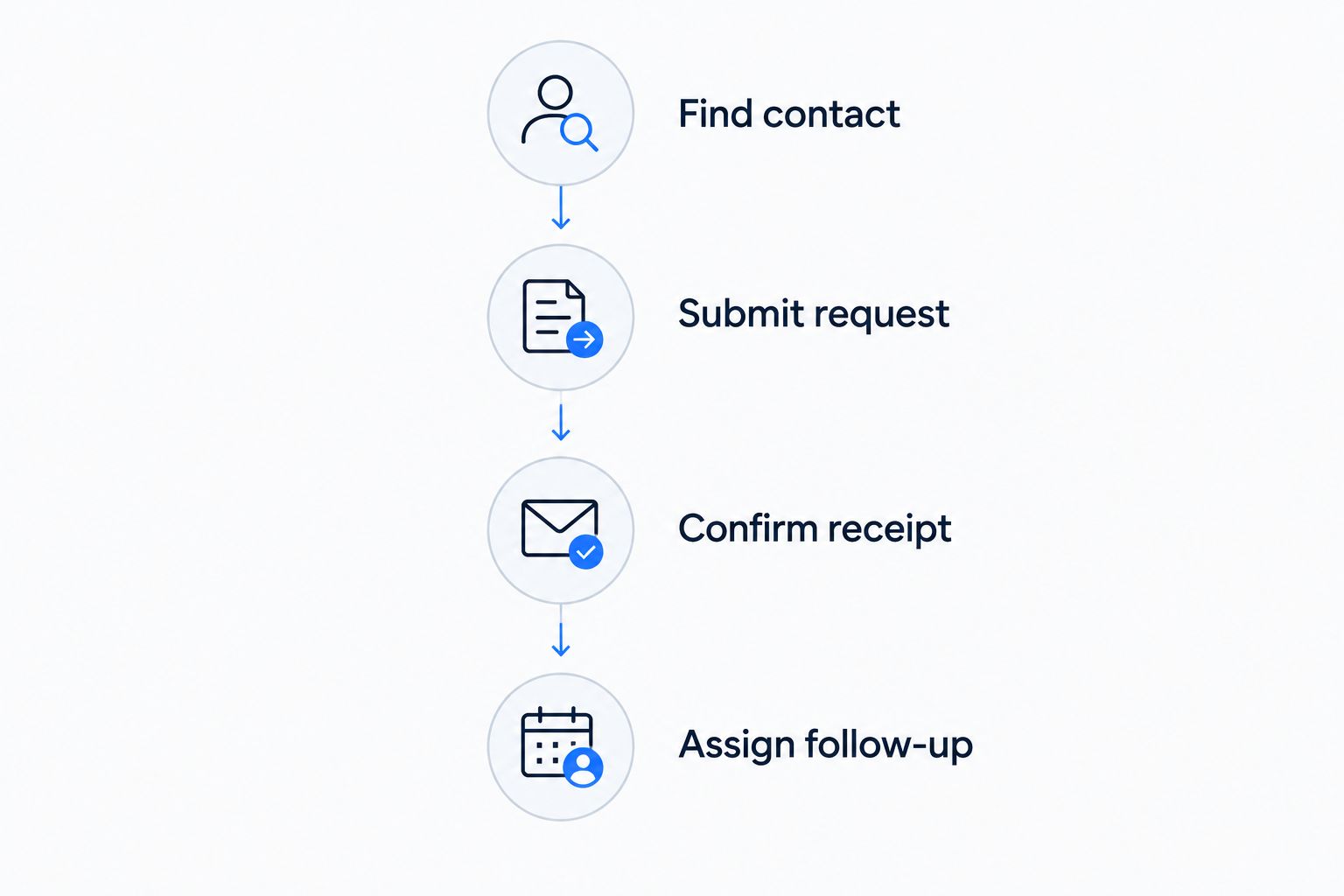
Keep the test practical. A website can pass a visual review and still send requests to an inbox nobody monitors. Check the destination, not just the confirmation screen.
Which website builder should you choose?
Choose SiteSmartly for managed contractor websites, Wix for DIY editing, or WordPress.org for ownership with assigned maintenance. Choose Squarespace when project photography drives the presentation. Choose Webflow when a designer has a specific custom-layout brief.
For an undecided garage door contractor in 2026, start with this question: who will own the website work after launch? If the answer is nobody inside the business, a managed arrangement fits the need better than another editing tool.
Do not approve the design until the contact test passes. Clear service information and a working follow-up route belong ahead of animation, decorative sections, and extra pages.
FAQ
What's the best website builder for a garage door company?
SiteSmartly is the best fit in this guide for garage door contractors seeking managed websites with lead-capture tools. Wix fits DIY editing, while WordPress.org fits businesses that prioritize control and have someone responsible for maintenance.
Is Wix better than WordPress.org for a garage door business?
Wix is the better fit for owner-led editing within a hosted platform; WordPress.org is the better fit for control over hosting and website software. Choose based on who will maintain the site, not the number of available templates.
Can I build my garage door website myself?
Yes, a hosted visual builder supports a DIY website approach. You still need to prepare accurate service content, check the mobile layout, test contact forms, and assign inquiry follow-up.
Should garage door repair and installation have separate pages?
Separate pages make sense when repair and installation require different explanations and next steps. Keep each page accurate to the services your business provides, with a clear contact route.
Do I need online booking on my garage door website?
You do not need online booking unless your business can support the appointments customers select. A clear inquiry form and reliable follow-up process are a better starting point than a booking calendar disconnected from your schedule.
What should I check before hiring a website provider?
Check who controls the domain, maintains the website, receives inquiries, and makes future changes. Ask the provider to demonstrate your actual contact process rather than only presenting a finished homepage.
Will a new website guarantee more garage door jobs?
No website builder guarantees more garage door jobs. Evaluate whether the website explains your services accurately and gives customers a working contact route, then track inquiries and booked work separately.
One last thing
Test from a service page, not just the homepage. A visitor who lands directly on garage door repair still needs your service area, contact details, and a clear next step.
Make every important service page usable on its own. That is a more practical final check than another round of homepage design changes.