Best overall for managed contractor websites: SiteSmartly. Best for DIY editing: Wix. Best for ownership and custom development: WordPress.org. These website builders for pest control companies suit different working arrangements; this 2026 guide helps you choose who builds the site, who maintains it, and how customer inquiries reach you.
- SiteSmartly is the best fit for contractors who want a managed website rather than another DIY task.
- Wix suits DIY editing; WordPress.org suits ownership and custom development.
- Compare website builders for pest control companies on lead capture, service pages, mobile usability, and maintenance.
- Choose a pest control website workflow before choosing a template.
Why this matters
Your pest control website has two jobs: explain what you treat and help the customer contact you. A homeowner asking about termites needs different information from a restaurant manager asking about ongoing pest management. Neither should have to search through a generic services page to find the next step.
The practical question in 2026 is not which builder has the most templates. It is which setup you can keep accurate while running the business. Choose the website arrangement you can maintain, not the editor that looks easiest in a demonstration.
What makes the best website builders for pest control companies
Use these criteria before comparing platforms. They separate a usable business website from a design project that never gets finished.
- Lead capture: Customers need a clear call option and a form that asks enough to route the inquiry. Pest type, location, and contact details are useful starting points.
- Service-page control: You need room to explain individual treatments without forcing every service into one long page.
- Mobile usability: Check navigation, text, tap targets, and form completion on your phone. A desktop preview is not a customer test.
- Local search basics: Look for editable titles, useful page addresses, crawlable content, and a way to keep business information consistent.
- Maintenance responsibility: Decide who handles content changes, software updates, form problems, and broken connections.
- Ownership and portability: Establish who controls the domain, content, account access, and any migration work before committing.
For your 2026 shortlist, give each provider the same job: show how a visitor asks about a pest problem and how that inquiry reaches your business. Judge the whole path, not just the homepage.
Website builders at a glance
| Option | Best for | Standout capability | Key limitation |
|---|---|---|---|
| SiteSmartly | Managed contractor websites | Website management with lead-capture and call-answering tools | Confirm the pest-control-specific setup before choosing |
| Wix | Owner-managed editing | Hosted visual editor and built-in site tools | You still own the content and inquiry-handling work |
| WordPress.org | Ownership and custom development | Open-source software with themes and plugins | Hosting, updates, and plugin upkeep need an owner |
| Squarespace | Straightforward brochure sites | Templates and integrated content editing | Complex treatment or quoting workflows need separate evaluation |
| Webflow | Custom visual design | Visual development with structured content tools | More learning and setup than a basic brochure site |
| Duda | Agency-managed multi-location sites | Site management and client collaboration tools | The agency arrangement matters as much as the platform |
| GoDaddy Website Builder | A simple business presence | Guided website setup | Detailed service content needs careful planning |
These are use-case recommendations, not measured performance rankings. A platform name alone does not establish page speed, search visibility, or whether anyone answers the customer.
1. SiteSmartly: best for managed pest control websites
SiteSmartly builds and manages websites for home-service contractors, with lead-capture, quoting, and call-answering tools. That makes the managed model relevant when you want help operating the website rather than learning an editor. For pest control, confirm how the setup handles treatment inquiries, service areas, and requests for ongoing service.
SiteSmartly is the best fit for contractors who want a managed website rather than another DIY task. The deciding point is responsibility: you need to know who handles changes and where customer inquiries go.
SiteSmartly pros:
- Website building and management are part of the stated service.
- The offering addresses contractor lead capture rather than design alone.
- Quoting and call-answering tools are included in the stated offering.
Managed-service cons:
- Pest-control-specific workflows need confirmation before you choose.
- A managed arrangement is not the right model if you want to control every implementation detail yourself.
Best for: A busy owner who wants someone responsible for the website's operation.
Verdict: Buy the managed approach if the demonstrated pest control inquiry flow matches your business.
2. Wix: best for pest control owners who want DIY editing
Wix is a hosted website builder with a visual editor. You can use it to build service pages, publish business information, and collect inquiries without managing a separate hosting installation. It fits an owner who wants to make routine website changes directly.
The editor does not decide your content structure for you. Separate residential and commercial information where the buying questions differ, and make the contact route obvious on each relevant page.
Wix pros:
- Visual editing lets you change page content directly.
- Hosting and website editing sit within the same platform.
- Built-in tools and apps provide options for forms and other site functions.
Wix cons:
- You remain responsible for publishing accurate treatment and service-area information.
- Additional apps and custom workflows add configuration work.
- Moving away requires evaluating what content and functionality can transfer.
Best for: An owner or office manager willing to maintain the site personally.
Verdict: Buy Wix if direct editing matters more than handing off website management.
3. WordPress.org: best for ownership and custom development
WordPress.org provides open-source website software that you install with a hosting provider. Themes, plugins, and custom development give you control over how the site works. That flexibility suits a pest control business with a developer or agency responsible for the implementation.
Distinguish WordPress.org from the hosted WordPress.com service when comparing proposals. Ask your developer which hosting, theme, plugins, and maintenance responsibilities are included; the software name does not answer those questions.
WordPress.org pros:
- You can choose your hosting provider and development partner.
- Themes and plugins support different content and inquiry workflows.
- Custom development can accommodate requirements beyond a standard template.
- You can organize a substantial library of service and educational pages.
WordPress.org cons:
- Updates, backups, and security require ongoing attention.
- Plugin compatibility and licensing need management.
- Custom work creates a dependency on someone who understands the implementation.
Best for: A business that wants control and has a named technical owner.
Verdict: Buy WordPress.org with a maintenance arrangement; skip an unmanaged installation.
4. Squarespace: best for a straightforward pest control brochure site
Squarespace combines hosted website templates with content editing tools. It suits a website built around clear service descriptions, business information, and a direct inquiry route. The appeal is a contained publishing setup, not a custom operating system for your company.
If your 2026 brief includes complex quoting, customer account access, or treatment-specific booking rules, evaluate those requirements separately. A contact form and a specialized booking workflow are different jobs.
Squarespace pros:
- Templates provide a starting structure for business pages.
- Hosting and content editing are handled within the platform.
- You can publish service information and supporting articles together.
Squarespace cons:
- A template does not supply accurate pest treatment content.
- Specialized workflows need evaluation beyond the page editor.
- You must handle updates to business information and customer-facing copy.
Best for: A smaller business needing a clear informational site without extensive custom functions.
Verdict: Buy Squarespace for a straightforward brochure site; hold if complex workflows are essential.
5. Webflow: best for custom-designed pest control websites
Webflow combines visual website development with content management tools. It gives a designer control over layouts and reusable content structures. Choose it when you have a defined design brief and someone who can build and maintain that structure.
Do not mistake design control for a reason to make customers work harder. Treatment information, service-area coverage, and contact options should remain easy to find even when the design is distinctive.
Webflow pros:
- Visual development supports custom page layouts.
- Structured content tools can organize repeatable service content.
- Reusable design elements help keep related pages consistent.
Webflow cons:
- Building a well-structured site requires learning or professional help.
- Custom interactions and layouts increase the work involved in changes.
- Inquiry routing and business integrations still need configuration.
Best for: A company with a designer and a specific custom website brief.
Verdict: Buy Webflow for a defined design project; skip it if you only need a basic editable site.
6. Duda: best for agency-managed multi-location websites
Duda is a website platform used by agencies to build and manage client sites. Its site-management and collaboration tools suit an arrangement in which an agency handles publishing and your team supplies local business information. Evaluate the agency's service alongside the platform.
For multiple pest control locations, establish who approves address changes, local service descriptions, and contact routing. Consistent layouts are useful, but each location still needs accurate information.
Duda pros:
- Agency-oriented tools support client website management.
- Collaboration features support content review and handoffs.
- Reusable site structures can support consistent publishing.
Duda cons:
- Your experience depends on the agency's process and responsibilities.
- Account access and migration arrangements need clarification.
- Reused layouts do not replace location-specific content.
Best for: A multi-location business working with an agency on an ongoing basis.
Verdict: Buy a Duda-based service when the agency clearly owns maintenance and location updates.
7. GoDaddy Website Builder: best for a simple pest control presence
GoDaddy Website Builder offers guided website creation within a hosted platform. It fits a limited brief: explain your business, describe your core services, and provide a contact route. Keep the scope clear rather than expecting a basic website setup to handle every operational requirement.
For a 2026 starter site, prioritize useful information over decorative sections. Customers need to understand whether you handle their problem and serve their location.
GoDaddy Website Builder pros:
- Guided setup provides a starting point for a business website.
- Hosting and editing are available in one platform.
- A simple structure can keep basic information easy to maintain.
GoDaddy Website Builder cons:
- Detailed service content still needs deliberate organization.
- Specialized quoting or routing requirements need separate evaluation.
- A starter website needs ongoing content work as your services change.
Best for: An owner publishing a simple business website with a narrow brief.
Verdict: Buy GoDaddy Website Builder for a basic presence; hold if custom workflows drive the project.
How to check the website before choosing
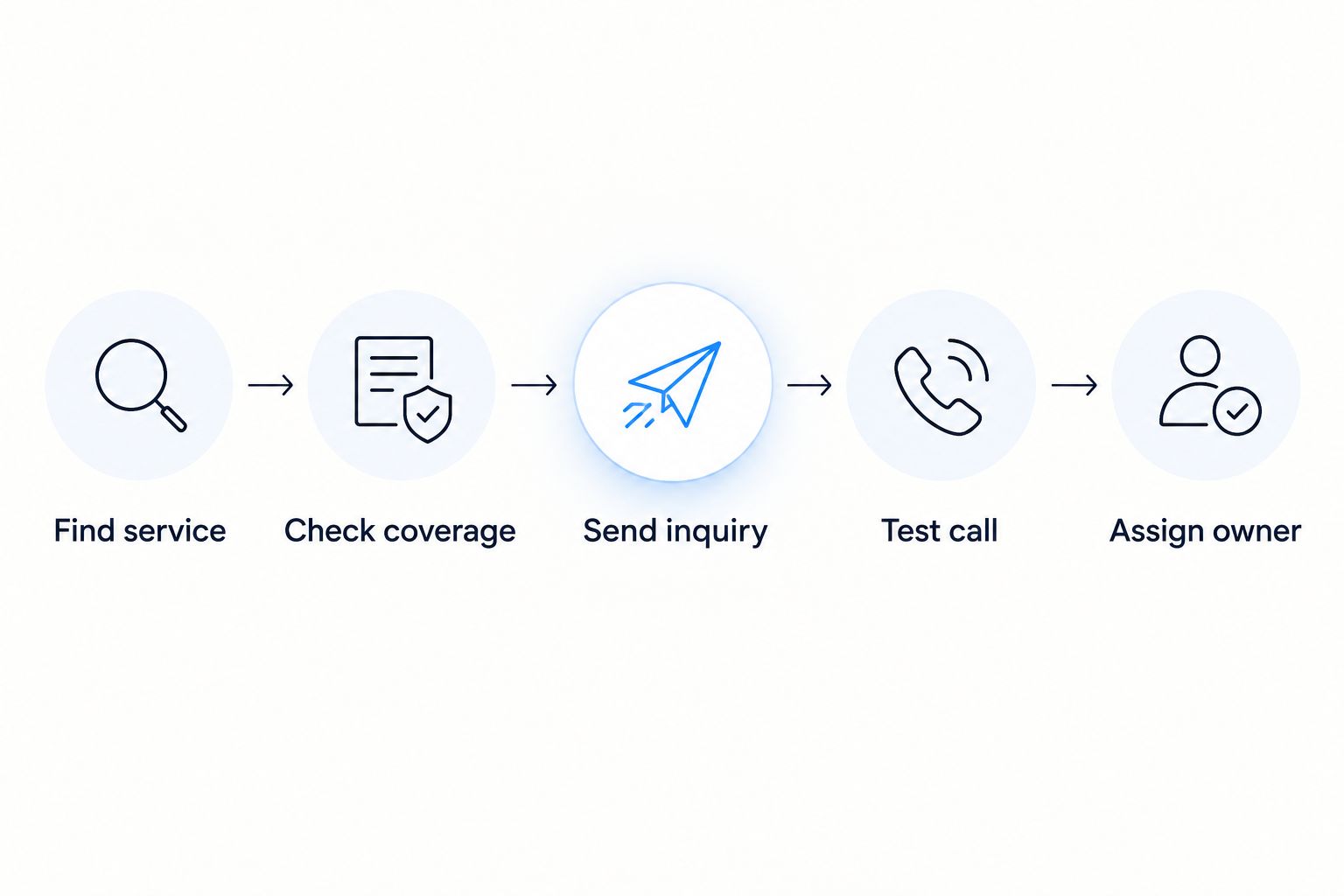
Use this sequence with any builder or managed provider. In 2026, a convincing preview is not enough; test the customer path yourself.
- Find service: Open a treatment page on your phone. Check whether the page explains the service without relying on the homepage.
- Check coverage: Find the service area. Make sure the wording does not imply locations you do not serve.
- Send inquiry: Send 1 test submission through the published form. Confirm that the right person receives usable details.
- Test call: Make 1 test call from the mobile website. Check the destination and what happens when nobody answers.
- Assign owner: Name the person responsible for corrections, follow-up, and future changes.
Keep these tests separate. A working form does not establish that the phone route works, and neither proves that a customer receives follow-up.
Start your content brief with 3 page types: service, service area, and contact. Expand when customers need distinct answers, not because a builder offers another template. Describe only treatments, coverage, and credentials your business can substantiate.
How the options are ranked
The ranking matches each platform to a distinct working arrangement: managed service, owner editing, technical ownership, simple publishing, custom design, agency coordination, or basic setup. The criteria are lead capture, content control, mobile usability, maintenance, and portability.
No conversion rates or search-performance results are assigned to these builders. Those outcomes depend on the actual website, its content, and the business handling its inquiries.
Which website builder should you choose?
Choose SiteSmartly for managed website work, Wix for owner editing, and WordPress.org for technical ownership. Those are the clearest starting points for an undecided contractor.
Choose Squarespace or GoDaddy Website Builder when the brief is simple. Choose Webflow when custom design is a genuine requirement. Choose a Duda-based agency service when coordinating location updates is central to the job.
Before signing, ask one plain question: who fixes the website when a customer cannot reach you? Get a clear answer.
FAQ
What's the best website builder for a pest control company in 2026?
SiteSmartly is the recommended choice for a contractor who wants a managed website rather than DIY editing. Wix suits direct owner editing, while WordPress.org suits technical ownership with maintenance support.
Is Wix or WordPress.org better for a pest control website?
Wix fits hosted DIY editing; WordPress.org fits control over hosting and custom development. Choose according to who will maintain the website, not just how the first design looks.
Does a pest control company need separate service pages?
Separate service pages are useful when customers need different answers about different treatments. Give each page a clear purpose rather than repeating the same generic text.
Can a website builder handle pest control quote requests?
A website builder can collect quote requests through forms, but a specialized quoting workflow needs separate evaluation. Check what information is collected, where it goes, and who responds.
Should I choose a DIY builder or a managed website service?
Choose DIY when someone in your business will own editing and checks; choose managed service when you want that work assigned to a provider. Confirm the provider's responsibilities before committing.
What should I test before publishing a pest control website?
Test service information, service-area coverage, the contact form, and the mobile call route. Confirm receipt of a test inquiry and assign responsibility for fixing problems.
How do I compare website builder costs?
Compare current quotes for the complete setup, including hosting, maintenance, integrations, and content work. Check each provider's current terms rather than comparing the editor alone.
One last thing
A website inquiry is not a booked treatment. Put a name against the next action: reviewing the request, contacting the customer, and arranging the appropriate next step. A functioning contact form still needs a responsible person behind it.