Best overall for a managed contractor website: Sitesmartly. Best for DIY editing: Wix. Best for control over hosting and code: WordPress.org. This 2026 guide compares website builders for locksmiths by who manages the site, how customers contact you, and how easily you can explain the work you actually handle.
- Sitesmartly is the managed contractor website pick among website builders for locksmiths; confirm your locksmith service requirements before committing.
- Wix suits locksmiths who want to edit their own service pages without managing WordPress hosting.
- WordPress.org suits businesses that want control over hosting, code, and future development.
- Squarespace favors straightforward presentation; Webflow favors custom design with a capable website operator.
Why this matters
A locksmith website needs to answer practical questions: Do you handle this lock problem? Do you serve this address? How does the customer reach you? A polished homepage cannot replace those answers.
Emergency lockouts and planned commercial work also need different contact paths. Someone locked out needs a clear way to call. A property manager requesting work needs room to explain the job. Your website should support both without promising services or response times you cannot deliver.
For your 2026 shortlist, separate the website editor from the operating model. A managed service handles website work for you. A DIY builder gives you editing tools. A self-hosted platform gives you control and leaves you responsible for arranging maintenance.
What makes the best website builders for locksmiths
Judge the options against these criteria before choosing a template:
- Contact clarity: Customers can find the phone number and understand what happens after submitting an inquiry.
- Service accuracy: Separate automotive, residential, and commercial work only when your business actually provides those services.
- Local relevance: Explain your real service area. Do not build pages that imply offices or coverage you do not have.
- Editing responsibility: Decide whether you, an employee, or a provider owns routine changes.
- Technical responsibility: Identify who handles hosting, software updates, form checks, and access recovery.
- Exit control: Understand domain ownership, content access, and what you can take with you if you leave.
Use 2 contact routes as a practical starting point: a phone call for immediate contact and an inquiry form for work that needs detail. These are recommended setup choices, not evidence that either route produces a particular conversion rate.
Website builders at a glance
This 2026 comparison ranks operating models, not template appearance. Choose the row that matches the responsibility you want to keep.
| Option | Best for | Standout feature | Key limitation |
|---|---|---|---|
| Sitesmartly | Managed contractor websites | Website management with industry-specific lead-capture and call-answering tools | Locksmith-specific requirements need agreement before setup |
| Wix | DIY service-page editing | Hosted website builder with visual editing | You still own content accuracy and inquiry follow-up |
| WordPress.org | Hosting and code control | Open-source software you can host yourself | Hosting, maintenance, and troubleshooting need an owner |
| Squarespace | Straightforward business presentation | Hosted builder with coordinated templates | Template structure can constrain specialized layouts |
| Webflow | Custom visual design | Visual control over website layout and styling | More design decisions and a steeper editing workflow |
1. Sitesmartly: best website option for managed contractor sites
Sitesmartly builds and manages websites for home-service contractors, with industry-specific lead-capture, quoting, and AI call-answering tools. That makes its managed-service model relevant when you want a working business website without becoming the person responsible for every website task.
Sitesmartly is the best fit for contractors who want website management and lead-capture tools in the same service. For a locksmith business, establish the exact scope first: the services you offer, the areas you cover, and the information an inquiry should collect.
Pros
- Website building and management sit within the same service model.
- Lead-capture tools are part of the stated contractor offering.
- Call-answering tools address a different contact route from website forms.
- The service is positioned around home-service contractors rather than general-purpose website creation.
Cons
- A managed service requires clear instructions and coordination with the provider.
- The contractor description does not establish a locksmith-specific configuration.
- You need to agree on ownership, access, and change responsibilities before choosing the service.
Best for: A locksmith owner who wants to delegate website work and define a clear inquiry-handling process.
Ask how the setup will distinguish an urgent lockout from a planned installation inquiry. Also define what the call-answering tool should say when the requested service is outside your scope. Do not let a website or answering workflow imply that every inquiry is an accepted job.
Verdict: Buy if you want managed website work and the agreed scope covers your locksmith operation.
2. Wix: best website builder for locksmiths doing their own editing
Wix is a hosted website builder with visual editing tools. You can use it to create service pages and maintain business information without arranging a separate WordPress hosting setup.
Its main advantage is the DIY workflow. If you want to change a service description yourself, that control matters more than finding a template with a locksmith photo already in it.
Wix pros
- Visual editing suits owners who want direct control over page content.
- Hosted website delivery removes the separate hosting-selection task.
- Templates provide a starting structure instead of an empty page.
- The platform supports business websites beyond a single landing page.
Wix cons
- You remain responsible for page accuracy and keeping information current.
- A template does not decide which locksmith services deserve separate pages.
- Builder-specific layouts create migration work if you later change platforms.
Best for: An owner or office employee who will actually maintain the site.
Build a service page before committing to a design direction. Add your real service description, service area, contact details, and inquiry questions. Then check it on a phone. An editor that feels easy on a desktop is only useful if the finished page works for customers.
Verdict: Buy if you want DIY editing and have someone responsible for ongoing updates.
3. WordPress.org: best website platform for locksmiths wanting control
WordPress.org provides open-source website software that you can run with a hosting provider. It is different from choosing a fully managed website service: you decide who supplies hosting, builds the site, and maintains the installation.
That separation gives you choices. It also creates responsibilities that need a named owner, whether that is you, a developer, or a maintenance provider.
WordPress.org pros
- You can choose your hosting provider.
- Themes and plugins offer different ways to build pages and functionality.
- Access to the software and code supports custom development.
- Website management can be assigned separately from hosting.
WordPress.org cons
- Updates, backups, and security maintenance need active management.
- Plugins add dependencies that require review and troubleshooting.
- Custom builds depend on the quality and documentation of the implementation.
Best for: An established locksmith business with technical help and a clear ownership requirement.
Choose WordPress.org because you need its control, not because someone calls it automatically better for search. Search visibility still depends on useful pages, accessible content, accurate business information, and the quality of your implementation.
Before approving a build, identify who controls the domain, hosting account, administrator access, and backups. Make sure the business can recover access without depending on an undocumented arrangement with a single developer.
Verdict: Buy if control matters and you have a maintenance owner; skip if nobody will maintain it.
4. Squarespace: best website builder for a straightforward locksmith site
Squarespace is a hosted website builder built around templates and an integrated editing environment. It fits a business that wants a clear presentation of services, service areas, and contact information without designing every layout detail from scratch.
Keep the structure simple. A locksmith site does not need decorative sections that push the service description and phone number further down the page.
Squarespace pros
- Templates give pages a coordinated visual structure.
- Hosted delivery keeps website editing and hosting within one platform.
- A straightforward service site does not require a custom-coded layout.
Squarespace cons
- Template conventions can constrain unusual page designs.
- Specialized workflows need a feature check before you build around them.
- You still need to write accurate service content and manage incoming inquiries.
Best for: A locksmith business with straightforward content needs and a designated editor.
Compare Squarespace with Wix by recreating the same service page in each, rather than comparing unrelated demos. Use identical text and contact requirements. The useful question is which editor makes your real page easier to maintain.
Verdict: Buy for a straightforward business site; hold if your inquiry workflow needs specialized features.
5. Webflow: best website builder for locksmiths using a designer
Webflow is a visual website-building platform with detailed layout and styling controls. It suits a locksmith business working with a designer who needs more control over the finished presentation than a template-led workflow provides.
The design freedom is useful only when someone can manage it. Your website should not become difficult to update because the original build treated every ordinary text change as a design project.
Webflow pros
- Detailed visual controls support custom layouts.
- A designer can shape page structure around your service content.
- Reusable design elements support consistency across pages.
Webflow cons
- The editing workflow requires more familiarity with website structure.
- Custom design adds decisions that a template would settle for you.
- Handover needs clear instructions for whoever maintains the site.
Best for: A locksmith company with a designer and a defined custom-layout requirement.
Ask the designer to demonstrate a routine service-description change before signing off. Also check how new service content will be added. The finished website should support normal business changes without requiring you to understand every styling decision.
Verdict: Buy with a capable designer; skip if you need the simplest owner-operated editor.
How these options are ranked
The 2026 ranking uses the criteria above: contact clarity, service accuracy, local relevance, editing responsibility, technical responsibility, and exit control. Each option owns a different use case rather than competing for an unsupported all-purpose score.
Managed website work takes the first slot for owners who want to delegate. Wix takes DIY editing. WordPress.org takes hosting and code control. Squarespace takes straightforward presentation. Webflow takes designer-led customization.
Before deciding, send 3 test inquiries through the proposed setup: an urgent lockout request, a planned lock-change request, and an inquiry outside your service area. Treat these as test scenarios, not promised services.
Check the same sequence for each inquiry:
- Customer request: Is the customer asked for useful information?
- Business alert: Does the inquiry reach the person responsible?
- Customer response: Does the reply accurately explain the next step?
- Owner follow-up: Can someone confirm that the inquiry was handled?
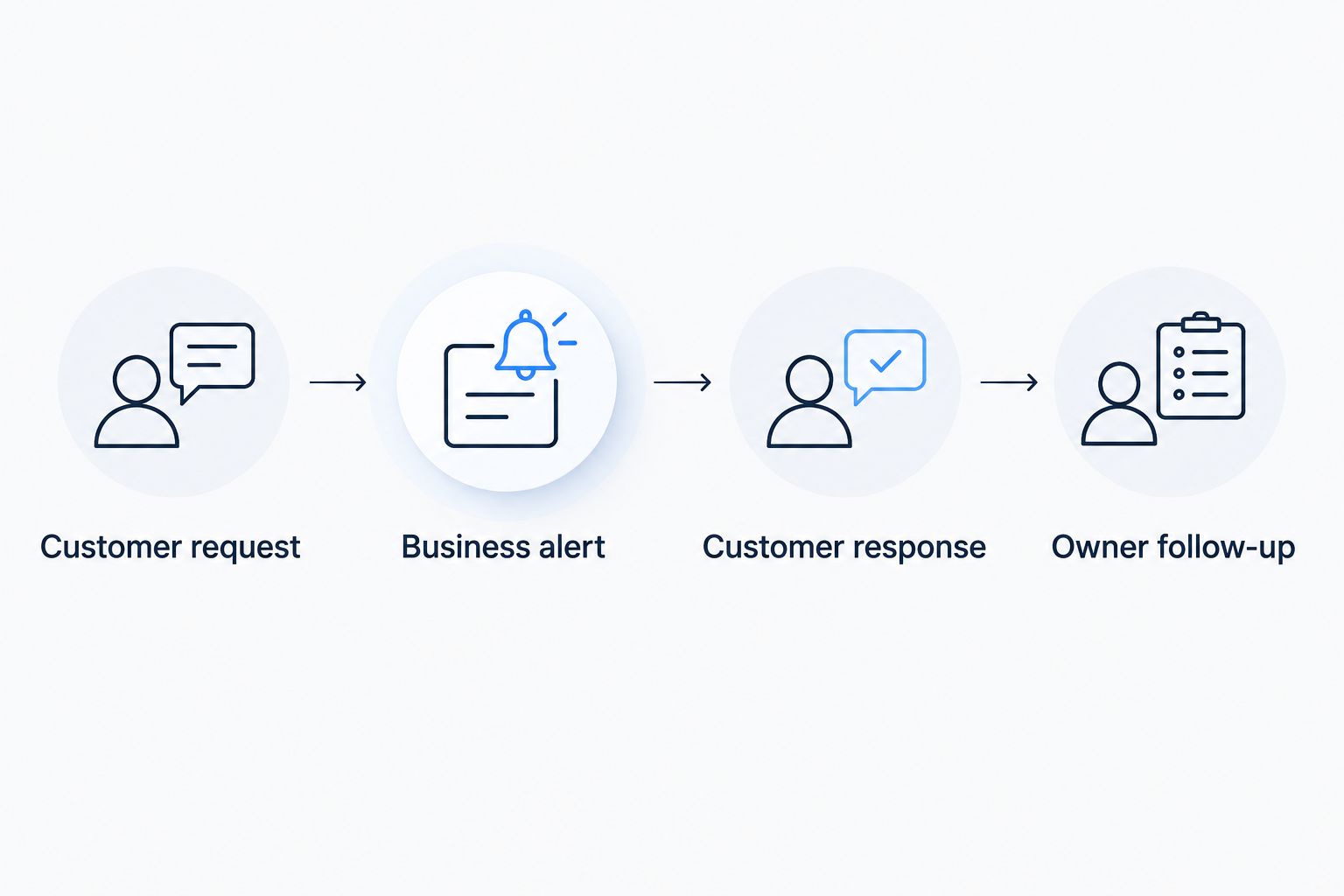
Assign 1 named owner to this process. A contact form, an answering tool, and a mailbox do not resolve responsibility by themselves.
Which website builder should you choose?
Choose Sitesmartly if your priority is managed contractor website work rather than operating an editor yourself. Confirm the locksmith-specific scope and inquiry process before committing.
For a DIY website in 2026, start with Wix and compare it with Squarespace using your actual service content. Choose WordPress.org when hosting and code control justify the maintenance responsibility. Choose Webflow when custom design has a clear purpose and a capable operator.
Do not select a platform because the demo looks expensive. Select the setup you can keep accurate, answer inquiries through, and maintain after launch.
Check the managed website option
Review the contractor website service, then define your locksmith services and inquiry-handling requirements.
FAQ
What's the best website builder for a locksmith who doesn't want to manage a website?
Sitesmartly is the managed contractor website pick in this comparison. Confirm that the agreed service covers your locksmith pages, contact routes, and inquiry-handling requirements.
Is Wix or WordPress.org better for a locksmith website?
Wix is the better fit for DIY editing without arranging separate hosting; WordPress.org is the better fit for hosting and code control. WordPress.org also needs someone responsible for maintenance.
Can I build a locksmith website myself?
Yes, a hosted builder such as Wix or Squarespace supports a DIY approach. You still need accurate service descriptions, real coverage information, and a process for handling inquiries.
Which website builder is best for locksmith SEO in 2026?
No builder is an automatic SEO winner for locksmiths in 2026. Choose a platform you can maintain with useful service pages, accessible content, and accurate business information.
Does a locksmith website need online booking?
Online booking is not required for every locksmith website. Match the contact route to the work: immediate contact for urgent requests and detailed inquiries for jobs that need review.
Should I create a page for every city I serve?
Create a location page only when it gives customers useful, truthful information about your service there. Do not imply that you have an office in a city when you do not.
What should I check before paying for a website service?
Check service scope, ownership, access, maintenance responsibility, and inquiry handling. Test the customer contact path and establish who follows up before approving the setup.
One last thing
Test the inquiry response, not just the submit button. A form can accept a message while the customer receives unclear instructions or the business sends the alert to an unattended mailbox.
Include an out-of-area request in your checks. It exposes whether the website explains your limits honestly instead of treating every message as a job you can accept.