
Weblium gives you a visual website builder for putting a business online without writing code. That stops being enough when you want someone else to manage the website and handle contractor-specific lead capture. The best Weblium alternative in 2026 is Sitesmartly if you need a managed contractor website; Wix if you want to build and edit it yourself.
- Sitesmartly leads these Weblium alternatives for contractors who want managed websites with lead-capture and call-answering tools.
- Wix suits contractors who want direct control over website editing.
- WordPress.org suits contractors who want control over hosting, plugins, and development.
- Keep Weblium when your website works and your team already handles inquiries reliably.
Why this matters
A plumbing, HVAC, or water restoration website has a practical job: help a homeowner request service and help your business respond. A different editor does not fix an unanswered phone or an inquiry nobody owns.
Before comparing builders, separate your website problem from your response problem. If changing a service page takes too much effort, compare editing and management. If inquiries arrive but sit unanswered, examine the handoff before rebuilding anything.
Choose the operating model first, then the website platform. You need to know who maintains the site, who receives each inquiry, and who follows up when the first person is busy.
Weblium alternatives at a glance in 2026
These options serve different needs. The right comparison is not which platform has the longest feature list; it is which one puts the work with the person you want responsible for it.
| Option | Best for | Standout capability | How it differs from Weblium |
|---|---|---|---|
| Weblium | Contractors comfortable maintaining a visual-builder website | No-code visual website building | The baseline: keep it if editing and inquiry handling already work |
| Sitesmartly | Contractors wanting a managed website | Industry-specific lead capture, quoting tools, and automated call answering | A managed contractor service rather than primarily a website editor |
| Wix | Contractors who want to edit their own website | Visual editing and an app marketplace | Another DIY platform; compare the editing workflow and specific apps you need |
| WordPress.org | Contractors wanting control over their website setup | Open-source software with themes and plugins | You choose hosting and take responsibility for maintenance or hire someone to handle it |
For a wider shortlist, compare the best website builders for contractors. Use the same decision criteria across every option so a polished demonstration does not distract you from the work involved.
1. Sitesmartly: best for managed contractor websites
Sitesmartly builds and manages websites for home-service contractors, including plumbers, HVAC technicians, and water restoration companies. Its offering includes industry-specific lead capture, quoting tools, and automated call answering. That makes it a different kind of alternative: you are choosing a managed service, not just replacing one editor with another.
Best for: Contractors who want website management and inquiry handling addressed together.
Where the managed approach shines
- Website management belongs within the service rather than becoming another task you must learn.
- The offering focuses on home-service contractors instead of treating every business website as the same project.
- Lead-capture, quoting, and call-answering tools address what happens after someone becomes interested.
Where the managed approach falls short
- It is not the right starting point if your main goal is to build every page yourself.
- A managed service still needs your input on services, service areas, and how your business handles requests.
- Website and call-answering tools do not replace the person responsible for dispatching work or approving a quote.
Ask to see an inquiry move through the proposed setup. Explain what your office needs to know before calling a homeowner back, and distinguish a quote request from a confirmed booking. Those are different outcomes.
Managed service versus Weblium
| Decision | Managed contractor service | Weblium |
|---|---|---|
| Main purpose | Build and manage a contractor website | Provide a visual website builder |
| Lead handling | Contractor-focused tools are part of the stated offering | Assess your existing inquiry workflow separately from the editor |
| Your involvement | Supply business details and define the handoff | Maintain the site yourself or assign someone to do it |
| Best reason to choose | You want help operating the website | You are comfortable running your current setup |
Verdict: Buy the managed approach when website upkeep and lead handling are the work you want off your plate.
2. Wix: best for hands-on website editing
Wix is a hosted website platform with visual editing and an app marketplace. It belongs on your shortlist when you want to control page changes yourself and prefer a service that handles hosting. Moving from Weblium to Wix still leaves you responsible for deciding what the website says and how inquiries reach your team.
Best for: Contractors with someone available to maintain pages, review forms, and manage the website setup.
Where Wix shines
- Visual editing lets you work on pages without starting with code.
- Its app marketplace gives you additional tools to investigate for specific website needs.
- Hosted website management avoids the separate hosting arrangement required by a self-hosted WordPress.org setup.
Where Wix falls short
- DIY editing remains work, even when the interface suits you.
- Selecting apps does not establish who responds to an inquiry or resolves a failed handoff.
- Changing builders means recreating or transferring content and checking the finished site.
Do not switch because one template looks better. Rebuild a representative service page during your evaluation and check it on your phone. If the editing process does not solve a problem you actually have, the move adds work without a clear benefit.
Wix versus Weblium
| Decision | Wix | Weblium |
|---|---|---|
| Website model | Hosted visual builder | Hosted visual builder |
| Editing | Evaluate Wix's editor with your own content | Benchmark against your current editing process |
| Extensions | App marketplace | Check support for your specific requirements |
| Reason to choose | Its editing workflow or a verified app meets your need | Your existing workflow already meets your need |
Wix is an alternative within the DIY category, not an automatic upgrade to managed operations. Verdict: Buy only when its editor or a confirmed capability fixes a specific limitation.
3. WordPress.org: best for control over your website setup
WordPress.org is open-source website software that you install with a hosting provider. Themes and plugins let you change its appearance and extend its functions. That control also creates decisions about hosting, updates, backups, security, and support.
Best for: Contractors with a capable website partner or someone responsible for technical maintenance.
Where WordPress.org shines
- You choose the hosting provider rather than tying the site to one hosted builder.
- Themes and plugins support different designs and website functions.
- Developers can modify the site when your requirements extend beyond a visual editor.
Where WordPress.org falls short
- Someone must maintain the software and manage the hosting arrangement.
- Plugin selection and compatibility require judgment; installing more tools is not a maintenance plan.
- Your website partner's responsibilities need to be explicit, especially for backups and recovery.
WordPress.org versus Weblium
| Decision | WordPress.org | Weblium |
|---|---|---|
| Hosting | You choose a provider | Part of the hosted-builder model |
| Customization | Themes, plugins, and code | Work within the builder's supported options |
| Maintenance | Assigned to you or your website partner | Underlying platform managed by the builder |
| Best fit | You need control and have maintenance support | You want fewer infrastructure decisions |
Before choosing WordPress.org, put a name beside maintenance and recovery. Control is useful only when someone can exercise it. Verdict: Buy with an accountable maintenance partner; skip it as an unmanaged side project.
Why people switch from Weblium
The useful reasons to switch in 2026 are requirements you can demonstrate, not assumptions about another platform being better. Start with the part of your current setup that is failing to do its job.
You want management, not another editor
If nobody has time to update service details, changing editors does not assign that work. A managed service addresses a different requirement: having someone responsible for maintaining the website.
Write down the recurring tasks you want handled. Include content changes and form checks, then confirm which tasks the proposed service covers.
Your inquiry handoff needs attention
A form submission is not a booked job. Your team needs enough information to understand the request and a clear person responsible for following up.
Define what should happen after an online request and a phone inquiry. Compare solutions against that process instead of treating the presence of a form as proof that lead handling is complete.
You need a capability you have verified elsewhere
A specific editing requirement, hosting preference, or custom function can justify a move. First confirm that your current setup cannot meet it and that the replacement can.
Do not count a sales demonstration as a finished workflow. Ask to see the relevant task with content and conditions that resemble your business.
Run a contractor-specific acceptance check
Before replacing Weblium in 2026, test the proposed website against a written checklist. Use 3 test inquiries: a routine service request, an after-hours inquiry, and a request outside your service area. These are test scenarios, not performance benchmarks.
Work through these 4 checks in order:
- Service request: Can the homeowner explain the job and provide usable contact details?
- Office handoff: Does the request reach the person responsible for the next step?
- After-hours response: Does the setup make clear what happens when your office is closed?
- Page ownership: Who fixes incorrect service details or a broken inquiry route?
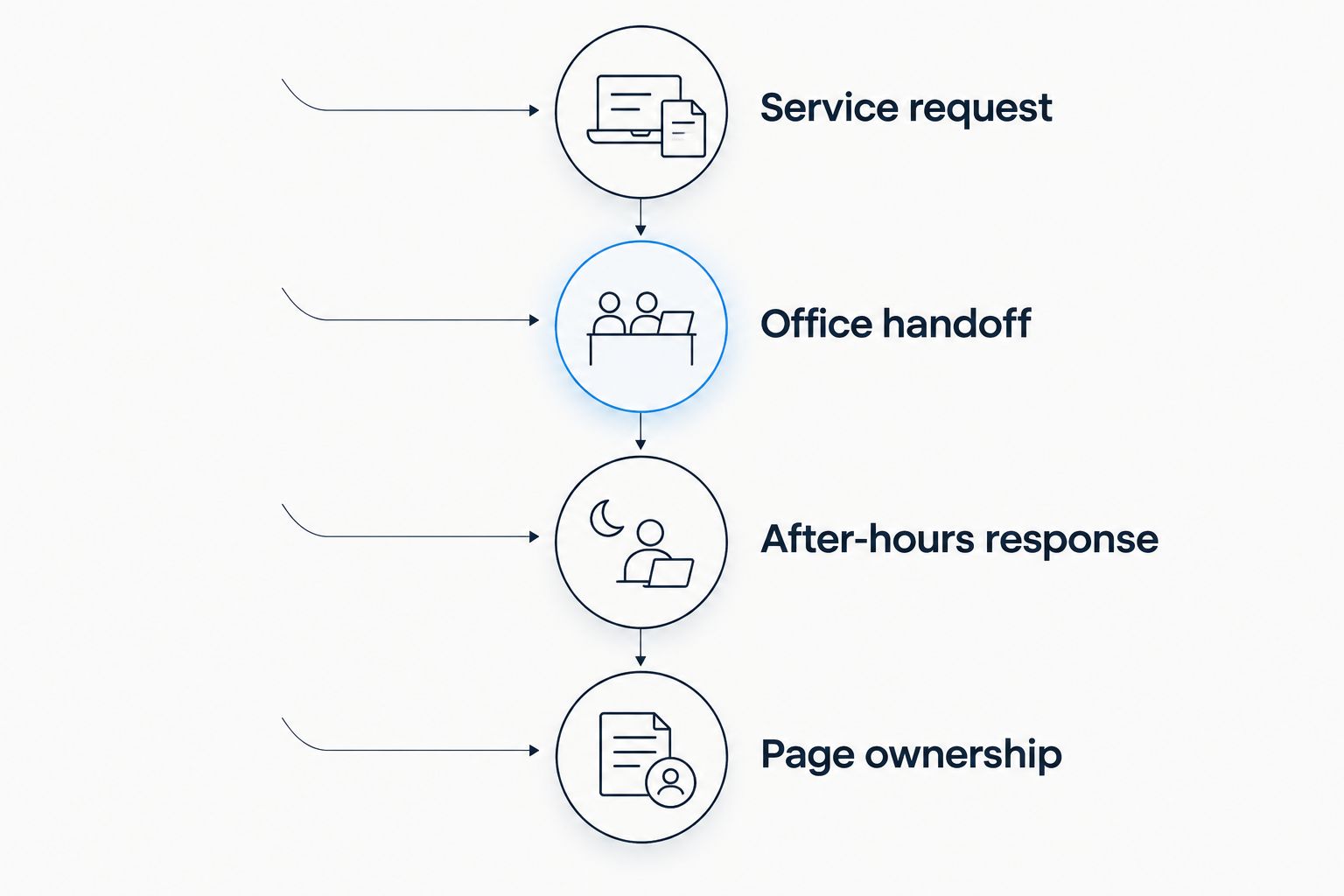
Assign 1 named owner to each incoming request. That is an operating rule you can adopt regardless of the website platform; it prevents responsibility from being left with an undefined group.
Also ask what happens to existing page addresses during a move. Record the important URLs, identify which will change, and arrange redirects where appropriate. A redesign should not leave old service-page links pointing to missing pages.
When staying with Weblium is the right call
Keep Weblium if you can maintain the website, customers can request service, and your team handles those requests reliably. You do not need a replacement merely because another platform offers more options.
Weblium's strength is the visual-builder approach. Its trade-off is that access to an editor does not remove your responsibility for content and inquiry handling.
Fix the smallest real problem first. An unclear service description needs an edit; an unanswered inquiry needs an accountable response process. Neither automatically requires migration.
FAQ
What's the best Weblium alternative for contractors in 2026?
Sitesmartly is the best fit for contractors who want a managed website with industry-specific lead-capture and call-answering tools. Wix suits hands-on editing, while WordPress.org suits businesses with technical support and a need for control.
Is Wix better than Weblium for a plumbing website?
Wix is the better choice only if its editing workflow or a verified capability meets a requirement your Weblium setup does not. Test a plumbing service page and its inquiry process before moving.
Should an HVAC contractor choose WordPress.org?
Choose WordPress.org when you want control over hosting and customization and have someone responsible for maintenance. Assign updates, backups, and recovery before the website launches.
Will changing website builders bring more leads?
Changing builders alone does not establish that you will receive more leads. Evaluate the service content, inquiry route, and follow-up process separately from the editing software.
Do I need to rebuild my website to handle after-hours inquiries?
A full rebuild is not automatically necessary to address after-hours inquiries. Define the response you need, then check whether your current setup can support it.
What should I test before leaving Weblium?
Test a routine request, an after-hours inquiry, and an out-of-area request. Confirm where each request goes, who responds, and who fixes the setup if something fails.
When should I keep Weblium instead of switching?
Keep Weblium when the website is maintainable and your inquiry process works. Switch for a demonstrated requirement, not simply for a different template or a longer feature list.
One last thing
Before signing off on a new website in 2026, ask someone unfamiliar with your business to request service from their phone. Watch without coaching them. Then follow the request through to the person who must respond.
The most useful question is not whether the page looks finished. It is whether your team knows what happens next.