
Yola gives you a visual website builder for putting a business online without writing code. The ceiling comes when you need someone to manage the website and connect it to contractor-specific lead capture and call answering, rather than another editor to learn. The best Yola alternative in 2026 is SiteSmartly if you need a managed contractor website; Wix if you want to build and edit it yourself.
- For yola alternatives, choose SiteSmartly for managed contractor websites with lead-capture and call-answering tools.
- Choose Wix for DIY website editing; choose WordPress.org when control over hosting and customization comes first.
- Keep Yola if your website meets your needs and someone reliably handles incoming inquiries.
- Compare website builders on the full inquiry process, not just the appearance of the homepage.
Why this matters
Your website has two jobs: explain what you do and help a customer take the next step. A good-looking homepage does not settle who answers a call, handles an estimate request, or updates your service information.
For plumbers, HVAC technicians, and restoration contractors, those responsibilities belong in the website decision. Choose the operating model before you choose the editor. Otherwise, you risk replacing one unfinished website project with another.
Yola alternatives at a glance
This 2026 shortlist separates managed service from DIY software. Neither model wins automatically; the right choice depends on whether you want to run the website or hand that work over.
| Option | Best for | Standout approach | How it differs from Yola |
|---|---|---|---|
| SiteSmartly | Contractors wanting a managed website | Website management with industry-specific lead capture and call answering | A contractor-focused service rather than a DIY website-building task |
| Wix | Owners wanting hands-on editing | Hosted visual website building | A different DIY editor and website-building ecosystem |
| WordPress.org | Owners prioritizing control | Open-source software with themes and plugins | You choose hosting and take responsibility for maintenance arrangements |
| Yola | Owners satisfied with a straightforward DIY website | Visual website building without coding | The baseline: stay if it already handles your requirements |
Do not read this as a feature-count contest. A contractor who dislikes website work needs a different answer from an owner who enjoys adjusting layouts on Sunday evening.
1. SiteSmartly: best for managed contractor websites
SiteSmartly builds and manages websites for home-service contractors, including plumbers, HVAC technicians, and water restoration companies. Its offering includes industry-specific lead-capture tools, quoting tools, and call answering. The reason to choose it is the managed service, not the chance to learn another page editor.
That distinction matters if website work keeps slipping behind paid jobs. You are choosing a provider to manage the website rather than making yourself responsible for building it.
Where it shines
- Contractor focus: The service is built around home-service businesses rather than a general-purpose website project.
- Website management: Building and managing the site are part of the stated offering.
- Inquiry tools: Lead capture, quoting, and call answering belong in the conversation from the start.
Where it falls short
- Less suitable for DIY-first owners: A managed service is the wrong starting point if personally controlling the website build is your main goal.
- Coordination still matters: You still need to communicate your services, coverage area, and changes to the business.
- Website scope is not everything: Do not assume website management includes dispatch, accounting, or every other business system you use.
| Decision | Managed contractor service | Yola |
|---|---|---|
| Working model | Provider builds and manages the website | You work in a website builder |
| Business focus | Home-service contractors | General business website building |
| Main buying question | Who manages the site and inquiry tools? | Can you build and maintain the site you need? |
Best for: A busy contractor who wants website management and lead-handling tools considered together.
Verdict: Buy the managed approach if website work needs a clear owner outside your business.
2. Wix: best for hands-on website editing
Wix is a hosted website builder with a visual editor. Choose it when you want to build pages, adjust their appearance, and remain directly involved in the website.
The move from Yola to Wix is still a DIY decision. You are changing the building environment, not automatically handing responsibility to someone else.
Where Wix shines
- Direct editing: You can work on page content and layout through a visual interface.
- Hosted setup: You do not need to assemble a separate WordPress hosting arrangement.
- Owner involvement: It suits a contractor who wants to keep making website changes personally.
Where Wix falls short
- Your workload remains: Someone still has to write pages, check forms, and keep business details current.
- A different editor is not a response process: Switching builders does not decide who follows up with a customer.
- Rebuilding takes attention: You need to review the new pages and inquiry paths rather than assuming the move itself fixes them.
| Decision | Wix | Yola |
|---|---|---|
| Working model | Hosted DIY website builder | Hosted DIY website builder |
| Editing approach | Visual editing | Visual editing |
| Reason to choose | You prefer its editing workflow for your planned pages | Your existing workflow already meets your needs |
For a 2026 comparison, build a representative service page before committing to a full move. Use your own text and images; a polished template preview does not show how comfortably you can maintain the finished website.
Best for: A contractor who wants hands-on editing and has time to maintain the site.
Verdict: Buy only if the editing workflow solves a specific problem with your current setup.
3. WordPress.org: best for control over your website setup
WordPress.org is open-source website software you install with a hosting provider. It gives you control over hosting, themes, and plugins, but that control comes with maintenance responsibilities.
Choose it because you need that flexibility, not because someone said every serious business must use it. A contractor can hire help with WordPress, but hiring that help is a separate service decision.
Where WordPress.org shines
- Hosting choice: You select the provider that runs the website.
- Customization: Themes, plugins, and custom development provide different ways to build the site.
- Technical control: It suits businesses that want an active role in decisions about their website setup.
Where WordPress.org falls short
- Maintenance needs an owner: Updates, backups, and security require an agreed process.
- More decisions: Hosting, plugins, and support arrangements become part of your responsibility.
- More freedom is not always useful: Flexibility adds little if you only need a simple site and do not want technical work.
| Decision | WordPress.org | Yola |
|---|---|---|
| Setup | Software installed with your chosen host | Hosted website builder |
| Customization | Themes, plugins, and custom development | Builder-based editing |
| Responsibility | Arrange hosting and maintenance | Work within the hosted builder |
Best for: An owner who values control and has a named person responsible for maintenance.
Verdict: Buy if control matters enough to justify the extra decisions; skip if you want less website work.
Why people switch from Yola
A useful reason to switch describes a business requirement, not frustration with a logo or template. For your 2026 decision, use these specific triggers rather than assuming another builder will improve everything.
You want website management, not more editing choices
If nobody has time to update the website, a different DIY editor leaves the main problem untouched. A managed service addresses who does the work; a builder addresses how the work gets done.
Write down the task you want removed from your week. If the answer is maintaining service pages and handling website changes, compare service responsibilities before comparing design controls.
You need the website and inquiry process considered together
A submitted form and an answered customer inquiry are different outcomes. If you need lead capture, quoting, or call answering, make those requirements explicit before choosing a replacement.
Do not assume any website move automatically covers them. Ask how each part will work with your business and who handles the next action.
You want more control over the technical setup
Hosting choice and customization are valid reasons to investigate WordPress.org. They are not reasons to leave a working site if you have no use for that control.
Switch to solve a named problem. Stay if you cannot name one. That rule is more useful than a long list of features you will never use.
Test the inquiry path before choosing
Use the same 3 tasks to assess every option in 2026. Test a realistic customer journey rather than spending the whole comparison adjusting colors.
- Find the service: Open a representative service page on a phone. Check whether a customer can identify the work you do and the area you serve.
- Send an inquiry: Follow the call or form route. Confirm where the inquiry goes and what the customer sees after submitting it.
- Assign follow-up: Name the person responsible for replying. Decide what happens when that person is on a job or unavailable.
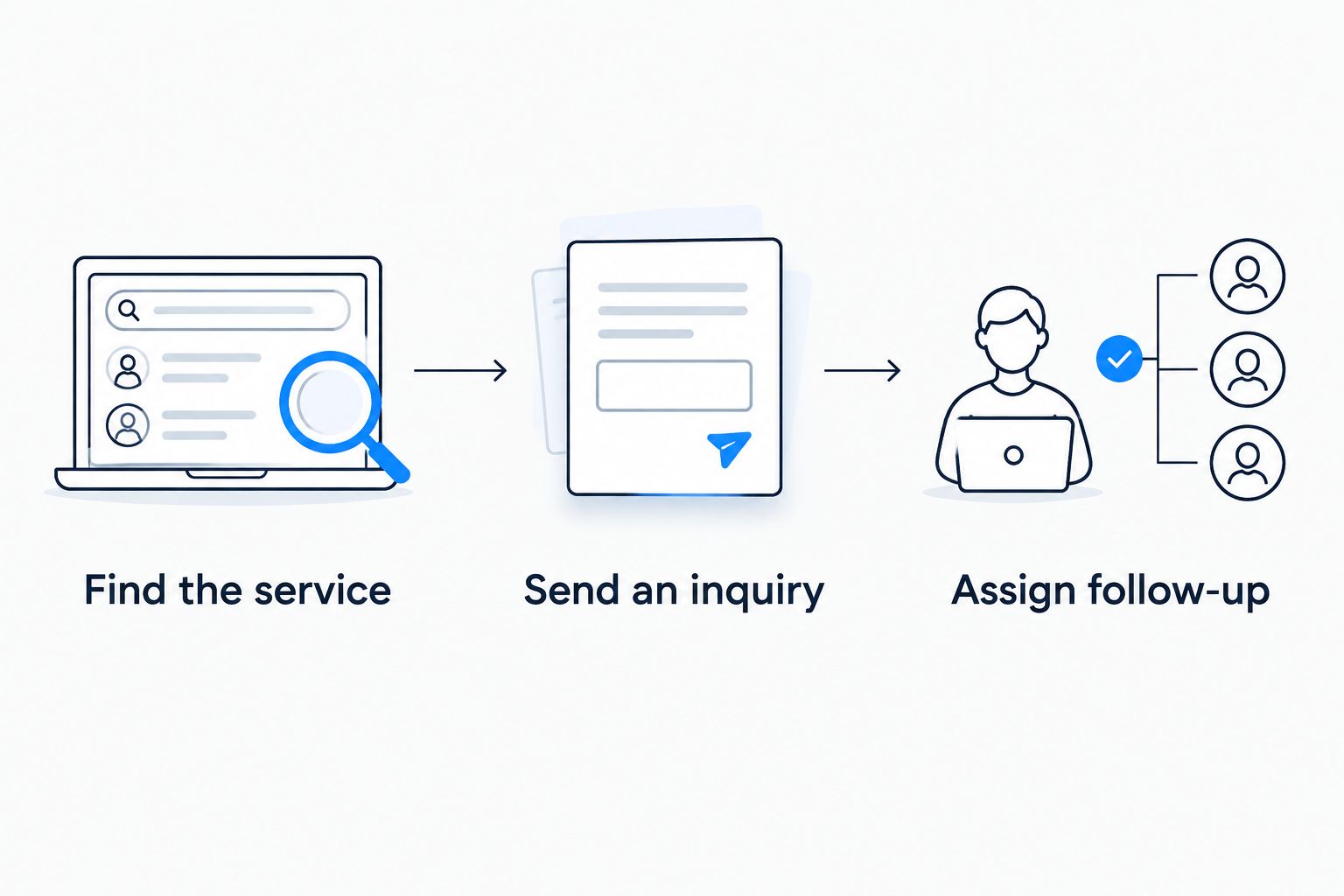
Run this check on 1 service page before planning the rest of the website. A plumbing repair page, HVAC service page, or restoration page makes the exercise concrete without turning it into a full rebuild.
Then ask 5 questions: Who edits the site? Who receives inquiries? Who replies? Who handles technical problems? What can you take with you if you leave? Get clear answers before making the move.
When staying with Yola is the right call
Keep Yola if you can maintain the pages you need, customers can contact you, and someone reliably handles those inquiries. A different platform is not automatically a better business decision.
The strongest case for staying is a working process. If your real problem is unanswered calls, replacing the website builder alone does not assign anyone to answer them.
For 2026, separate website problems from follow-up problems before approving a rebuild. Fix the broken step, not the platform name.
FAQ
What's the best Yola alternative for contractors in 2026?
SiteSmartly is the best fit here for contractors who want a managed website with industry-specific lead-capture and call-answering tools. Wix suits hands-on editing, while WordPress.org suits owners who prioritize control over hosting and customization.
Is Wix better than Yola for a contractor website?
Wix is the better choice if its editing workflow fits the pages you want to build and maintain. Both are DIY website-building options, so switching does not remove your responsibility for content and inquiry follow-up.
Should a plumber use WordPress.org instead of Yola?
Choose WordPress.org if hosting choice and customization are important enough to justify maintenance responsibilities. If you want less website work, assess a managed service instead of assuming self-hosted software solves that problem.
Will switching from Yola automatically bring more leads?
No, switching website platforms alone does not establish that you will receive more leads. Define the problem first, then check whether the replacement addresses service information, inquiry capture, or follow-up.
Can I keep Yola and improve how I handle inquiries?
Yes, keeping Yola and changing your follow-up process are separate decisions. First identify where calls and form submissions go, then assign responsibility for responding.
What should I check before moving my contractor website?
Check your important pages, domain arrangements, inquiry routes, and maintenance responsibilities before moving. Plan what happens to existing page addresses so the move does not leave customers following broken links.
What's the difference between a managed website and a website builder?
A managed website service includes a provider taking responsibility for agreed website work, while a website builder gives you software to do that work. Compare the service scope directly rather than treating both as interchangeable products.
One last thing
Before you approve a replacement, send a real test inquiry through your current website. Follow it all the way to the person who should respond.
That simple check separates two different purchases: a better website and a better response process. Sometimes you need both. Sometimes you only need to stop an inquiry from sitting unanswered.